Amante de la buena literatura, el cine y las series de televisión.
Cuando no leo, escribo o veo películas, me gusta jugar sudoku, estudiar ajedrez y cocinar.
It’s time to update! A new version of FrostWire Plus is available for #Android users. If you want to get more search results using FrostWire, you have to download this new version. We fixed EZTV, Torlock, and Zooqle. Moreover, we fixed some bugs related to the filtering tools. Also, the music player now has all horizontal layouts available.
Changelog
FrostWire 1.9.9 – AUG/14/2017
– Creative Commons Features removed for Google Play users, available on FrostWire Plus
– Search: EZTV, Torlock, Zooqle fixed
– Search: BTJunkie removed
– Download: Yify magnets can now be found in DHT
– New jlibtorrent 1.2.0.12-RC1
– Filtering bug fixes
– Audio Player ‘Clear Queue’ fix
– Crash fixes, performance upgrades
– ogury 2.1.13
– compileSDK 26, gms 11.0.4, gradle 4.0.2, android support 26.0.1
– Update in VPN offering
– Fixes freeze copying magnets to clipboard
– Less ads
– Music player has all horizontal layouts
– Warn user about Internet Connection dropped
What is FrostWire?
FrostWire is a free, open source BitTorrent client first released in September 2004, as a fork of LimeWire. It was initially very similar to LimeWire in appearance and functionality, but over time developers added more features, including support for the BitTorrent protocol and a full blown media player.
Happy Thursday! Today we’re glad to announce FrostWire 1.9.8. for Android. This is one of our major releases of this year being that includes new features that will make your experience a lot better. If you want to download torrents or files in a more precise way you need to download this release!
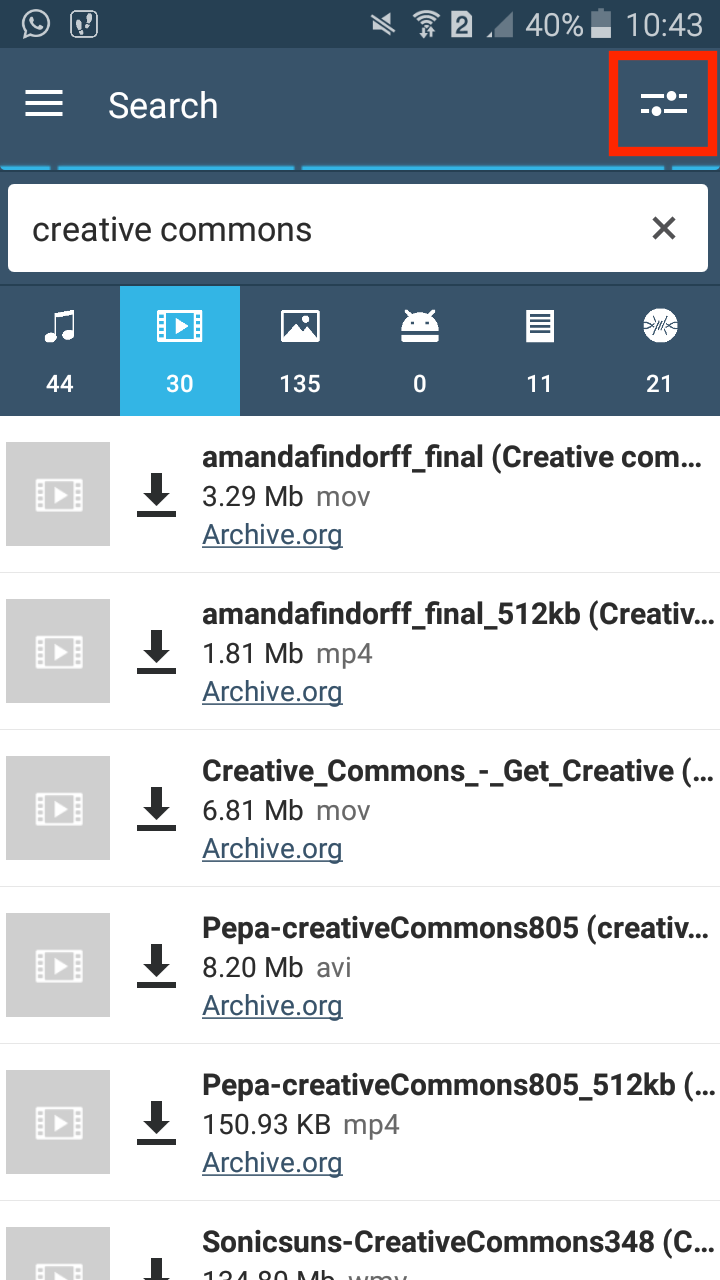
First of all, FrostWire for Android now have search filtering tools. What is that? Search Filtering Tools allows you to get better search results. After you do a search you can filter it (by keyword, source, file extension,etc) in order to get more accurate results.
How to use Search Filtering Tools?
It’s easy!
Open FrostWire 1.9.8+ and do a search.
Then, click on the menu bottom on the right. You will see different options for filter results. For example, you can filter by a manually entered keyword, or an automatically detected prominent search source.
You can also filter by sources / channels, file extensions, or/and file names.
As you apply filters, the results in the background will be reduce to match all of the filters you’ve specified and less suggestions are automatically calculated.
By default the filters you apply are inclusive (+), if you touch an applied filter it will switch from inclusive (-), to exclusive (-), meaning it will check for results that do not have such keyword in its metadata.
More updates
On the other hand, we improved VPN detection and services. FrostWire will block bittorrent connection if you have a VPN and you are not using it. In this manner, your privacy will be protected! If you don’t have a VPN, we strongly recoomend you to install it!
If you love to have an app with a fresh and cool design you will be happy to see that we updated the user interface.
Finally, now you will have the option to see “Last Added” for each song on the music player.
Changelog
FrostWire 1.9.8 – JUL/25/2017
– More robust app startup
– New search filtering tools
– New jlibtorrent 1.2.0.11-RC2
– Improved VPN detection
– BitTorrent connection recovers when VPN service goes off and VPN protection off
– Library updates: kotlin 1.1.3, gms 11.0.2, MoPub 4.15
– UI-refresh: Transfer list items, drawable cleanup, My Music list items,
removed double divider in search result list item, added missing new line
to grid base
– Fixed memory leaks and runnaway threadpools causing out of memory errors
– Translations updated (Finnish, Greek, Danish, Czech, Italian, Arabic, French,
Portuguese, Spanish, Hindi, Croatian, Indonesian, Hebrew, Korean, Japanese,
Russian, Slovak, Romanian, Serbian, Swedish, Thai, Turkish, Ukranian)
– ogury 2.1.11
– Music player ‘Last Added’ now shows album cover art for each song
– Fixes possible music player freezes
– YT search fixed
– Less ads
What is FrostWire?
FrostWire is a free, open source BitTorrent client first released in September 2004, as a fork of LimeWire. It was initially very similar to LimeWire in appearance and functionality, but over time developers added more features, including support for the BitTorrent protocol and a full blown media player.
Good morning! Begin your day downloading the new release of FrostWire Plus for Android! This update has a lot of performance and stability improvements. In addition, we update our services to keep up with the best technology torrent and Android.
Changelog
FrostWire 1.9.6 - JUN/09/2017
 - Performance and stability improvements
 - New jlibtorrent 1.2.0.9
 - GSON 2.8.1
 - Google Play Libraries 11.0.0
 - Ogury 2.1.6
 - AppLovin 7.2.0
 - Fixes Seeding setting bug
 - Improves and fixes bugs in Transfer's action bar menu options
 - Fixes issue with documents query filter
What is FrostWire?
FrostWire is a free, open source BitTorrent client first released in September 2004, as a fork of LimeWire. It was initially very similar to LimeWire in appearance and functionality, but over time developers added more features, including support for the BitTorrent protocol and a full blown media player.
Thursday release! It’s time to update FrostWire! We’re happy to announce FrostWire 6.5.2. for Windows, Mac, and Linux. This version fixed two torrent search engines (Monova and Torlock), and we added BTJunkie search again! So now you’re going to have more search results.
FrostWire is a free, open source BitTorrent client first released in September 2004, as a fork of LimeWire. It was initially very similar to LimeWire in appearance and functionality, but over time developers added more features, including support for the BitTorrent protocol and a full blown media player.
We’re excited to announce a new release of FrostWire Plus for Android (1.9.4).
The user interface upgrades included are part of our roadmap to FrostWire for Android 2.0.
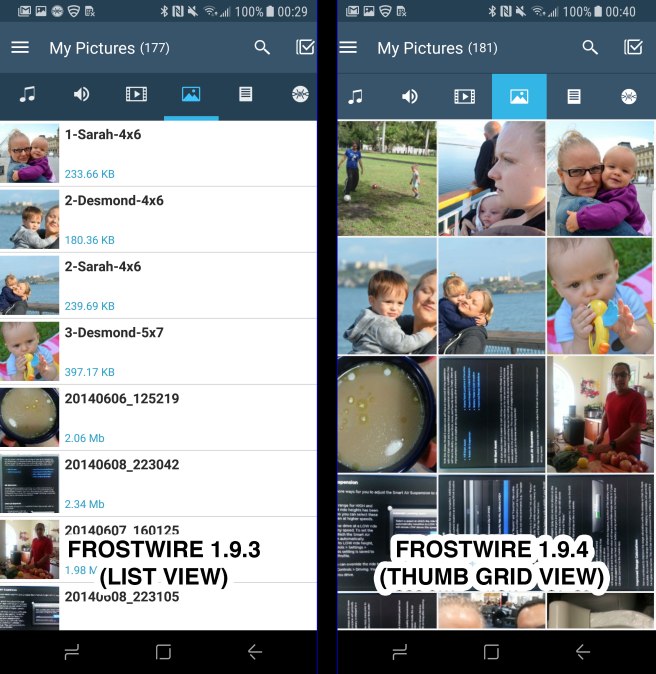
On FrostWire 1.9.4, we added thumb grid views for browsing the pictures and videos on your device.
On past versions of FrostWire, images and videos were displayed in a list view, this meant a lot of scrolling just to see a few pictures or video thumbnails, with the grid views you will have a more efficient way of viewing and managing your media files.
A new feature to accompany the new grid media browsing is a built-in Image Viewer.
You can open an image and on the toolbar menu you will find more actions:
Open, File Information, Set as Wallpaper, Rename, and Share.
The new “File Information” window, is available for all file types.
On the next updates the Image Viewer will continue to improve by including a few more basic features like browsing through the rest your pictures using swipe gestures once you’ve opened an image.
Subtle Design Upgrades
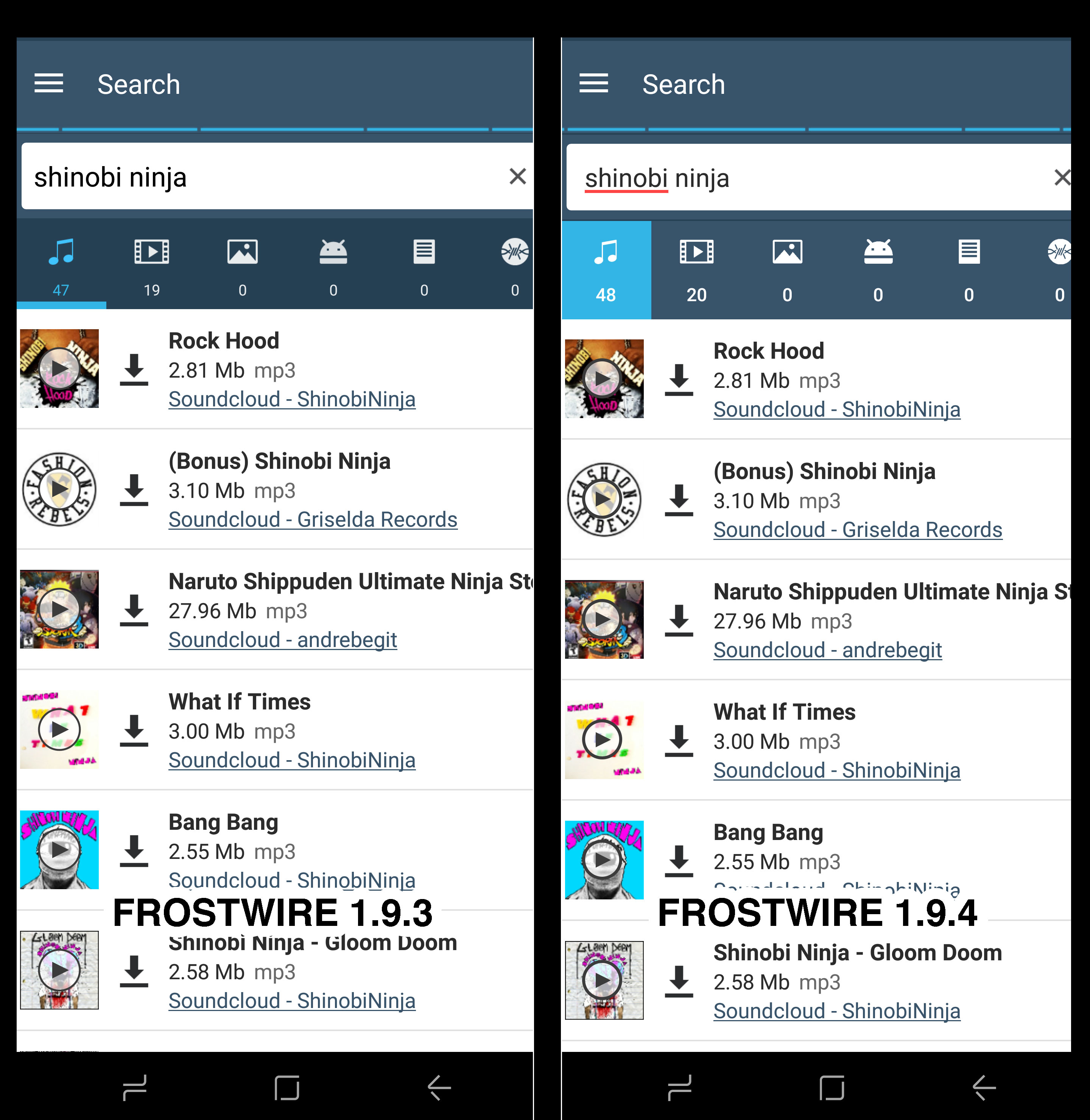
We’ve rewritten our file type selection user interface on FrostWire 1.9.4. using the latest Android APIs available for better performance, we’ve also made subtle changes on the way they look.
FrostWire is a free, open source BitTorrent client first released in September 2004, as a fork of LimeWire. It was initially very similar to LimeWire in appearance and functionality, but over time developers added more features, including support for the BitTorrent protocol and a full blown media player.
Happy Friday! It’s time to update FrostWire! On this release we fixed YouTube search results. If you had problems with search results on previous releases, it’s important to get FrostWire Plus 1.9.3 for Android or FrostWire 6.4.9. for Windows, Mac, and Linux!
FrostWire is a free, open source BitTorrent client first released in September 2004, as a fork of LimeWire. It was initially very similar to LimeWire in appearance and functionality, but over time developers added more features, including support for the BitTorrent protocol and a full blown media player.
Good morning! Begin your day downloading the new release of FrostWire Plus for Android! We’re glad to announce that we added a new torrent search engine (Zooqle), so now you’re going to get more results! Also, we fixed other search engines (Torlock and Monova). On the other hand, we fixed some bugs for a better user experience!
Changelog
FrostWire 1.9.2 - APR/19/2017
 - New jlibtorrent 1.2.0.8
 - New Zooqle search
 - Torlock, Monova search fixed
 - Mininova search discontinued
 - All menus now show icons to visually identify actions
 - Fixes issues preventing FrostWire to cleanly shutdown its services on Exit
 - Hides Android top status bar when previewing videos in full screen mode
 - Fixes video preview bug that would overlay ad and download button
   over video if user went to full screenmode too soon
 - Mopub/Ogury integration
What is FrostWire?
FrostWire is a free, open source BitTorrent client first released in September 2004, as a fork of LimeWire. It was initially very similar to LimeWire in appearance and functionality, but over time developers added more features, including support for the BitTorrent protocol and a full blown media player.
Happy Tuesday! We’re happy to announce this new release of FrostWire Plus. If you love to have Android apps with great design, you’ll love our new version (1.9.0) of FrostWire. We have been working on new material-design navigation menu and we also improved our music player.
Try it today! Remember that you can download FrostWire Plus for free on our website!
Changelog
FrostWire 1.9.0 – MAR/10/2017
– New material-design navigation menu
– Full featured miniplayer available outside My Music
– Fixes bug where equalizer window would not open
– Music player cleanup
– InMobi network removed
– All translations up to date
– BTJunkie.eu search discontinued
– New jlibtorrent 1.2.0.6 (final release) fixes BitTorrent bugs
– Colors and theme update, major icons cleanup
– Fixes issue on music player when screen was rotated
– Fixes issues with SoundCloud search
What is FrostWire?
FrostWire is a free, open source BitTorrent client first released in September 2004, as a fork of LimeWire. It was initially very similar to LimeWire in appearance and functionality, but over time developers added more features, including support for the BitTorrent protocol and a full blown media player.
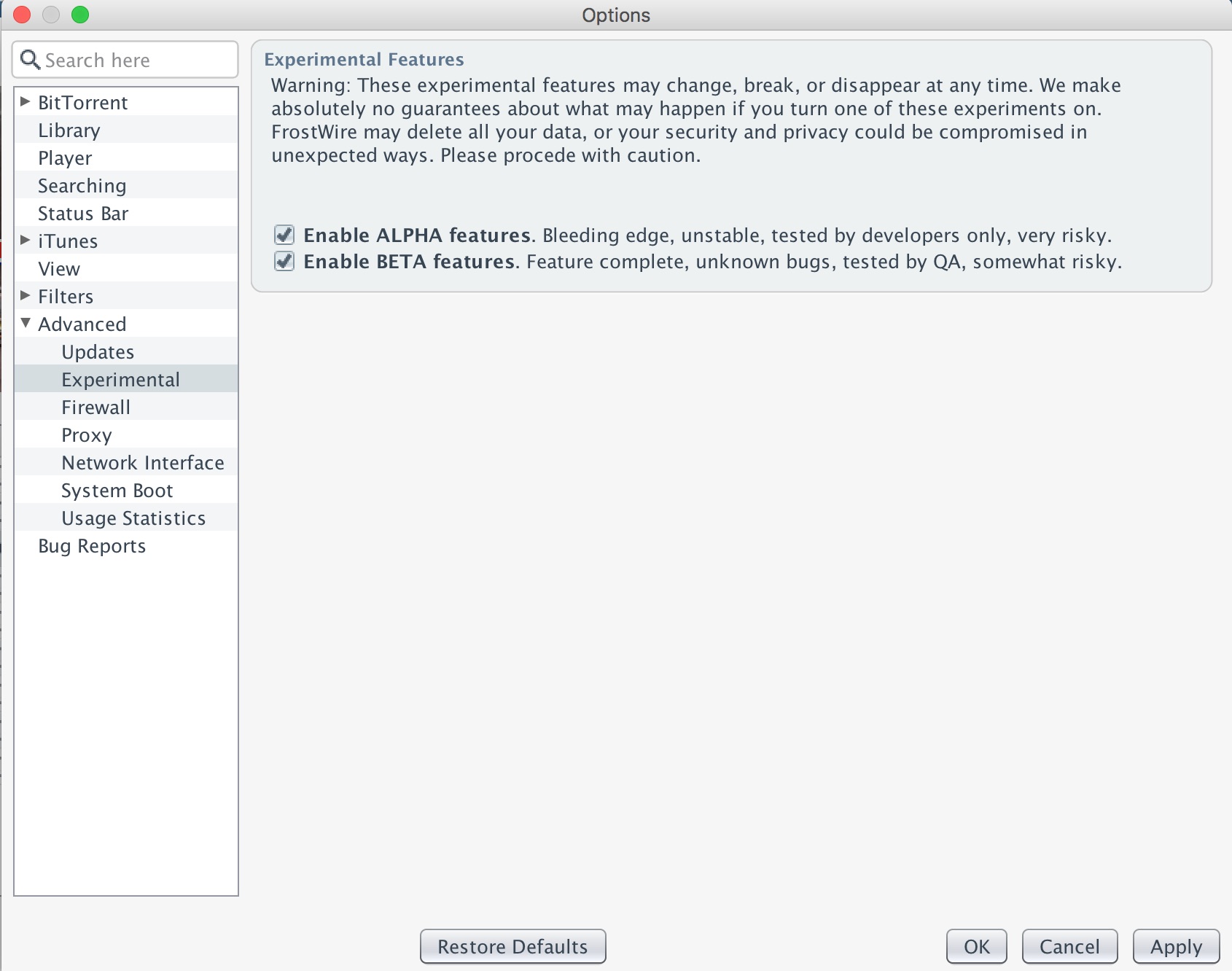
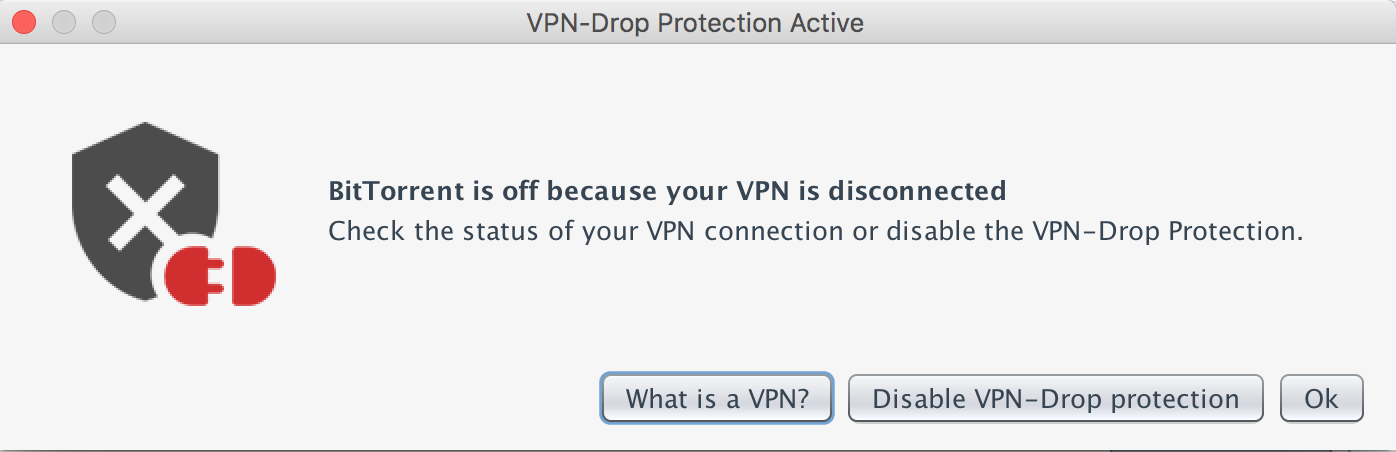
You will have the chance to try the future features of our software! For example, you can try the new setting of VPN-Drop protection. If a VPN connection is not available, automatically FrostWire will stop all BitTorrent traffic for your protection.
New: VPN-Drop protection (Experimental Feature)
As our first experimental feature we’re introducing a Privacy Protection feature for VPN users out there. FrostWire will detect if your VPN connection drops and if you have this setting activated FrostWire will automatically stop all BitTorrent transfers to protect your privacy.
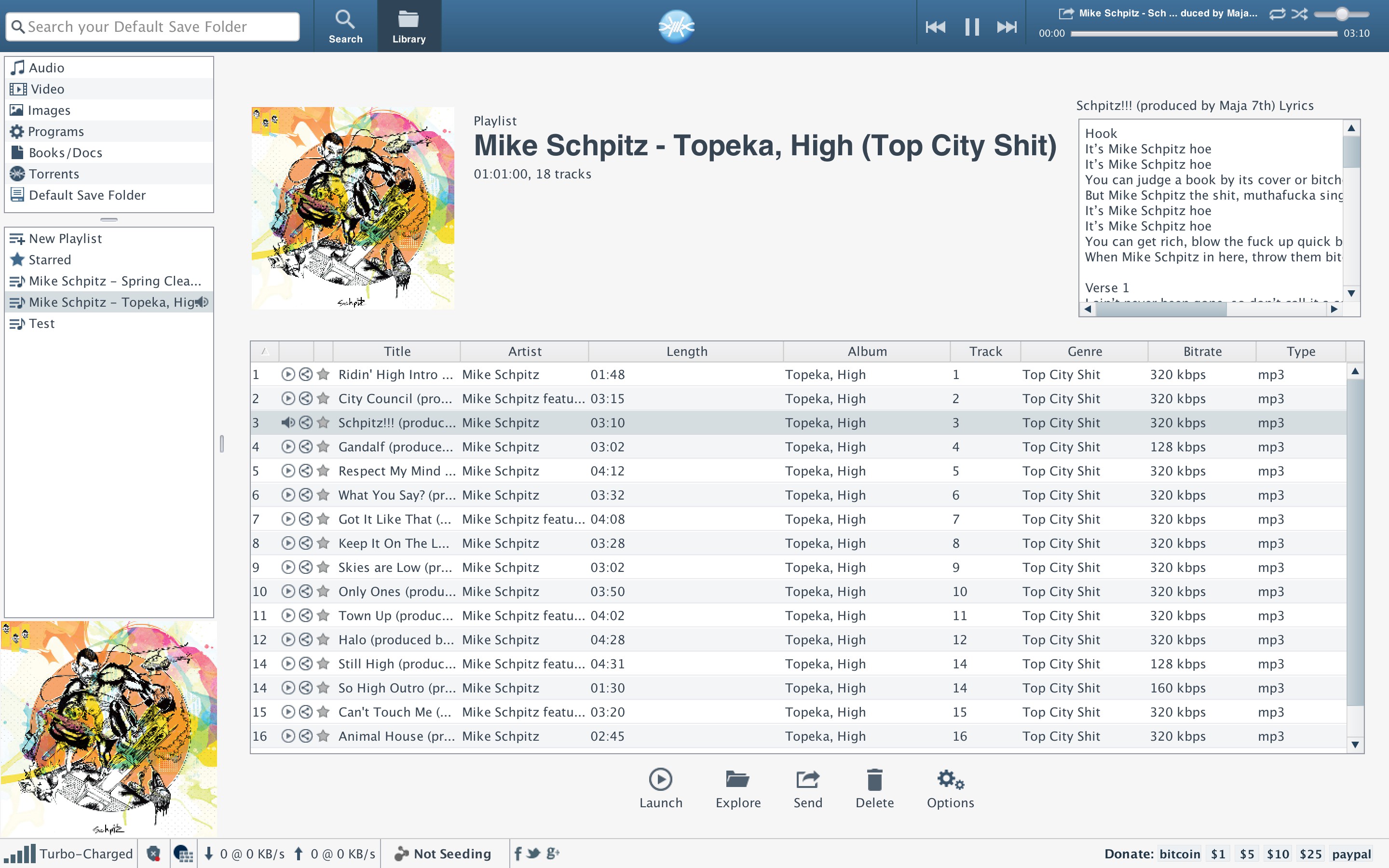
Also, now we added support to display lyrics when available. Now you can listen to music and enjoy the lyrics in the software without the need to open your web browser to search for it!
On the other hand, we fixed a bug related to SoundCloud search, and issues reported with BitTorrent transfers.
Changelog
frostwire (6.4.6) stable; urgency=high
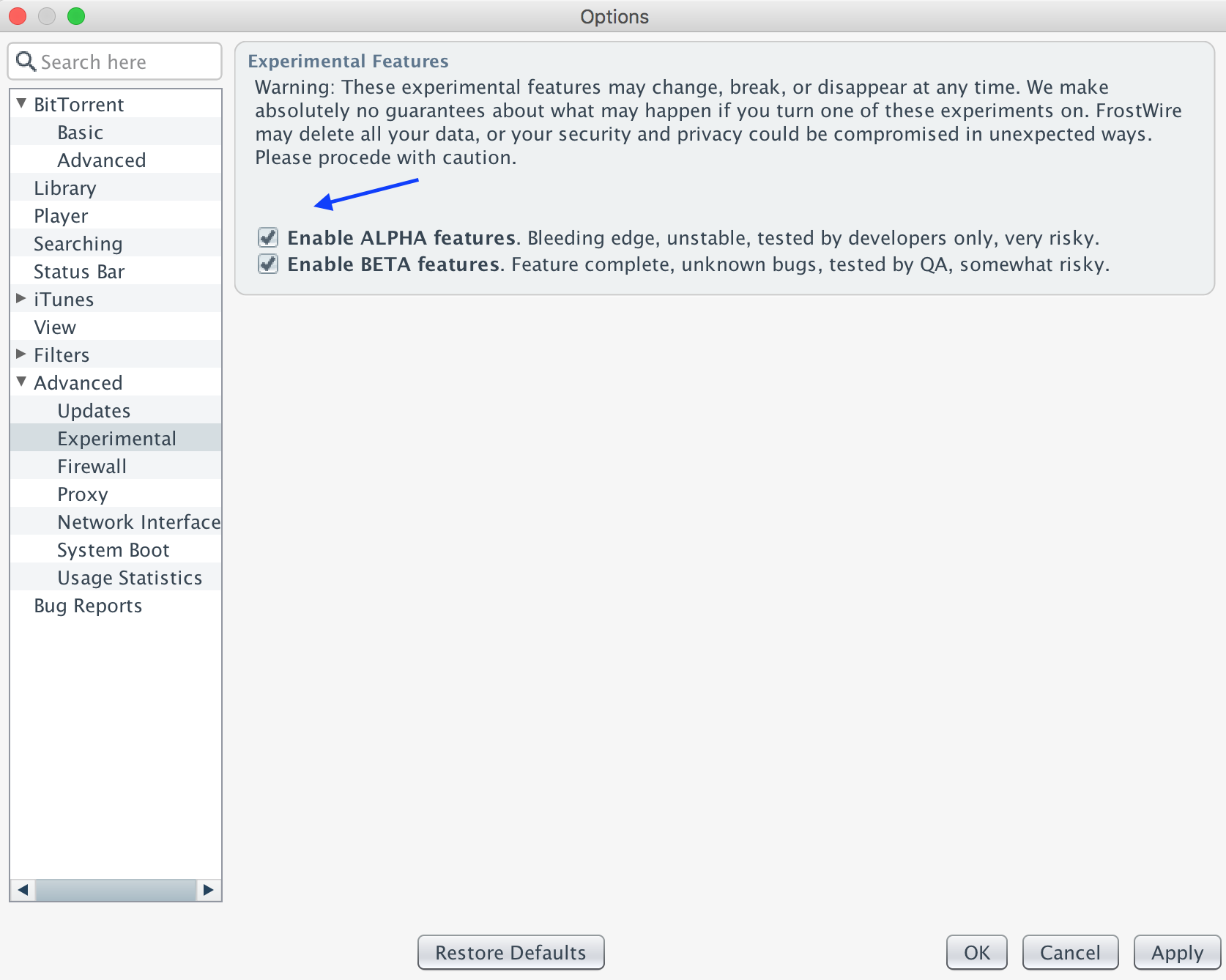
  * New Options > Advanced > Experimental. Users can now try ALPHA and BETA features
    at their own risk.
  * New revision of jlibtorrent 1.2.0.6 fixes BitTorrent bugs
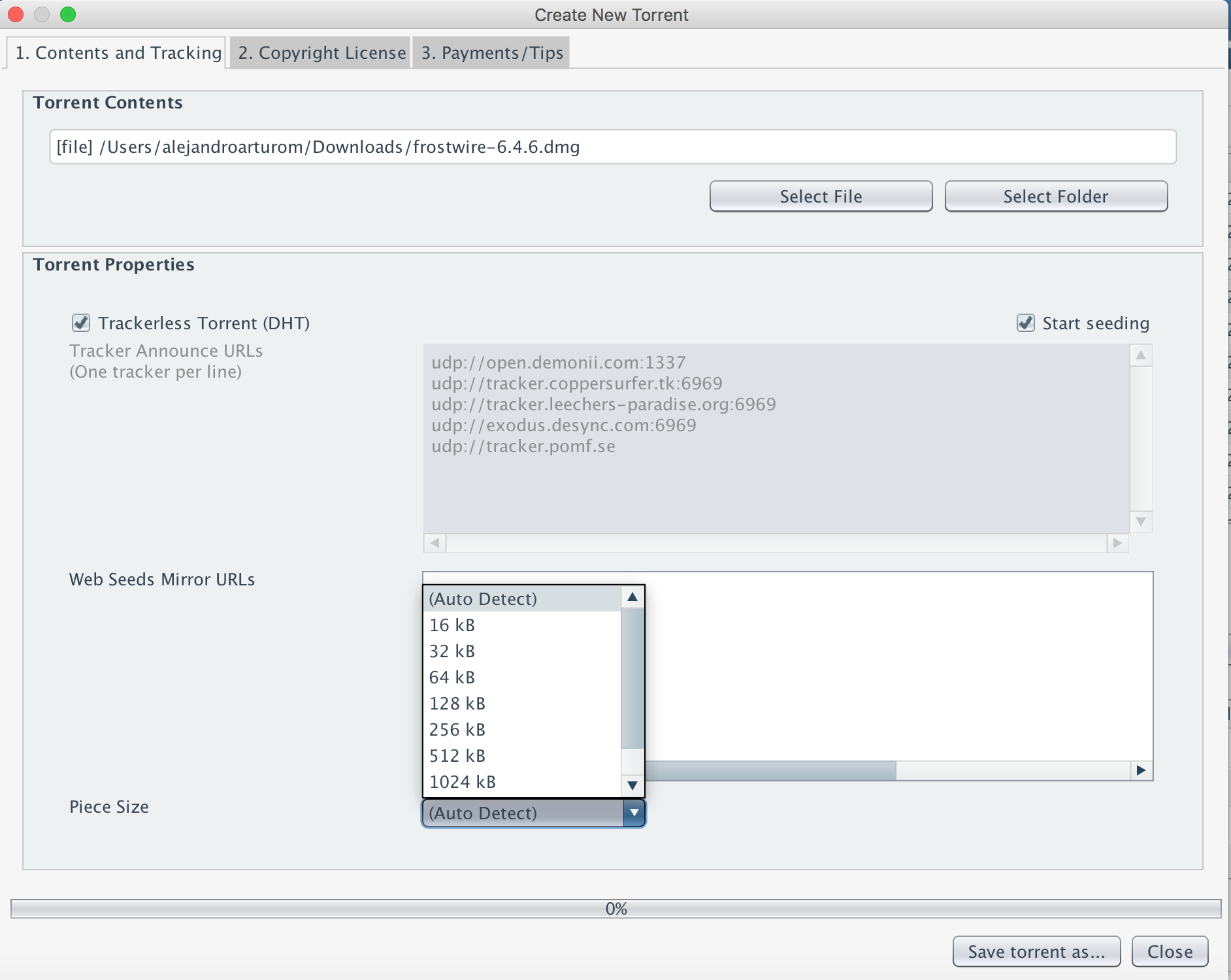
  * New piece size selection on torrent creation dialog
  * Library > Playlists UI improvements. Support to display lyrics when available
  * BTJunkie.eu search discontinued
  * Fixes issues with SoundCloud search
  * FrostWire wizard is now displayed when a new build number is detected
  * jlibtorrent version number available in about window
  * ALPHA: New VPN-Drop protection setting. Automatically stop all BitTorrent traffic
    if no VPN connection is available

 -- FrostWire Team <contact@frostwire.com>  Tue, 7 Mar 2017 19:45:51 -0600
What is FrostWire?
FrostWire is a free, open source BitTorrent client first released in September 2004, as a fork of LimeWire. It was initially very similar to LimeWire in appearance and functionality, but over time developers added more features, including support for the BitTorrent protocol and a full blown media player.
Starting FrostWire 6.4.6 as our first experimental feature we’re introducing a Privacy Protection feature for VPN users out there.
FrostWire will detect if your VPN connection drops and if you have this setting activated FrostWire will automatically stop all BitTorrent transfers to protect your privacy.
This is a really important setting if you want to protect your privacy on the Internet as you won’t accidentally be transferring or sharing files using your local IP address.
How to use VPN-Drop Protection?
1. Go to Tools > Options > Advanced > Experimental > Check Alpha
2. On the same setting screen go to BitTorrent > Advanced and check the box.
Then apply settings, and the protection should be on.
Warning, this is an Alpha feature, use at your own risk. On our next release it could be promoted to beta as we continue to test and optimize And then show the screenshot of the warning and how the feature works.
FrostWire is a free, open source BitTorrent client first released in September 2004, as a fork of LimeWire. It was initially very similar to LimeWire in appearance and functionality, but over time developers added more features, including support for the BitTorrent protocol and a full blown media player.
















 Official FrostWire Blog