p2pnet news needs you

p2pnet.net, a long time news provider in the p2p world is having some trouble and needs your support.

p2pnet has been working non stop for years to provide p2p news for readers, however times are tough and the site needs some help!

Without p2pnet.net and the voice of other websites like it FrostWire would never be what it is and most of you would’ve never heard of it.

Please donate if you can.

FrostWire Keeps you Safe

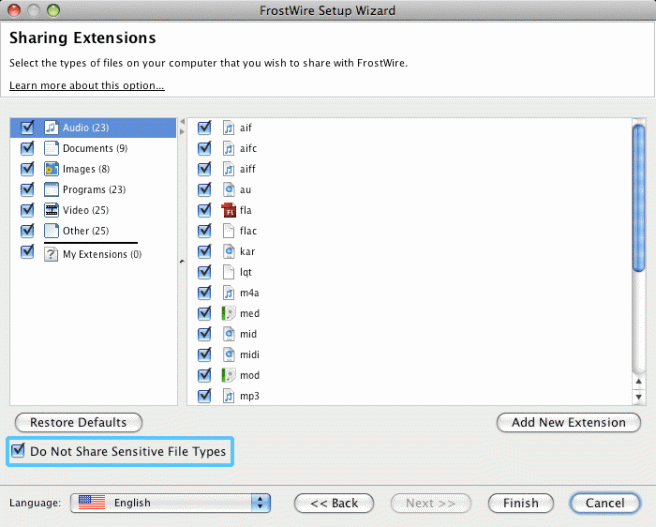
FrostWire Protects you - Sensitive Files not shared by default

By default FrostWire will protect you from sharing sensitive files like important documents, tax forms and other documents identity thieves might be looking for. FrostWire will not share by default files with .doc, .rtf and .pdf extensions.

FrostWire 4.18.1 Coming Soon

We’ve heard your complaints about bugs and we’ve fixed some of them, we’re working on some more and soon we’ll release a new version, among some that have already been fixed:

– Updates on the “Connection Doctor” component, to address connectivity issues
– Updates on secondary (after-search) loading logic. Loads secondary overlay on the spot, more room for FrostClick artist promotions.
– Fixes a bug where the media player would loop non-stop without playing all the songs on a playlist once it found an mp3 it could not play
– Fixes a bug on for Mac OSX where FrostWire would only download torrents opened via Finder if it was already running. Torrents now launch FrostWire and start downloading at once.
– Updates video help link to point to YouTube video of how to install FrostWire on Mac. http://www.youtube.com/watch?v=hakWq8q8CHQ

Basically we’ll be addressing issues with Connectivity, Some Mp3 files not playing, and other usability issues.
There’s some other work on the way to cut about 80% to 90% of the fake search results, but it could make it on FrostWire 4.18.2 if we can’t have it done in time for 4.18.1.

FrostWire 4.18.1 will also have access to a new network of Community Hosted UHC servers that will allow many more peers to get Turbo Charged right away.

Thanks for the feedback, we appreciate it.

Compiling Ghost White Crab on Linux x86_64 Ubuntu Linux

Compiling this software is usually just a matter of running ‘make’, but if you try to do so in Ubuntu 64bit, you’ll encounter the following error on the config_test.log file

skipping incompatible /usr/lib/gcc/x86_64-linux-gnu/4.3.3/libgcc.a when searching for -lgcc

To solve this issue just do the following:

apt-get install libc6-dev-i386

This makes the make script work since lib6-dev-i386 installs the
l32bit development libraries for GNU C for AMD64 (64bit linux)

Now it works!

About Ghost White Crab
GhostWhiteCrab is a portable, stand-alone GWebCache implemented in C. It is open-source and distributed under a BSD-style license. It was developed as a light-weight replacement for CGI GWebCache implementations in PHP, Perl, ASP etc. Unlike those, GhostWhiteCrab can easily handle millions of transactions per hour while consuming little memory and CPU resources. Although GWebCaches are usually used as bootstrap system for Gnutella, you can use them for any other network as well. GhostWhiteCrab doesn’t handle multiple networks at a time, but you can configure it for any network you like.

GhostWhiteCrab is also an UDP Hostcache (UHC) for the Gnutella network. This is the recommended use now as most Gnutella clients support this or have completely switched to this bootstrap method. An UDP hostcache is much lighter weight, especially in terms of traffic. It’s possible to run GhostWhiteCrab as UHC instead of a GWebCache, or it can serve as both at the same time.

Download BZIP2 compressed sources

FrostWire Sticker Eyepatch

Jonathan Malik sent us a pic of how one of his FrostWire stickers came in handy after he got his left eye swollen at bar

Hope it gets better soon!

Get free stickers
Share pictures of your stickers

FrostWire: Safe to Install

FrostWire awarded SAFE TO INSTALL by FindMySoft.com

The Editor in Chief of FindMySoft.com has just sent us the following message, which we’re very proud of:

Hello!
I am the FindMySoft.com Editor in Chief.
FindMySoft.com is running a program to certify shareware and freeware software.
We are pleased to inform you that your software FrostWire 4.17.0 has been tested on 01 Oct 2008 by one of our software engineers and has been found \”SAFE TO INSTALL\” on any computer. It has been granted the \”SAFE TO INSTALL\” certificate. This means that your software contains no viruses, spyware, adware, trojans and backdoors and causes no threat when installed.
We would also like to congratulate you for the quality of your product. It exceeds the quality standards of many other software products in its category.

Edith, Editor in Chief FindMySoft.com

Other Safe Download Certificates

Safe and Clean by Softpedia
By Softpedia.com


Tested Spyware free by Download.com

Problems running FrostWire on Ubuntu 8.04 with 64bit JVM?

If you recently upgraded your Ubuntu to 8.04 (64bit version), the Sun JVM that comes with it may be giving you an error similar to this one:


Loading FrostWire:
#
# An unexpected error has been detected by Java Runtime Environment:
#
# SIGSEGV (0xb) at pc=0x00007fa25489d755, pid=8123, tid=1082538320
#
# Java VM: Java HotSpot(TM) 64-Bit Server VM (10.0-b22 mixed mode linux-amd64)
# Problematic frame:
# C [libc.so.6+0x30755] catgets+0x15
#

Users from our FrostWire Forum came up with a solution:

by xbj9000 on Fri May 16, 2008 3:13 pm
I have a solution for those of us running 64 bit systems:

Code:

sudo apt-get install ia32-sun-java6-bin

Code:

sudo update-alternatives –config java

Then choose the ia32 version of Java 6.

Thanks a lot guys.