
FrostWire 7.0.4 — MCP Server, No More Freezes, and a Faster UI

We’re excited to announce FrostWire 7.0.4 for desktop — a release packed with a brand-new built-in MCP server, comprehensive EDT freeze fixes that eliminate UI hangs across the app, major rendering improvements to the transfer Pieces panel, and several quality-of-life features for torrent creation and management.

Windows Installer: frostwire-7.0.4.windows.exe

MacOS Installers:
frostwire-7.0.4-x86_64.pkg (Intel)
frostwire-7.0.4-arm64.pkg (Apple Silicone)

Linux
frostwire-7.0.4.x86_64.tar.gz (Intel)
frostwire-7.0.4.arm64.tar.gz (Arm64)

What’s New

Built-in MCP Server
FROSTWIRE_SKILL.md

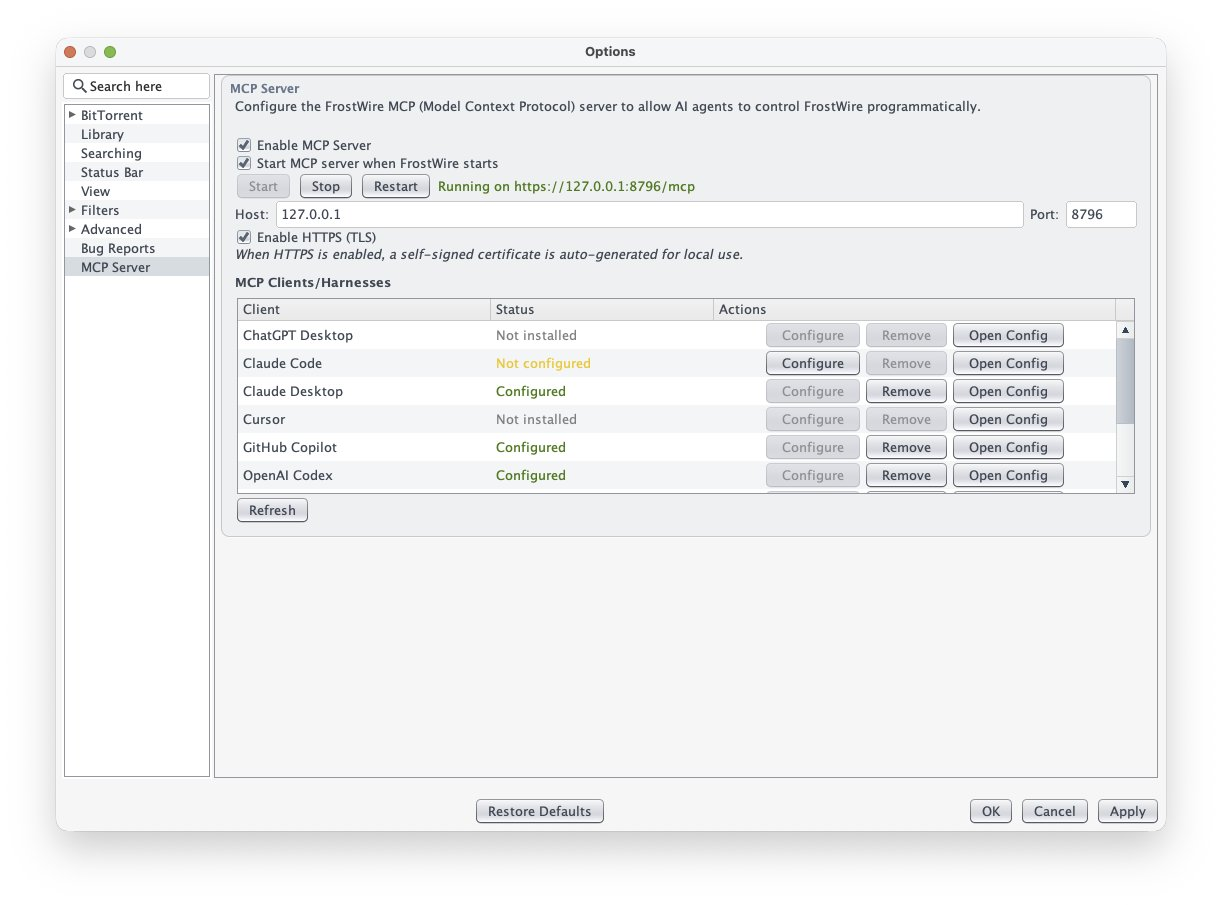
FrostWire now ships with a built-in Model Context Protocol (MCP) server — a first for any BitTorrent client. This opens up FrostWire to the AI tooling ecosystem with 38 desktop tools across 8 categories, settings-pane controls, and client configuration support for:

  • GitHub Copilot
  • Codex
  • Claude Desktop
  • OpenCode
  • Qwen
  • ChatGPT Desktop

AI agents can now interact with FrostWire’s desktop functionality through a standardized protocol.

Torrent Creation: Piece Sizes Up to 128 MB

The Torrent Creation Dialog now supports piece sizes up to 128 MB (previously capped at 4 MB). When creating a torrent, the dialog automatically recommends an optimal piece size based on your total content — targeting 1,000–3,000 pieces. This dramatically reduces RAM usage when seeding large files like 4K Linux ISOs.

Per-Torrent Save Location
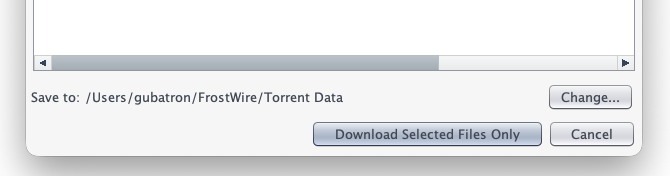
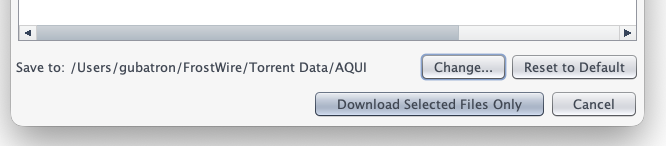
When selecting files to download from a torrent, the dialog now shows the current save folder with Change… and Reset to Default buttons. You can pick a custom download location for each individual torrent without changing your global default.
Per-Torrent File Priority Control

The transfer detail Files tab now gives you full control over which files to download and how much bandwidth each gets:
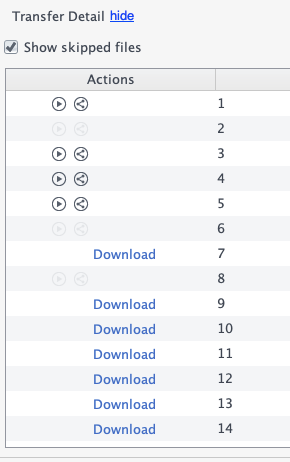
  • “Show skipped files” checkbox — persisted globally (default ON). Skipped files appear dimmed in gray with a Download button to resume them individually.
  • Priority column — right-click any file to open an 8-level popup menu (from libtorrent’s IGNORE to SEVEN). Adjust bandwidth allocation per file within a torrent without affecting the rest.
  • All JNI calls for file metadata run on background threads, so the UI stays responsive even with torrents containing thousands of files.

Restart Button Dialog

When you change settings that require a restart (language, theme, network mode), FrostWire now shows a “Restart Now” / “Restart Later” dialog instead of just a passive message.
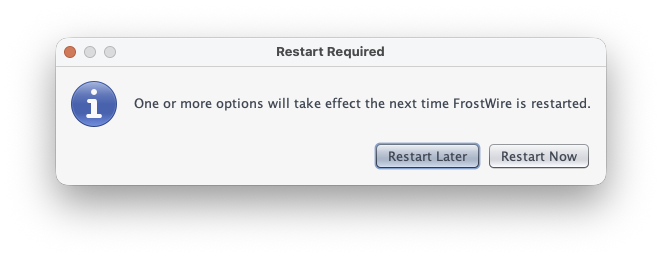
Clicking Restart Now gracefully shuts down and relaunches the app with the new settings applied.

YouTube Playlists & Channels

Pasting a YouTube channel or playlist URL now opens Telluride playlist search mode. Playlist partial results also appear correctly in the Video tab.

IP Filtering

The IP Filter settings pane is now fully wired to BTEngine — the clear and import buttons actually update the libtorrent ip_filter. The settings tab is no longer hidden.


No More UI Freezes

This release tackles the root cause of UI freezes across FrostWire. We identified and fixed 24 EDT (Event Dispatch Thread) violations that were blocking the UI during file I/O, torrent parsing, JNI calls, and dialog creation.

macOS Deadlock Fixes

  • Fixed a macOS EDT deadlock in FramedDialog where AppKit held awtLock during modal JDialog creation while EDT needed it for text rendering
  • Changed APPLICATION_MODAL to MODELESS in CreateTorrentDialogSendFileProgressDialog, and EditTrackerDialog to prevent nested modal dialog deadlocks
  • Added pack() before setVisible(true) in SendFileProgressDialogEditTrackerDialogOptions dialog, and About dialog to prevent macOS awtLock contention

Off-EDT Operations

The following operations now run on background threads instead of blocking the UI:

  • Theme loading at startup — Nimbus and FlatLaf Look-and-Feel initialization is now performed on the main thread before any Swing components exist, eliminating a consistent >2 second EDT freeze on every launch
  • Language flag image preloading — all locale flag icons are loaded into the ResourceManager cache before the setup wizard opens, so JComboBox layout no longer triggers MediaTracker.waitForID() on the EDT during startup
  • ApplicationHeader image preloading — header button background images are loaded on the main thread before MainFrame construction, preventing another MediaTracker.waitForID() stall
  • IconManager initialization — moved from the EDT to the main thread during late startup tasks
  • File launching via Desktop.open() — opening files with the OS default application now runs on a background thread, preventing X11 Desktop integration stalls on Linux when playing media
  • Transfer detail panels (General, Trackers, Peers, Pieces) — all JNI data gathering is now off-EDT
  • Native magnet URI generation — no longer blocks >2 seconds on large torrents
  • Resume data generation during pause/resume — need_save_resume_data() no longer stalls transfer actions
  • File progress computation — table painting no longer calls libtorrent file_progress() JNI on EDT
  • File I/O and torrent parsing in library table initialization
  • Directory scanning in library table updates
  • Future.get() blocking in library table selection removal
  • Recursive I/O guards added to DirectoryHolder.getFiles()
  • Drag-and-drop file existence checks — no longer triggers file.exists() syscall on EDT
  • File priority changes — all libtorrent filePriority() JNI calls run off-EDT via BackgroundQueuedExecutorService

Stability & Crash Fixes

JNI Crash Prevention

We’ve hardened the app against macOS Java 21 font-layout JNI crashes caused by malformed Unicode content:

  • Sanitize and de-HTML external text across search results, transfer names, locale labels, tooltips, and renderers
  • Normalize library text before Swing/Nimbus measures it, stripping Unicode format/control glyphs
  • Replace LineBreakMeasurer with JTextArea preferred-size calculation in tooltip UI
  • Sanitize transfer detail table strings (Files, Peers, Trackers) before Swing paints them
  • Added -Dsun.java2d.fontlayout=0 JVM argument to suppress JDK 21 SunLayoutEngine JNI warning spam during SynthComboBoxUI font layout on startup

Other Critical Fixes

  • Audio extraction crash: After extracting audio from a video download, selecting the newly added file in the library table could crash with IllegalArgumentException: Row index out of range if the file hadn’t been scanned yet. Added a bounds check to LimeJTable.setSelectedRow() to prevent this race condition.
  • Library Audio/Video nodes empty: Clicking Audio or Video in the library tree showed no files even though the Default Save Folder displayed downloads correctly. Fixed three root causes: MediaTypeSavedFilesDirectoryHolder.getFiles() was hardcoded to return an empty array instead of the cached files; LibraryMediator.scanInternal() refused to add newly downloaded files to empty caches; and SearchByMediaTypeRunnable didn’t fall back to the torrent data directory when DIRECTORIES_TO_INCLUDE was empty.
  • Shutdown hang: Added 30s timeout to LifecycleManager shutdown latch to prevent indefinite hangs
  • File size precisionBTDownload.getSize() return type changed from double to long — no more precision loss above 2GB
  • Library showing 0.0KB: File metadata loading now wrapped in try-catch with proper cell invalidation after background load
  • Library refresh (F5): Now properly re-sorts files after async lastModified load without flooding the resort executor
  • Transfer detail stale dataTransferDetailGeneral now discards stale async metadata updates when switching transfers quickly
  • Piece panel syncTransferDetailPieces now ignores late selection updates so piece counts stay in sync with the selected transfer
  • Settings failures: UI notification now fires when settings load/save fails
  • YCCK JPEG fix: Color inversion corrected using Adobe APP14 marker Transform field
  • CreateTorrentDialog: Bottom buttons now visible on first open without requiring manual resize
  • Speed limit controls: Added download/upload speed limit adjustment buttons to TransferDetailGeneral
  • First-view detail panel: The transfer detail panel now populates correctly on first view. A HierarchyListener detects when the Transfers tab becomes visible and triggers an initial selection update, fixing the empty detail panel bug on first open.
  • Checkbox flicker eliminated: The “Show skipped files” checkbox no longer flickers or corrupts its saved setting when toggled. Fixed a race condition between the 1-second refresh timer and user-initiated clicks.
  • Checkbox lag fixed: The “Show skipped files” checkbox now responds instantly. Checkbox-initiated updates moved from the shared single-threaded BackgroundQueuedExecutorService queue to a dedicated thread (matching Android’s HIGH_PRIORITY pattern), eliminating double-queueing with the 1-second refresh timer that caused multi-second UI lag on busy transfers.
  • Checkbox truly instant: The checkbox no longer re-fetches file metadata from libtorrent on every click. A cached holder list means toggling is a pure-EDT filter operation with zero JNI calls — the table updates in milliseconds even for torrents with thousands of files.
  • Table refresh fixed: The Files tab now rebuilds its table with fresh data on every refresh instead of calling tableMediator.update(), which was a no-op for immutable pre-computed holder objects.
  • Large torrent table freeze fixed: Replaced the per-row fireTableRowsInserted storm with a single bulk model replacement (setHolders) that fires fireTableDataChanged once. The EDT no longer freezes for seconds when updating a torrent with thousands of files.
  • Torrent file listing optimizedBTDownload.getItems() no longer performs a redundant piece-checking loop on every call. For a torrent with 10,000 pieces, this eliminates 10,000 th.havePiece() JNI calls per refresh. The tracker is now initialized once and kept up-to-date by libtorrent alerts.
  • Torrent switch fixed: Selecting a different transfer now correctly updates the Files tab. Replaced the broken target != btDownload guard with a monotonic sequence counter, so stale background completions are skipped without blocking legitimate torrent switches.
  • Library tree missing files fixedSearchByMediaTypeRunnable no longer skips disk search when the cache is non-empty. Files that existed on disk before startup (or in directories not covered by scanInternal) now appear correctly in Audio/Video tree nodes.
  • Library path consistency fixedFileUtils.listFiles() now returns absolute paths, ensuring cache deduplication and canonical path resolution work correctly across platforms.
  • Priority popup themed: The priority popup menu now uses FrostWire’s themed SkinMenuItem/SkinMenu components for consistent dark theme rendering.
  • File progress refresh: File progress percentages now update correctly after priority changes — no more stale 0% displays.

Settings Persistence

  • Tip of the Day: The “Show Tips at Startup” checkbox now saves immediately when toggled. Previously, the unchecked state could be lost if the app was force-quit before the normal exit save path ran.
  • Setup wizard infinite loop fixed: The wizard now saves its completion state synchronously instead of asynchronously. Previously, force-killing the JVM (e.g., IDE stop button) before the background save task executed caused the wizard to run again on next startup, which in turn reset SHOW_TOTD=true every time.
  • Setup wizard no longer resets tips unconditionally: The wizard only resets “Show Tips at Startup” on actual version updates, not when it appears for other reasons (intent window, associations, etc.).

HexHivePanel Overhaul

The transfer Pieces panel (HexHivePanel) received a complete rendering overhaul:

Fixes

  • Consistent hex tiling math with the fast flat-hex path for large swarms — no more overlapping piece cells
  • Restored the 3D cube-shaded look while keeping corrected tiling math and off-EDT cached rendering
  • Rows now wrap against the full viewport width — no more missing right-edge cubes
  • No longer cancels queued renders before rasterization starts — prevents refresh starvation (blank panel)
  • Coalesces rapid refresh requests through a single background render loop — 1-second detail updates no longer invalidate in-progress rendering
  • Merges retained viewport batches using non-overlapping seam bands — no more moving white gaps between rendered cube rows

Performance

  • Renders and publishes visible viewport cubes first — the Pieces tab paints quickly before the full scrollable bitmap finishes
  • Tracks viewport movement and resizes — only renders the visible region plus directional lookahead margins instead of repainting thousands of off-screen cubes
  • Retains a full-size backing bitmap and incrementally patches new viewport batches — previously drawn cubes stay visible when scrolling back
  • Prioritizes a smaller visible-band render with directional buffer and shorter row batches — reduces transient blank patches while scrolling

Search & Download Improvements

  • Tracker list refresh: Default tracker lists updated across desktop torrent creation, magnet URLs, and CreateTorrentDialog with current reliable public trackers (opentrackr, openbittorrent, stealth.si, exodus, torrent.eu.org, moeking, explodie, coppersurfer)
  • SoundCloud search now excludes tracks not marked as downloadable — only shows content the platform explicitly allows for download
  • Idope search updated to the new idope.pics domain and filters placeholder “No results returned” API responses
  • MagnetDL search parser now accepts both raw JSON arrays and quoted JSON-array payloads
  • SlideDownload now extracts .zip downloads with zip-slip protection
  • PerformersHelper now filters hidden files alongside pad files in search results
  • QuotedStringTokenizer now supports backslash quote escaping
  • TorrentFileFilter display string now properly internationalized
  • GloTorrents search engine removed (domain gtso.cc is parked and no longer functional)

Dependency Upgrades

LibraryOld VersionNew Version
BouncyCastle1.801.83
FlatLaf3.63.7.1
SQLite JDBC3.50.3.03.51.3.0
JetBrains Annotations26.0.226.1.0
JUnit5.12.25.13.4

Cleanup

Removed dead EDT-blocking code from BTDownloadMediator, unused utility methods, ancient try/catch hacks, Thread.sleep() scroll hacks, and dozens of stale TODO comments throughout the codebase.

FrostWire for Android 3.1.0 build 771: modern playback, safer downloads, and much stronger Android compatibility

FrostWire for Android 3.1.0 build 771 is a major stability and modernization release centered on one high-impact outcome: the app now behaves much more like a modern Android media and download app.

This build rebuilds the music player around Media3/ExoPlayer, restores reliable standard Android media notifications, hardens YouTube and Internet Archive downloads, migrates preferences to Jetpack DataStore, modernizes VPN/Wi-Fi protection logic, and removes a long list of UI-thread bottlenecks that could lead to freezes or ANRs.

By the numbers

FrostWire for Android 3.1.0 build 771 includes 120 documented Android release-note items:

  • 69 fixes
  • 13 improvements
  • 33 maintenance items
  • 5 new features

We were able to perform 120 updates using a ton of AI compute sponsored by your donations, thank you.

There is no separate crash: bucket in the 3.1.0 changelog, but many of the fixes are crash-class or ANR-class hardening, especially around Chaquopy/yt-dlp startupmusic playback transitionsDataStore persistenceMediaStore access, and deprecated Android API migrations.

Highlights, from most important to least important

1. The music player was rebuilt around ExoPlayer and Media3

This is the biggest change in the release.

FrostWire’s Android player moved from the deprecated MediaPlayer and RemoteControlClient stack to ExoPlayer / Jetpack Media3 / MediaSessionService. That migration fixed long-standing race conditions and made the player work like a current Android media app.

The result:

  • a standard Android media notification instead of a fragile custom RemoteViews implementation
  • output device selection in the notification for Bluetooth/Cast-style routing
  • more reliable play/pause, shuffle, repeat, and metadata refresh behavior
  • much better behavior during cold start, background playback, next/previous, and auto-advance transitions

2. Android media notifications now survive real playback use

The media notification work was not just a visual refresh. It fixed a whole class of playback-control failures that made background listening unreliable.

This release fixes:

  • missing media notifications on Android 12+
  • notification disappearance during engine-service notification refreshes
  • notification loss during next/previous/auto-advance transitions
  • stale Not playing state during active playback
  • notification controls failing to keep metadata, cursor state, and queue state in sync
  • previous-track history breaking after several songs
  • playback being killed when backing out through FrostWire’s “go home” dialog

In practice, the player notification is now much closer to how people expect Spotify, YouTube Music, or Pocket Casts to behave.

3. Fresh downloads and direct-file playback now work much better

3.1.0 removes a major source of frustration around newly downloaded songs.

The app now handles audio files more intelligently before MediaStore has indexed them:

  • freshly downloaded audio can start immediately instead of waiting for slow MediaStore indexing
  • YouTube audio downloads now open in FrostWire instead of a third-party app
  • direct-file playback no longer depends on a valid MediaStore ID
  • freshly completed YouTube downloads from Transfers can replace the current song correctly
  • album art fallback works even when MediaStore IDs or album IDs are not ready yet

This means FrostWire now behaves correctly in the exact window where users most often try to play a file: right after the download completes.

4. YouTube download reliability was substantially hardened

The YouTube pipeline got a deep reliability pass.

Notable fixes include:

  • fixing the Chaquopy/yt-dlp startup crash path caused by Android-incompatible subprocess behavior
  • threading per-format http_headers through the full download pipeline so requests keep the headers YouTube expects
  • preventing malformed headers from dropping all subsequent headers
  • treating non-2xx responses as failures so FrostWire no longer leaves behind misleading 0-byte files
  • improving browser-like default headers in the OkHttp wrapper

This release also updates the Python/Chaquopy environment and the yt_dlp integration so Android playback and downloading are much less brittle.

5. Search and download sources are more dependable again

Several search and download integrations were repaired or improved:

  • SoundCloud search was restored by validating remote credentials before caching and falling back safely when necessary
  • SoundCloud result filtering was corrected to match real downloadable/streamable behavior
  • Internet Archive downloads from search results were restored, including nested archive paths for composite crawled results
  • YouTube playlist URL search was added, with playlist partial-result support in Telluride
  • FrostWire is now offered more reliably for .torrent files and magnet links from browsers and download managers

The common theme is less silent failure and better handoff from search results into actual playback or downloads.

6. Preferences and settings were modernized with Jetpack DataStore

This release migrates FrostWire away from SharedPreferences to Jetpack DataStore, with a central configuration repository and safer default handling.

Benefits include:

  • atomic preference writes
  • safer migration from older installs
  • less risk of preference corruption or type mismatch crashes
  • settings writes moved off the UI thread to reduce ANR risk
  • a single source of truth for defaults and volatile preference resets

This is one of the most important under-the-hood changes in 3.1.0, even though it is less visible than the player work.

7. UI freezes, disk I/O, and ContentResolver work were pushed off the main thread

A large part of 3.1.0 is Android hygiene work that directly affects responsiveness.

The release removes:

  • 38 ContentResolver.query() calls from the UI thread
  • 12 disk I/O operations from the UI thread
  • 9 unnecessary async roundtrips for simple in-memory reads

It also fixes multiple StrictMode violations across music, transfers, suggestions, settings, and file opening flows.

These are the kinds of changes that make the app feel less fragile even when they are not visible as a single headline feature.

8. VPN Guard and Wi-Fi Only protections were updated for modern Android APIs

Networking protections had been weakened by deprecated Android APIs.

3.1.0 fixes this by:

  • migrating network monitoring from deprecated broadcast-based connectivity APIs to NetworkCallback
  • restoring correct Wi-Fi Only behavior
  • restoring correct VPN Guard behavior
  • adding faster periodic protection-state monitoring
  • surfacing transfer-screen indicators when protections pause downloads

This is important correctness work for anyone relying on FrostWire to respect network constraints.

9. Transfers, My Music, and deletion flows were cleaned up

Several library and transfer-list correctness bugs were fixed:

  • transfer rows and transfer detail file lists now refresh against the correct live state
  • transfer audio play buttons now open the same player flow used by My Music
  • deleting songs no longer leaves ghost entries in Recent/Favorites
  • 0-byte broken downloads are now filtered out of Recent
  • track deletion avoids a lifecycle-related NullPointerException

This reduces a class of bugs where FrostWire appeared to “undo” the user’s action because the UI reloaded stale data too early.

10. New power-user and privacy features were added

The release also adds a few meaningful new capabilities:

  • I2P network integration for anonymous proxy support
  • I2P settings UI under Settings > Advanced
  • frostwire_launcher.py TUI to build, install, run, and inspect the app without Android Studio
  • live logcat viewing from the launcher

These are not the core reason 3.1.0 matters, but they make the build more capable for both advanced users and developers.

11. Android compatibility and dependency modernization continued

This build also includes a broad modernization sweep:

  • EngineIntentService moved away from deprecated JobIntentService
  • deprecated fragment/activity/notification APIs were migrated across the app
  • old custom media notification plumbing was removed in favor of Media3
  • Gradle/AGP/Python/build tooling and multiple Android dependencies were updated
  • search and media helper code was cleaned up and consolidated

That maintenance work matters because much of the 3.1.0 stability gain comes from removing old code paths that modern Android no longer treats kindly.

Types of work in 3.1.0

This release is not just “a player update.” It spans several categories:

  • Playback architecture modernization: MediaPlayer -> ExoPlayer/Media3, MediaSessionService, notification/output controls
  • Playback correctness fixes: queue sync, metadata refresh, previous/next behavior, cold-start playback, direct-file playback
  • Download hardening: yt-dlp/Chaquopy reliability, YouTube headers, 0-byte download prevention, archive.org result downloads
  • Search/source fixes: SoundCloud, Internet Archive, YouTube playlist URLs, intent filters for torrents/magnets
  • Settings/persistence modernization: SharedPreferences -> Jetpack DataStore, safer migrations, centralized defaults
  • Responsiveness and ANR prevention: main-thread query and disk-I/O removal, StrictMode cleanup, fewer async hops
  • Network protection correctness: Wi-Fi Only, VPN Guard, and modern connectivity monitoring
  • Developer and power-user tooling: I2P support, launcher TUI, live logcat

Why 3.1.0 matters

FrostWire for Android 3.1.0 build 771 matters because it fixes the seams between searching, downloading, and actually using media on a modern Android device.

Before this release, the most visible pain points were exactly where users notice breakage fastest: fresh downloads not opening correctly, notifications disappearing, playback controls getting stuck, settings writes freezing the UI, and modern Android API changes quietly breaking network protections or media behavior.

This build addresses those pain points directly and moves the app onto a much healthier foundation.

FrostWire 7.0.2 Released: Enhanced Privacy with VPN-Drop Protection & Smarter Search

We are excited to announce the release of FrostWire 7.0.2 (Stable) for Windows, macOS, and Linux. This update is a significant milestone for user privacy and search efficiency, introducing a robust “VPN-Drop Protection” system to keep your identity safe while downloading.

Windows
frostwire-7.0.2.windows.exe

MacOS
frostwire-7.0.2-x86_64.pkg (Intel)
frostwire-7.0.2-arm64.pkg (Apple Silicon)

Linux
frostwire-7.0.2.x86_64.tar.gz
frostwire-7.0.2.arm64.tar.gz

Whether you are a casual downloader or a power user, 7.0.2 brings a more responsive, cleaner, and safer experience to your desktop.

🛡️ Stay Protected: New improved VPN-Drop Protection

Screenshot 2025-12-28 at 2 15 16 PM

The headline feature of this release is the VPN-Drop Protection. In the world of BitTorrent, maintaining a secure connection is paramount. We’ve added a fail-safe to ensure your real IP address is never accidentally exposed.

Quick Toggle: You’ll notice a new checkbox in the status bar. This allows you to instantly enable or disable VPN-Drop Protection.

Automatic Pausing: If this setting is on and your VPN disconnects, FrostWire will automatically pause all BitTorrent transfers.

Smart Alerts: FrostWire now checks for an active VPN connection when you start a new download, open a .torrent file, or paste a magnet link. If you aren’t protected, a dialog will alert you before the transfer begins.

Performance First: We’ve optimized the logic behind the scenes (using a new VPNDropGuard system) to ensure that checking your VPN status won’t lag your computer or freeze the interface.

🔍 Better Search, Faster Results

We’ve overhauled how FrostWire sorts your search results to help you find the highest quality files in less time.

Relevance First: Search results are now prioritized by keyword matches first, followed by seed counts and popularity. This ensures that the most relevant and “healthy” files stay at the top of your list.

Bug Fix: We’ve squashed a bug where seed counts were occasionally disappearing from the search UI. You’ll now have full visibility into the health of every file before you click download.

🎨 Clean & Compact UI

We believe a powerful tool should also be a beautiful one. FrostWire 7.0.2 features a more compact status bar layout. By reducing spacing and using a smaller font for the VPN indicators, we’ve freed up screen real estate while still keeping your vital connection stats front and center.

There is even a handy, clickable “VPN” link in the status bar that takes you directly to information on how to better protect your privacy.

Changelog Highlights:

Improved: Search result sorting (Keyword relevance > Seeds/Popularity).

New: VPN-Drop protection checkbox in the status bar.

New: VPN status checks when starting downloads or opening magnet links.

Fix: Resolved issue with disappearing seed counts in search results.

Optimization: All VPN-related logic moved to background threads to prevent UI blocking.

UI: Minimalist spacing for VPN and status indicators.

Download FrostWire

FrostWire for Android 3.0.14: Critical Stability Fixes & Engine Optimization

Just in time for the new year, we are rolling out a vital update for our Android users. FrostWire 3.0.14 (build 768) is now available, and it addresses several critical “day-one” issues introduced with our recent V2 architecture overhaul.

This release focuses on making sure the app starts correctly, downloads reliably, and accurately reports the status of your transfers.

What’s Fixed in Build 768?

🛠 Fixing the “Error” Status Bug

Many users reported that newly started torrents would immediately show an “Error” status even when the download was healthy. We found that the app was occasionally reading from an outdated status cache. We’ve implemented a fix to invalidate that cache immediately upon starting a transfer, ensuring you see the actual download progress instead of a false error.

⚡ Solving Initialization Crashes

We’ve eliminated two major race conditions that occurred during the app’s startup sequence:

  • Port 0 Binding Failure: Previously, the BitTorrent engine (BTEngine) would sometimes try to start before your settings were loaded, causing it to fail by trying to connect to “Port 0.”
  • Session Initialization: We’ve ensured the ConfigurationManager now blocks and finishes loading preferences before the engine starts, preventing session-related crashes.

🔍 Restoring Search-to-Download Functionality

Following our recent search architecture consolidation, some results from popular sources (like TPB, 1337X, and MagnetDL) weren’t being recognized as torrents.

  • We have added support for the new CompositeFileSearchResult interface.
  • This ensures that when you click a search result, the download starts immediately as intended.

📈 Maintenance & Core Updates

We have refreshed our core dependencies to ensure maximum compatibility with the latest Android devices:

  • yt-dlp Updated to 2025.12.08: Essential for high-speed cloud video downloads.
  • Gradle Plugin 8.13.2: Optimized build performance.
  • Library Updates: Updated Firebase BOM (v34.7.0), AndroidX ExifInterface (v1.4.2), and SwipeRefreshLayout (v1.2.0).

How to Update

  • Direct Download: Visit FrostWire.com to download the latest APK directly.

If you’ve been having trouble with downloads not starting or seeing unexpected errors in your transfer list, this update is highly recommended. Thank you for helping us make FrostWire better by reporting these issues!

Happy New Year and Happy Downloading!
— The FrostWire Team