How to show Search/Transfers in split screen mode on FrostWire?

Since FrostWire 6.3.1 you can select how to show the transfers screen: as an individual tab or together below the search results in split view. On this post, you will learn how to use this new option.

Open FrostWire and you will see an individual tab for transfers.

frostwire 1

Click on transfers tab and you will see all transfers!
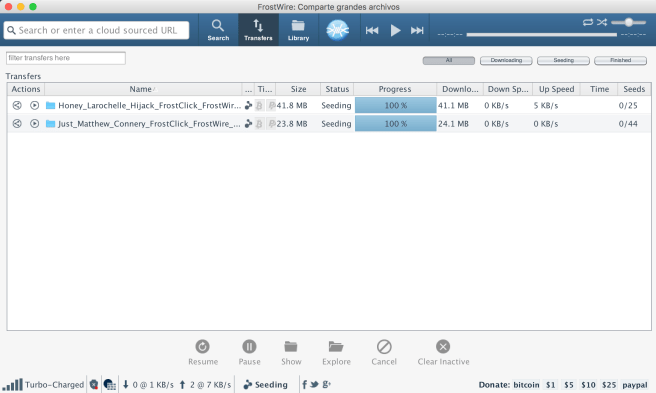
frostwire transfers tab

Now, if you prefer to have the transfers below the search results in split view, you have to click on the “View” menu and select the option “Search/Transfers Split Screen”
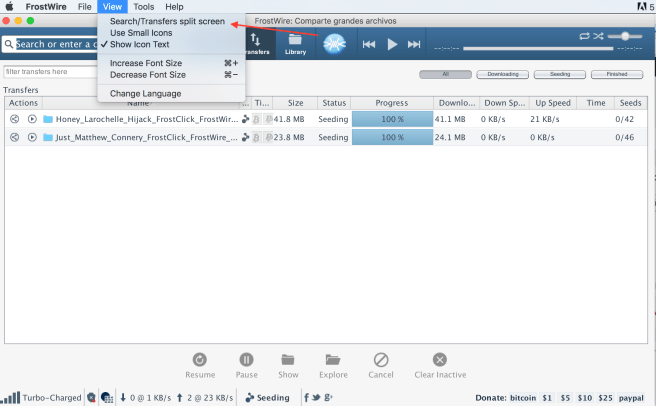
frostwire view select transfer split

Restart FrostWire and now you will have the search/transfers split screen!

search transfer split

What do you prefer? Transfers Tab or Search/Transfer split screen?


Video: How to share files and streaming music

EuTestei, a Brazilian YouTube tech channel, made a video about FrostWire. On this video you’ll learn the basic stuff of how to use FrostWire Plus for Android. If you speak portuguese, you’ll find this video very useful.

How to Extract Audio from Videos

Many times we want to extract audio from videos in order to listen to or to use in a project. FrostWire allows you to easily extract audio from videos.

1. Open FrostWire (if you don’t have FrostWire yet, download it for free on FrostWire.com).
2. Go to the Library. You need to have the video files on FrostWire Library.
libreria frostwire 3. Select the .mp4 video file(s).
4. Right click any of the selected video files and select the option “Extract Audio”

extract audio
5. Wait for the audio extraction to complete. Now you have the audio of the video on the Audio section. If for some reason you don’t see the new extracted m4a files, press [F5] to refresh.

Done

If you have any doubts we’ve also made an instructional video of how to extract audio from videos using FrostWire.

How to fully stop music playback on FrostWire for Android (VIDEO)

You can use the menu entry on the top right of the music player > Stop.

Or you can Long press the Play/Pause button and the audio playback will completely stop and memory will be freed.

Follow @FrostWire on Twitter

How to send files with FrostWire

Use FrostWire to send files without limits in size or bandwidth, ad free.

The more people you send the file, the better it works. There’s no limit to how many people you can send files.

Welcome to the peer to peer cloud.

How to install FrostWire in Debian Lenny

The folks at TuxArena – Debian and Ubuntu articles, news and tutorials, Linux reviews have written a very cool tutorial on how to install FrostWire on Debian Lenny

Thanks to TuxArena for this wonderful howto, you can follow @TuxArena on Twitter for more Debian related information.

How-To: Install and Run FrostWire 4.17.0 in Debian Lenny

Here is a Tutorial on how to install and run FrostWire 4.17.0 in Debian Lenny.

Thanks to the people at TuxArea for writing this detailed tutorial.