Many times we want to extract audio from videos in order to listen to or to use in a project. FrostWire allows you to easily extract audio from videos.
1. Open FrostWire (if you don’t have FrostWire yet, download it for free on FrostWire.com). 2. Go to the Library. You need to have the video files on FrostWire Library. 3. Select the .mp4 video file(s). 4. Right click any of the selected video files and select the option “Extract Audio”
5. Wait for the audio extraction to complete. Now you have the audio of the video on the Audio section. If for some reason you don’t see the new extracted m4a files, press [F5] to refresh.
If you have any doubts we’ve also made an instructional video of how to extract audio from videos using FrostWire.
Happy Sunday! This week has been very important because significant leaders like Mark Zuckerberg and Pope Francis spoke at the United Nations. And also, today we are releasing a new FrostWire (6.1.5) for Windows, Mac and Linux.
This update makes FrostWire faster and leaner in memory usage, here’s how.
We fixed Kat Search, Bitsnoop Search, and EZTV search, so now you won’t have any issues when you search. Also, we replaced our HTTP networking engine and FrostWire is now more efficient and reliable than ever when it comes to web connectivity, this means faster and more reliable search results, faster media result previews, faster YouTube, SoundCloud and Archive.org downloads and all of this with less resources from your computer.
We also updated our Java runtime to the latest version (1.8.0 build 60), and removed Radio functionality which had been hard to maintain, not used by many people and not that great as we couldn’t keep up with the station url churn.
If you want to enjoy online radio we recommend you just open your web browser and head to shoutcast.com.
Enjoy your weekend with this new FrostWire. Remember, FrostWire is totally free and you can download it directly our our website FrostWire.com/Downloads
Changelog
frostwire (6.1.5) stable; urgency=high
  * New http engine based on okhttp, uses pooled connections, less threads,
    less memory. Faster and more reliable search & cloud downloads.
  * libtorrent/jlibtorrent core update (v 1.1.0.9).
  * Fixes KAT search.
  * Fixes Bitsnoop search.
  * Fixes EZTV search.
  * Removes Radio functionality from Library.
  * When the search options are opened, the keyword textfield is autofocused.
  * Java Runtime upgrade to v1.8.0_60.
  * Codebase cleanup and refactors.

 -- FrostWire Team <contact@frostwire.com>  Thu, 25 Sep 2015 11:04:00 -0500
What is FrostWire?
FrostWire, a BitTorrent Client & YouTube Downloader that makes it easier to search, download, play and share content from the BitTorrent network & cloud sources, all in one place, announced today its new ‘preview’ and ‘play as you download’ capabilities for Android phones and tablets. The new preview feature not just enables users with a more convenient way to find and discover content, it makes downloading optional in some cases.
(If you are on Android right now, don’t download it with Chrome, as Google now wants to censor out apps outside of Google Play and it will not open the installer after you download it, use Firefox instead, or a use File Explorer to open the .apk installer after you have downloaded it)
Saturday, Sep. 26th 2015
Miami, FL.
We have replaced our web engine and now we have an even better app.
This means, faster search results, faster-more reliable cloud downloads and previews, less memory usage, less battery usage.
We’ve also fixed several search sources, SoundCloud, Bitsnoop and KAT are back.
There’s also a ton of user experience details we’ve taken care of that we hope you don’t even notice, as everything should just work.
CHANGELOG:
FrostWire 1.6.4 – SEPTEMBER/24/2015
– New http engine based on okhttp, uses pooled connections, less threads, less memory.
– Visited previews also marked as visited and remembered during session.
– Fixes SoundCloud.
– Fixes KAT search.
– Fixes BitSnoop search.
– Browse and manage your .torrent files.
– Browsing document files now reveals all saved .apk files.
– Multiple crash fixes on audio player.
– No more annoying yellow notification messages when removing tracks.
– UX: My files won’t forget your search filter if you overscroll for a refresh.
This new release has a lot of fixes (EZTV, BtJunkie search, torrents issues, crash on audio player), also we upgraded Picasso library for image caching and did a significant update to the jlibtorrent library that improves memory handling and avoids a DDoS attack on the network.
The update is currently being rolled out in stages to a small percentage of users on Google Play so that we can fix any newly introduced bug without impacting the majority of users.
FrostWire 1.6.3 - SEPTEMBER/06/2015
- Upgraded Picasso library for image caching.
- Code/library cleanup.
- New 'Remove Torrent and Data' action on finished torrent transfers.
- Clicked search results are marked as visited and remembered during session.
- jlibtorrent update 1.1.0.7, rebuilt with new swig library, memory optimizations, crashes fixed.
- Fixes EZTV, BtJunkie search.
- Fixes issue where torrent downloads would start on 3g/4g disregarding setting.
- Multiple crash fixes on audio player.
What Is FrostWire?
FrostWire is the only BitTorrent Client and YouTube Downloader for both desktop and Android, featuring built in torrent & cloud search, preview functionality and integrated media player. For artists looking to share their content and consumers looking to access new content, FrostWire’s software is an easy-to-use gateway to the world of torrents, file-sharing and peer-to-peer content distribution.
Featuring a BitTorrent client, YouTube and SoundCloud downloader & Music Player, FrostWire is available as a desktop client or an Android application.
The fully featured FrostWire Plus app, is available for a free download at the official website frostwire.com/android
The FrostWire Basic app available on Google Play is mainly a BitTorrent Client and does not provide YouTube and SoundCloud support due to Google’s Developer Terms of Service.
MIAMI, FL (AUGUST 12, 2015) – FrostWire, a BitTorrent Client & YouTube Downloader that makes it easier to search, download, play and share content from the BitTorrent network & cloud sources, all in one place, announced today its new ‘preview’ and ‘play as you download’ capabilities for Android phones and tablets. The new preview feature not just enables users with a more convenient way to find and discover content, it makes downloading optional in some cases.
Preview Before Download
Available today only for FrostWire Plus* (v1.6.1+), the ‘Preview before download’ feature allows users to stream YouTube and SoundCloud content directly from search results. This convenient (and free) feature lets users determine if they want to download the file for offline access, move on to another search result or simply play it without keeping a copy on the device.
Play As You Download
Because of how file pieces are shared on the BitTorrent network it’s not possible to offer instant previews the same way it can be done for cloud sources.
However, with the new ‘Play as you download’ feature available through both FrostWire Plus and FrostWire Basic**, users can listen to music or watch videos as they are being downloaded.
With nearly 3 million active Android installs, FrostWire is excited to provide their users an experience every media lover will appreciate. This new update will allow Android users to make better choices when selecting files to download from the hundreds of often closely named search results, saving them both time and bandwidth and getting them exactly the files they want.
What Is FrostWire?
FrostWire is the only BitTorrent Client and YouTube Downloader for both desktop and Android, featuring built in torrent & cloud search, preview functionality and integrated media player. For artists looking to share their content and consumers looking to access new content, FrostWire’s software is an easy-to-use gateway to the world of torrents, file-sharing and peer-to-peer content distribution.
Featuring a BitTorrent client, YouTube and SoundCloud downloader & Music Player, FrostWire is available as a desktop client or an Android application.
The fully featured FrostWire Plus app, is available for a free download at the official website frostwire.com/android
The FrostWire Basic app available on Google Play is mainly a BitTorrent Client and does not provide YouTube and SoundCloud support due to Google’s Developer Terms of Service.
We’ve finally done what you’ve been always asking for, “Play before download” (FrostWire Plus only) and “Play while you download” (available on basic too)
Play before download, a.k.a. “Preview”
Starting on FrostWire Plus 1.6.0 for Android (the one available only on our website, also 100% free), YouTube and SoundCloud search results can be streamed for preview, this way you can know ahead of time if this is the file you need for offline access, or if you just want to play it, you can do so.
Play while you download
But what about .torrent downloads? Given the distributed nature of the file pieces on the Bittorrent network, TODAY it’s harder to give you the same experience we can give you when streaming from a cloud source, we could do preview, but you’d be frustrated how long you’d have to wait in most cases.
Therefore, you can start any media Bittorrent download, and while you’re on the transfer screen you can wait for a Play button to appear. Once this button appears you can start playing the file before it finishes the download.
FrostWire 1.6.0 - AUGUST/03/2015
 - Streaming Previews on search results before download. (FrostWire Plus only)
 - Play .torrent media files while downloading.
 - Upgrade bittorrent engine to jlibtorrent 1.0
 - Updated SoundCloud search & download api.
 - Improved search suggestions.
 - Improved transition between My Music and Home screens.
 - Multiple crash fixes in music player.
frostwire (6.0.3) stable; urgency=high
  * Solves issue getting correct single file location from transfer manager.
  * Improved MD5 verification. Thanks @abderraouf-adjal
  * Important UI transfer related actions restored for Linux users.
  * Updated frostwire-jlibtorrent libraries,
    now built with older Boost 1.55, fixes Windows UI Freeze issue.
  * CPU usage reduced managing transfer items.
  * Croatian, Bulgarian, Polish, translation updates.
  * More cleanups and refactors.

 -- FrostWire Team   Wed, 3 December 2014 16:53:57 -0500
FrostWire is a free, open source BitTorrent client first released in September 2004, as a fork of LimeWire. It was initially very similar to LimeWire in appearance and functionality, but over time developers added more features, including BitTorrent support. In version 5, Gnutella support was dropped entirely, and FrostWire is only a BitTorrent client. Development of the program has been active since the program was first released in September 2004.


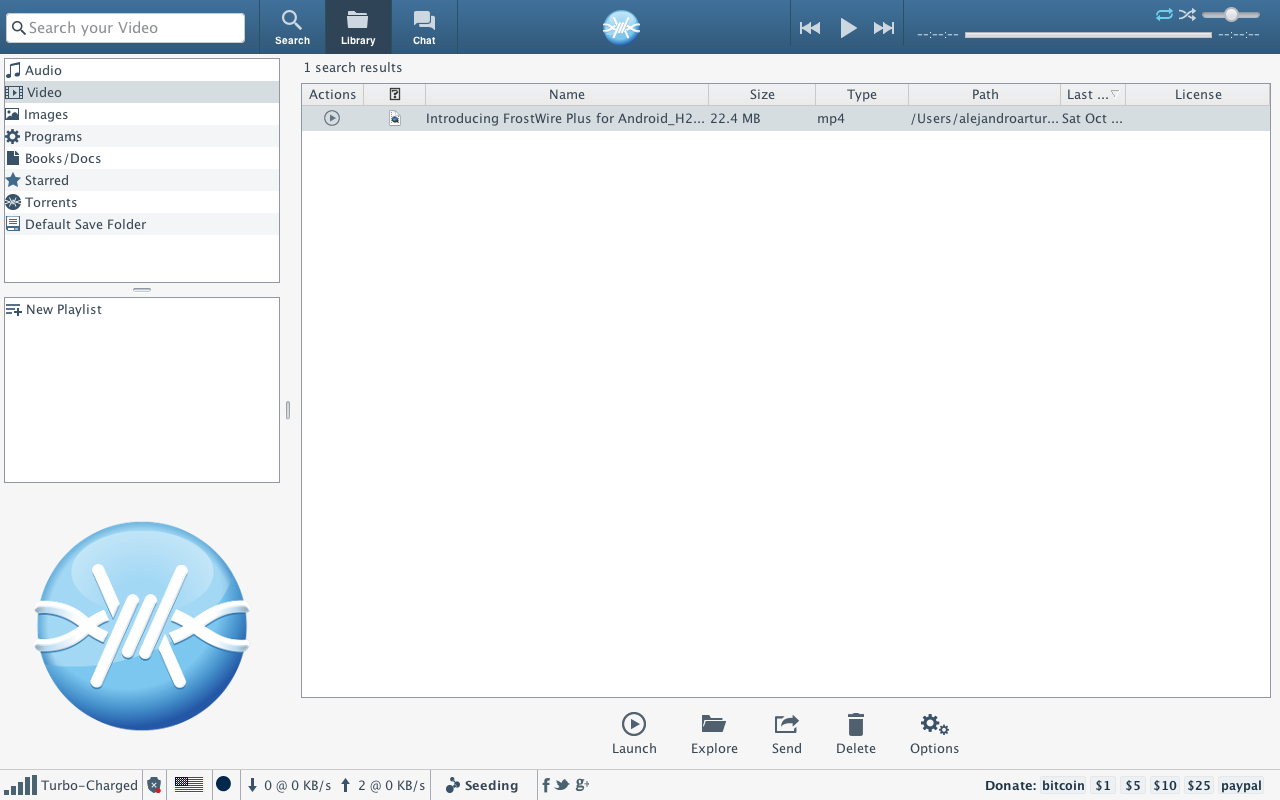 3. Select the .mp4 video file(s).







 Official FrostWire Blog