What is a torrent?

FrostWire utilizes torrents to accomplish peer to peer file sharing. There seems to be a lot of confusion on what a torrent is and how it is used.

First, let’s consider how files are organized and accessed. Any file can be considered as a string of bytes, starting at one and going to the end of the file. In most files systems, data can be read and written to a specific point in the file by using the character number, which can be expressed in many ways, but that’s not your problem. If you want character 10, ask the file system to give you character 10, and you don’t care how that happened.

You can think of torrents as two basic types: File torrents and Folder torrents. A file torrent names one file and only one file. If you wanted to obtain an album of 20 songs, you’d have to use 20 different torrents, if you used file torrents.

A folder torrent describes all of the data in a folder, which can include sub-folders. If an album of 20 songs is contained in one folder, that one torrent will allow you to obtain that entire album. Some torrents can contain a primary folder containing sub-folders, each containing many files. Torrents containing over a thousand files are NOT uncommon.

Even with a folder torrent, there is provision to select specific files and exclude others from the download process. This can vary from program to program. For FrostWire, its fairly easy and covered in many help articles.

The key is that a torrent is NOT the data that you want. It is a description of the data you want. Torrents are created by torrent programs. They organized the data into chunks and provide a data map of the file structure, based on those chunks, so that data matching the torrent description can be read and written, randomly, from the disk.

Because the data can be read and written randomly you can send to and receive from multiple people at one time. This means that the data describe by a torrent MUST be and remain unchanged on the disk, once the torrent is made. If the data is changed, it will invalidate the torrent and cause errors, which the system will catch and attempt to deal with, usually by disabling the offending torrent.

Each torrent can be identified by a unique hash total of the data layout. The hash description is not so large as to be difficult to handle, but is large enough to make generation of the same hash from different data almost impossible.

The hash is considered a unique identifier for each torrent and is the mechanism that torrent programs use to exchange information about who has what torrent.

Here are some facts.
A torrent contains NO data from the files it describes. It only contains a mapping of the way the data is organized on disk.

A torrent has NO information about who has the file described. If someone decides to share files from a torrent, the torrent program will advertise the hash, and those looking for that file will be so informed.

New FrostWire 6.1.9 [Windows, Mac, Linux] is out – Fixes YouTube issues and more

Download FrostWire 6.1.9 now

A new FrostWire update is available for Windows, Mac, Linux. (Android is coming very soon). This is an urgent release that includes YouTube search fixed.

Changelog

frostwire (6.1.9) stable; urgency=high
* Fixes Youtube search issues.
* New jlibtorrent 1.1.0.15
* Shared maglnk url shortening not done with Bit.ly anymore.
* Library now remembers your last media type selection for the next session.
* Fixes event handling bug on “Create New Playlist” dialog for MacOSX.
* New FrostWireInputDialog.

— FrostWire Team Mon, 21 Dec 2015 16:52:50 -0500

Get FrostWire 6.1.8. build 170 right now!

If you made a fresh install of FrostWire 6.1.8 build 169 you must have experienced a nasty crash on start. Users upgrading from previous versions were not affected by the bug.

FW

The crash has been fixed and you can download FrostWire 6.1.8 build 170 from our website, github.com or sourceforge.net


Introducing 1-click-seeding for Windows, Mac, Linux

Download FrostWire Plus 6.1.8 now

Today you can download the new FrostWire for Desktop (6.1.8.) release! This update a powerful new feature to help decentralize content without censorship with a simple click on every finished transfer.

one-click-seeding

Share and Seed any finished transfer in one click!

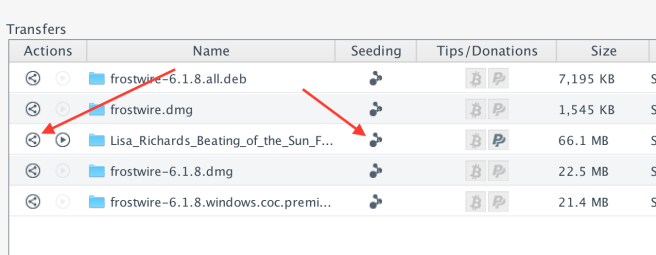
FrostWire has always allowed you to share or seed if you were a curious user, these actions were available for finished .torrent transfers, but now, they’re available to any finished transfer even if it came from a cloud service.

share-and-seed-any-download-with-frostwire

The seeding status icon is also a button you can use to start or stop seeding any transfer, no need to know about how to create a .torrent anymore, you just click and you’re seeding.

yoda_seed

If you want to share a transfer, or a big file from your computer with a friend, family member or co-worker, you can use the Share button on the actions column. FrostWire will make sure your transfer is a torrent (it will create one for you if it wasn’t a torrent download) and then it will provide you with means to share it through any channel, be it a tweet, a text message, email or other.

Screen Shot 2015-12-12 at 6.04.56 PM

and remember…

More improvements on Tab handling

frostwire 618

Changelog

frostwire (6.1.8) stable; urgency=high
* New status/control transfer buttons to Seed and Share transfers.
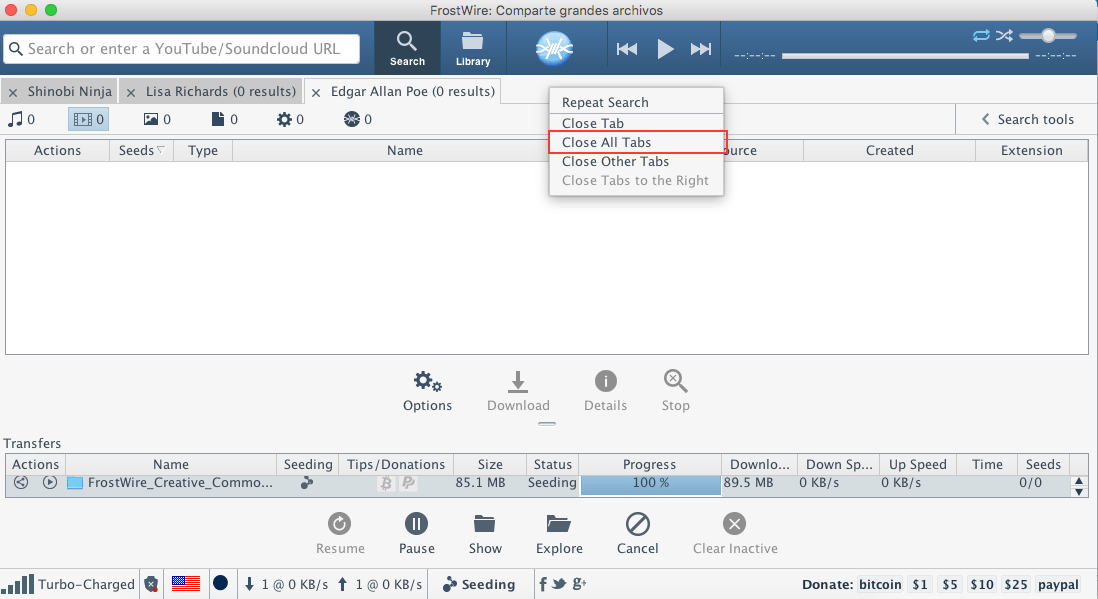
* New ‘Close All Tabs’ action for search result tabs.
* Youtube search updates.
* Fixes issues with playlists in Library.
* Minor user interface adjustments on Library tab.
* jlibtorrent library updates.

What is FrostWire?

FrostWire, a BitTorrent Client & YouTube Downloader that makes it easier to search, download, play and share content from the BitTorrent network & cloud sources, all in one place, announced today its new ‘preview’ and ‘play as you download’ capabilities for Android phones and tablets. The new preview feature not just enables users with a more convenient way to find and discover content, it makes downloading optional in some cases.

What is Seeding?

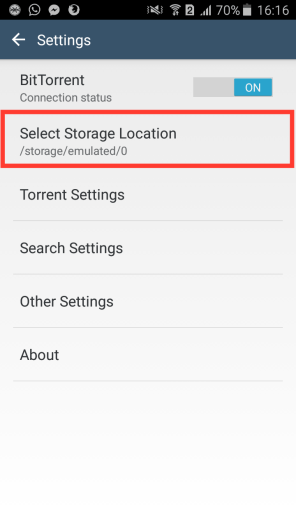
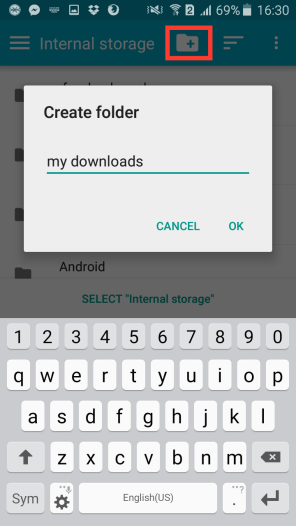
How to select a custom storage folder for your FrostWire downloads

FrostWire Plus for Android 1.6.7 lets you select a custom storage for your FrostWire downloads. Today we’re going to explain to you how to do that. It’s very easy!

  1. Open FrostWire Plus

    fw plus 1

  2. Go to Settings

    2015-12-04 19.29.59

  3. Click on Select Storage Location

    ffw storage

  4. Select a storage

    2015-12-04 19.30.14

  5. Create a folder

    2015-12-04 19.30.29

  6. Click on Select

    2015-12-04 19.30.45

  7. Done!

    2015-12-06 13.54.46

  8. Now you’re going to have a custom folder with all your downloads

    2015-12-06 13.55.20

Bonus tip

  1. You can hide/show SD card or hide/show file size

    2015-12-06 14.02.38
    2015-12-06 14.02.41

Do you need more help? Write a comment on this post and we’ll help you!

New FrostWire Plus (1.6.7) for Android released! YouTube Search Improvements!

Download FrostWire Plus 1.6.7 for Android now!

This new release of FrostWire Plus fixes a lot of issues (with YouTube search, Archive.org search, etc) and adds a new option: Select storage location.

ffw storageChangelog

FrostWire 1.6.7 – DECEMBER/03/2015
– New: Select storage location. Down to the folder where you want
your FrostWire download folders to be.
– New: Exit/Shutdown button replaces VPN button on FrostWire status
notification.
– YouTube search improvements.
– Library updates (support-v4, rxjava, gradle plugin)
– Fixes bug where invalid names could be used to rename files.
– Spanish translation update.
– Fixes issues with archive.org search, download. Thanks @X-NicON.
– Fixes back to home arrow dissapearing bug on My Music screens.


How to speed up your Android phone while using FrostWire!

Do you feel that your Android device is really slow? Do you like your FrostWire Plus app (or any app) but you are having problems because your device is not as fast as you want? Today we are going to give you a few tips in order to speed up your Android phone!

  1. Free up some space

    Screenshot_2015-12-02-12-28-41

  2. Clean your Cached Data

    Screenshot_2015-12-02-12-31-34

  3. Disable animations

    1. Navigate to About Phone in settings.
      1
    2. Tap the Build number seven times. You’ll get a message saying that Developer Mode is enabled. If you already have Developer mode enabled on your phone, you don’t need to do this.
      2
    3. Navigate to Developer Options in settings. This menu only appears after you’ve enabled developer mode.
      3
    4. Select Window animation scale.
      4
    5. Set Animation to off.
      5
    6. Select Transition animation scale and Animation duration scale and set each to off.
      6
  4. Restart your phone

    Sometimes you only need to restart your phone  if you feel it slowly.

  5. Delete all apps that you don’t use anymore
    2015-12-02 18.28.23

  6. Update your smartphone firmware

    Screenshot_2015-12-02-13-18-48

Sources: TomsGuide, Wikihow

Get FrostWire Plus for Free!

FrostWire Official Accounts

FrostWire has official accounts on different social networks. Don’t be fooled and follow only our official accounts. Remember, FrostWire is free.

FW

Music of the Week #5

November is almost end, but the good music is still here. This week we show you the three music bands of the week on FrostClick.

  1. Andres Puche: Sur
    andres-photo
    Andres Puche is the lead singer of HolySexyBastards (we reviewed their previous album right here on the HolySexyBastards) and in his first solo album he gives us a whole new side of his musical brain or alterego. Sur is a record that goes around folk, pop, cuban trova, psychedelic sounds and even shades of hip hop. His influences do vary, and his album can sound alike Tame Impala and Silvio Rodriguez all at once.
  2. The Suffers: Make Some Room
    thesuffers

    Hailing from Houston, Texas, The Suffers is a ten-piece band that offers a rich blend of classic American soul with rock n’ roll. Giving a foundation to vocalist Kam Franklin is a well-founded, solid sections of rhythm and horn.
  3. Little Brothers: Nostalgia Trip
    little brothers
    Little Brothers are a talented crew not afraid to break boundaries. Though the styles can seem somewhat abrasive, none of it sounds stale. Nothing is overdone, everything is fresh. Such a thing can’t be emphasized enough in music. Indie music is having a bit of an identity crisis and Nostalgia Trip 2011 fits that category pretty well. The sporadic nature of the music really makes you wonder whether this album was actually made in the 21st century.

If you have a band and you want us to review and share your music, please contact us!

Music of the Week #4

Good news! Last week we introduced Lisa Richards on FrostClick. Lisa Richards is our new promoted artist on FrostWire. We love her music and we want you to listen to her!

Also, you can listen to another 5 amazing bands that has been reviewed on FrostClick last week.

  1. Lisa Richards: Beating of the Sun
    Lisarichards

    Lisa Richards is not your ordinary singer/songwriter. This Queensland native has been honing her music for decades with five recorded albums under her belt and years of touring while based in New York City and Austin, Texas. She has rounded the festival circuits in the U.S. and has also brought her music to the U.K., Netherlands, Belgium, and Australia. Now, Lisa’s distinct voice, akin to great artist such as Billie Holiday and Suzanne Vega, is back in Beating of the Sun.
  2. bansheebeat: Lumine
    banshee.jpg

    Ride and curl along waves of luscious electro music in bansheebeat‘s Lumine. With flavorful chiptunes infused with some ambient melodies, this nine-track collection, released via Galaxy Swim Team, is a solid case for those who enjoy the beauty of late night chilling out with good music to accompany you along the way.
  3. Mitch Murder: After Hours
    mitchmurder (1)

    Hailing from Stockholm, Sweden, Mitch Murder is the moniker of producer Johan Bengtsson, creating retro synth pieces that remind you of the ’80s. Amidst the sudden overflow of artists/producers creating ’80s club/electro music these days, Mitch Murder separates himself from the rest by staying true to his chosen era and creating a genuine representation of its sound and culture.
  4. Homestead: Homestead
    homestead

    Homestead‘s self-titled album portrays a blend of sound that reminds us what it means to be lost and found, to let go and discover, to wither in winter and bloom in spring. In this five-track ensemble, Matthew Brue (vocals/keys), Trey Glaspie (guitar), Chris Munoz (bass/synth), and Hunter Sprague (drums) treat listeners with upbeat, synth-driven alternative pop melodies.
  5. FLEGMATIC: Esprit de conquête, la mostla tape
    Flegmatic

    French rock music doesn’t exactly have a reputation for being spectacular. When people think of French music, images of jazz bands in Parisian night clubs and street musicians on the Left Bank may come to mind. Crooners. Edith Piaf. Singers that put you in the mood for romance and bottles of wine under a cute full moon.
  6. The Peach Kings: Mojo Thunder EP
    mojo_mel_art

    Featuring four alternative indie pieces, Mojo Thunder is a follow-up collection to the band’s debut EP,Handsome Moves. The Peach Kings is the brainchild of Paige Wood and Steven Dies. According to their website, this cinematic garage rock duo weaves “sexy and relatable songs are the soundtrack for their intimate love story.”

If you have a band and you want us to review and share your music, please contact us!