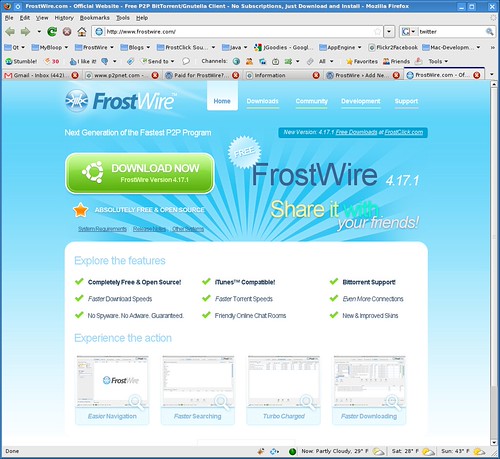
New FrostWire Website Finally Up

Today a new version of the website is up. The team has been working on this site since November 08 and finally it’s out.

FrostWIre's new Website

The forum has not been skinned to the new look of the site, and it’s been moved to it’s own space on the web server, independent from the site. Our apologies to the forum users and moderators if things are a bit rocky after the upgrades, we’ll hear all your complains and will work to help you get the forum just the way you need it.

We expect a few things to fail here and there, as every website, it’s always a work in progress and we expect your feedback.

Please report whatever problems you expect WITH THE WEBSITE on this post. Suggestions are welcome.

We hope you like it 🙂
FrostWire Team

FrostWire 4.17.2 for MacOSX

Download FrostWire 4.17.2 for MacOSX

This release for MacOSX includes some of the fixes added to Windows 4.17.2 release but it’s aimed mostly to solve some incompatibilities found on the new Macbooks and Macbook PROs.

Some Mac users had reported that FrostWire 4.17.1 would not start , we revised the previous launcher and fixed possible errors and updated the Mac OSX native libraries for improved Leopard compatibility. Also FrostWire will now refuse to be executed from the Disk Image (DMG), teaching some newly mac-converted users how they should install the application.

FrostWire/FrostClick has distributed over 20 Terabytes of free content

Since mid december 2008, FrostWire and FrostClick started promoting unsigned or indie artists willing to share their work for free or under Creative Commons license.

FrostWire promotion of Big Buck Bunny

As of today, FrostWire has shared over 20 Terabytes of data through over 230,000 downloads of music albums and a creative commons 3d animated film

With artists like Ray Sytes getting 48 thousand downloads (and going…) we hope in 2009 we can help undiscovered talent reach larger audiences, so far the reception by the FrostWire community has been great and we’re commited to bringing you professional quality content created by talented people who have a passion and love for what they do.

How to get promoted
If you are a professional content creator and you feel you have some amazing work the whole world needs to see, read this and then contact us if you think you got what it takes.

FrostWire getting international attention

FrostWire and FrostClick get some international mentions in Italy and France.

Here are the links to the reviews we found.

One P2P, Italy

Infos Jeunes, France

One Apple, Italy

Unsigned Musician Sean Fournier Draws Over 25,000 Downloads in One Weekend

FrostWire™ is positively on the news this morning showing how P2P can achieve great things when artists have an open mind when it comes to sharing some of their work for free.

As of FrostWire™ 4.17.0, we can promote legal content, or important information using the FrostWire™ welcome screen. We’ve vowed to never use this screen for spam or evil purposes of any kind, only to help content creators of all kinds (musicians, film makers, writers, software programers, photographers, video game shops and independent professionals) that are willing to share some of their work for free, or under creative commons licenses get their message across our ever growing network.

Sean Fournier is the first musician to do so, in only 4 days his 6 track album “Oh-my” was shared via FrostWire™ by over 25,000 users, at the time of this writing the download count by the torrent tracker is 27,923, saving Sean almost 1 Terabyte of data sent, plus having his music on tens of thousands of computers and who knows into how many portable music players.

You can read the full story on FrostClick.com, our initiative towards the distribution of 100% free and legal content over FrostWire™.

Here’s a press release we found this morning on the news:

Milford, CT (PRWEB) December 2, 2008 — Musician Sean Fournier harnesses the power of Peer-to-Peer networking to distribute his free album, ‘Oh My’, to hundreds of thousands all over the world via FrostWire’s welcome screen. Within the first weekend, this exposure returned over 25,000 complete downloads for this independent singer/songwriter.

sean_fournier_featured_frostwire_torrent_download
FrostWire Welcome Screen Featuring Sean Fournier

Spread it like the plague.
Fournier’s ‘Oh My’ is the first free album download to be featured on FrostWire’s Welcome Screen, which is a new feature designed to help musicians and content owners share their media for free on the FrostWire network.

‘Oh My’ is a six-track album which was created to be 100% free. Sean encourages his listeners to download it, share it, give it friends and family – and do anything within their power to “Spread it like the plague.”

Aside from it’s recent exposure on FrostClick.com, listeners can get their hands on ‘Oh My’ at Sean Fournier’s Official Website.

If you’re a professional content creator willing to share some of your work for free to get more exposure and thus increase your sales, contact us at FrostClick.com

Related Links

Sean Fournier’s Blog – FrostWire related Post #1

Sean Fournier’s Blog – FrostWire related post #2

FrostClick.com – Sean Fournier’s “Oh My” – A great Free Album

New FrostWire 4.17.2 for Windows

FOR IMMEDIATE RELEASE:

Official FrostWire 4.17.2 Windows Download link

Earlier this week the FrostWire community reported an issue with our latest fixes dealing with .bittorrent file associations in FrostWire 4.17.1 for windows. Thanks to user “Trel” we have now resolved this issue and launched a hot fix release that resolves the problem, also pushing forward a fix that will enable FrostWire to save considerable bandwidth when communicating over the Mojito DHT network, thus making the P2P network healthier as more users upgrade to 4.17.2.

Hat tip to the LimeWire Team for sharing the Mojito DHT findings.

CHANGELOG:

Version 4.17.2 (November 2008)

  • Fixes a newly introduced bug in Windows which would make FrostWire(tm) take over the .bittorrent file association without asking the user.
  • Reduces DHT network load. The LimeWire team found out that the Mojito “store forwarding” feature would not provide extra data availability, so it’s been turned off from the DHT on all new FrostWires.
  • FrostWire.ico has been updated. Now when FrostWire(tm) is associated to .bittorrent files, .bittorrent files will use the FrostWire(tm) icon.
  • Note: Version 4.17.2 exists only for Windows users. Mac and Linux users don’t need to worry about this hotfix release.

    About FrostWire

    FrostWire, a BitTorrent/Gnutella Peer-to-Peer client, is a collaborative effort from many Open Source developers and contributors from all around the world. In late 2005, concerned developers of LimeWire’s open source community announced the start of a new project fork “FrostWire” that would protect the developmental source code of the LimeWire client and any improvements to the Gnutella protocol design. The developers of FrostWire give high regard and respect to the GNU General Public License and consider it to be the ideal foundation of a creative and free enterprise market.

    Torrents. Changing MIME type and File Type Associations on Mac OSX

    After FrostWire 4.17.1 on MacOSX, FrostWire’s Info.plist file tells Mac OSX that FrostWire can be used as an application to open both torrent links and .torrent files.

    If you like FrostWire only for Gnutella but not as a torrent client, you may probably want to have your .torrent files, and torrent links going by default to your preferred torrent client. It could also happen that another client is already set as the default torrent application, and you may want FrostWire to be the default.

    The following screenshots will show you how to change the file associations and MIME type associations, which tell your web browser which application to open whenever a torrent link is clicked on.

    Changing File Associations

    1. Select a .torrent file

    2. Right click on it and select “Get Info” (or press Command + i )

    3. Select the Application you want to open it with, and click on the “Change All” button

    4. All your .torrent file associations are now changed to the new program.

    Changing MIME associations in Firefox
    Open your Firefox “Preferences” and head to the “Applications” tab. Search for “torrent” and change the behavior. You can make it ask you every time for what application to use, or you can set a new default.

    Note: If somebody knows how to change MIME type program associations in Safari, please let us know.