FrostWire at Mount Everest’s Basecamp thanks to Azoora’s John Purcell

Azoora_Jon_Everest_basecamp_20130401_132440

We think Azoora‘s John Purcell has raised the bar to the top of the world with this Hoodie picture.

Download Azoora’s A Thousand Ways Ep if you haven’t already, it’s absolutely free and free to share, remix and even make commercial use of thanks to its Creative Commons license

Absolutely cool, thanks so much, this makes FrostWire Everest cool.

Archive.org as a new search engine in FrostWire puts millions of free legal files in your hands.

We’re currently polishing our next release of FrostWire for Android 1.0.6.

Our last release was back in November 2012, since then we’ve received crash reports and lots of complaints that have helped us make the next FrostWire for Android much more robust and compatible for the +2,600 different supported Android devices that run FrostWire on hundreds of thousands of mobile devices every day.

We’ve taken this time to make the search experience considerably faster and we’ve finally been able to integrate our search with another great source of legally free available content, Archive.org.

Archive.org is a non profit organization that crawls and indexes the web’s free content and as of the moment of this writing by having FrostWire connect to its search api you will be able to search through an astonishing number of free and legal works, here’s how they break them down on their home page today:

1,181,452 movies
114,118 live concerts
1,567,041 audio recordings
4,386,872 texts

that’s over 7,246,483 works most of which are tagged with Public Domain and Creative Commons licenses that you’ll be able to download and share with FrostWire.

Most of this content is under the Public Domain and also under Creative Commons licenses.
If FrostWire can detect the license on the content it yields on search results you will see it on screen.

And every year that passes, more works automatically fall into the public domain so you will be able to access more and more information for free absolutely legally, literally from the palm of your hand via FrostWire. We think this goes in line with our mission, and once this update is released the world will be a little better place to be in since all of you will be empowered with free digital works and culture.

Other than that we’ve fixed many crashes, freezes, lowered cpu and memory consumption (which will make your battery last more), we’ve done upgrades on almost all of the application icons, fixed issues for older phones that didn’t have SD cards the way new phones do now, bugs on the audio player and so much more.

Archive.org as a search engine, and a revamp of the search experience is also being added to FrostWire for Desktop so stay tuned for our next desktop release as well (5.5.6)

changelog

FrostWire 1.0.6 - 03/28/2013
 - Faster search results. Search architecture revised and improved.
 - Includes search results from archive.org, which indexes millions
   of public domain and creative commons works from all over the
   internet.
 - FrostWire won't disable screen locking during audio playback.
   It's now up to the user to set longer auto-locking timeouts if
   they want to use FrostWire as an audio player in their vehicles.
 - UI fix, media player screen is correctly updated if a song starts
   while the screen was locked.
 - Updated icons and graphics.
 - Improved mime type detection.
 - Updated UPnP cling libraries for better Wi-Fi sharing discovery.
 - Multiple crashes and freezes fixed.
 - Opens .torrent files from urls and from any file browser.
 - Fixes a crash when sharing files from third party apps like FileKicker
   which pass filepath uris instead of android provider uris.
 - Fixes double audio playback issue with third party media playing apps.
 - Fixes bug where the app would force close and restart on phones without SD cards.

FrostWire 5.5.4 changelog

Free FrostWire 5.5.4 Download Now
In Geek speak, here are the full changes for FrostWire 5.5.4, released on Thursday, Feb. 21 2013.

frostwire (5.5.4) stable; urgency=high
  * New Feature: extract audio (.m4a) from (.mp4) videos on right click.
  * New Core Feature: HTTP resumeable large transfer support.
  * Upgrade: Default save folder for cloud downloads is updated without 
    restarting.
  * Upgrade: 'Repeat song' playback mode now available.
  * Upgrade: Enriched promotion display, now with audio and video previews and
    shortcuts to content creator's social media channels/streams.
  * Upgrade: binary compatibility improved for Windows releases.
  * Bug fix: if default save folder is changed it's now part of library scanned
    folders.
  * Bug fix: smart search engine wasn't notifying when it was done if there
    were no results.
  * Bug fix: several crashes and errors fixed.
  * Bug fix: partial download dialog for cloud downloads would sometimes appear
    empty.
  * Bug fix: out of memory error by UPnP-cling creating an infinite number
    of threads.
 -- FrostWire Team   Thu, 21 Feb 2013 14:38:57 -0500

FrostWire 5.5.3 HOTFIX update for Windows XP users

ATTENTION WINDOWS XP USERS.

A new hotfix 5.5.3 release is out to address slowdown/freezes reported by many XP users.

Please download the new installer at http://www.frostwire.com/downloads

If you are a windows user experiencing a major slowdown with FrostWire 5.5.2 please upgrade to 5.5.3

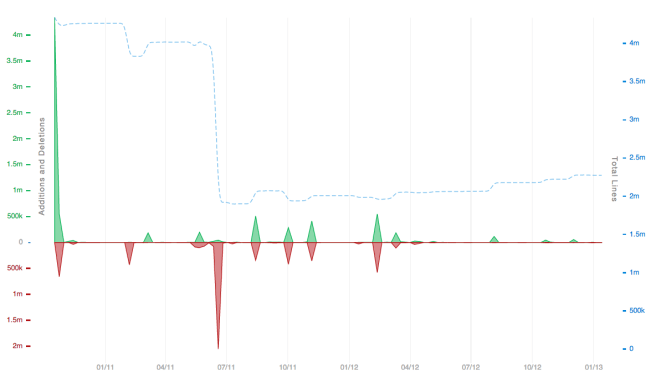
Doing more with 1/2 of the code

Just wanted to share a graph showing the number of lines of code in time for FrostWire during the past 2 years.

Boy have we removed code to make things better.

Screen Shot 2013-01-16 at 3.55.21 PM

You can also contribute to FrostWire, join us and make a difference!

New FrostWire 5.5.2 out – Look Mom, No Java required (full changelog)

happy-thanksgiving-2012

A very important FrostWire update has been released featuring about 20 bug fixes and enhancements.

Mac users that had issues with 5.5.1 and downgraded to 5.5.0 should update to 5.5.2, lots of issues were fixed for the Mac platform as we get ready to submit FrostWire to the MacOSX App Store.

Look Mom, No Java required (on Windows, Mac coming soon)
A major change in 5.5.2 for windows is the way that FrostWire uses the Java Runtime Environment.

Before 5.5.2 our installer would check if you had a suitable Java Runtime Environment installed and if it wasn’t there it’d try to download Oracle’s JRE and install it in your computer. This complexity introduced the possibility of several thousand FrostWire installations to not finish properly, our files wouldn’t be decompressed correctly and many of you couldn’t run FrostWire.

After 5.5.2, it doesn’t matter if you have Java installed or not. Our installer comes with a Java Runtime Environment, now every FrostWire running 5.5.2 will be running the same exact version of the JRE thus getting rid of JRE Fragmentation issues. FrostWire comes with a JRE compiled from source by the FrostWire Team, it includes several fixes after the public release of the JRE 7u10 update, and you should feel FrostWire performing a lot better if you’re on Windows.

Lately the Java Runtime Environment has been getting a lot of bad press due to security exploits that affect Java Applets on web browsers, please know that these security vulnerabilities do not affect FrostWire in anyway.

Please let us know of any issues, or enhancements you think are of the utmost importance and we’ll try to include it on 5.5.3 which we hope will have some major changes in the UI, towards our final design for FrostWire 6, which will focus on making the user experience a lot friendly and according to more modern design trends in software applications.

Enjoy and share responsibly.

frostwire (5.5.2) stable; urgency=high
* Upgrade: Now 'Movies' or 'My Videos' folder is included by default on new
installs since we now have a built-in video player.
* Upgrade: The Smart Search engine can now be disabled. No torrents will be
indexed and no search against the local database will be performed if
disabled.
* UI fix: Video Player Window Title now shows the file name being played.
* UI fix: Library > "Finished Downloads" renamed to "Default Save Folder"
* UI fix: When browsing another device on the Wi-Fi network newest shared files
are shown at the top of the table.
* Bug fix: On first installation FrostWire wasn't able to add 'From Devices' folder
to the Library.
* Bug fix: When restoring default settings FrostWire was not restoring default
library folders.
* Bug fix: Player remembers volume level from last song played.
* Bug fix: Sends correct file sizes on HTTP headers for shared files that
have changed in size after being shared.
* Bug fix: Repeat media play setting with only one item.
* Bug fix: New mime detector based on a bigger table.
* Bug fix: Video player doesn't skip frames when resuming from pause.
* Bug fix: Video player doesn't move frames when paused and volume slider
is being moved.
* Bug fix: Dropping a .torrent starts a download and doesn't ask to send to
a friend.
* Bug fix: (Windows) can delete files that are being played or seeded
from the Library.
* Bug fix: (Mac) compatibility with Mac OSX 10.5.x restored.
* Bug fix: (Windows) media player can open files with long paths.
* Bug fix: prevents NPE when opening a .torrent and trying to show icons when
the file system chooser wasn't available.

-- FrostWire Team  Tue, 15 jan 2013 20:00:00 -0500

Download the New FrostWire 5.5.1 and make your CPU happy

Download FrostWire Now

DOWNLOAD NOW, it’s free.

Got stickers yet?
TAG and let let others know there’s a near by FrostWire Wi-Fi sharing area.

What we fixed on 5.5.1:

frostwire (5.5.1) stable; urgency=high
  * New Clear Inactive button on transfers.
  * New setting to use the default system media player instead of
    FrostWire's.
  * New Download Cloud URLs, Torrents and Magnets by entering
    urls on the search field.
  * New toggle full screen video playback with double click.
  * Enhancement: Library file tables now show file modified date field and
    files are sorted by it in descending order so user can easily find
    newest files added to the library.
  * Enhancement: Playlist tables now show the track number column and
    are by default sorted by it in ascending order to enjoy
    albums in the order they were meant to be heard by the content
    creators.
  * Enhancement: mime type guessing is faster when sharing files on Wi-Fi
  * Bug fix: Library was getting confused with file extensions as part of file names.
  * Bug fix: sharing/unsharing popup menu behavior while sharing on Wi-Fi
  * Bug fix: resizing issues on preview download dialogs.
  * Bug fix: filtering on torrent detail dialog was broken.
  * Bug fix: Library continuous playback working from play button.
  * Bug fix: Cloud download error fixed.
  * Bug fix: Media lib unicode issue.

 -- FrostWire Team   Mon, 10 Dec 2012 20:00:00 -0500

Get FrostWire 1.0 for Android

If you are getting an Android device this holiday season, we’ve spent the last 5 months building a must-have app for it.

Install FrostWire via Google Play.

Download the .apk installer.

Here’s a few things you can do with our completely re-designed and easy to use file sharing client and media player.

Improved search that integrates with the cloud.

Search results are faster than ever (instant in most cases) and not only you’ll have the most powerful BitTorrent Deep-Smart search[1] featured in previous versions, now FrostWire integrates with popular cloud services where content creators from all over the world share millions of legally available files[2].

The fastest downloads ever on any FrostWire for Android.
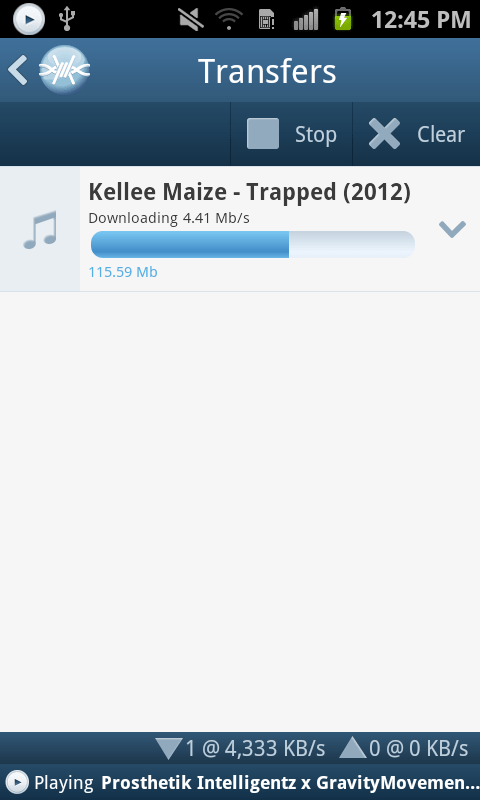
Be it on Wi-Fi, 3G or 4G you will experience in most cases downloads that are so fast you won’t even see the progress bar begin to move, by the time the transfer screen is opened the file will already be on your device. Specially when sharing files with other FrostWire devices (PCs too) on the same Wi-Fi network.

Share files between phones, tablets and computers without any networking know-how
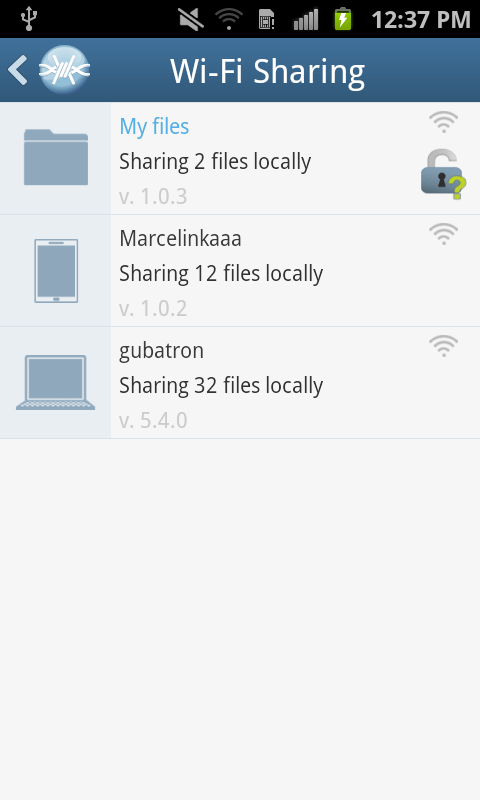
You don’t have to use cables or become a computer guru to share files between your phones, tablets or computers. We’ve also been working on FrostWire for desktop so that when you open FrostWire on your phone or computer you will be able to see every device automatically.

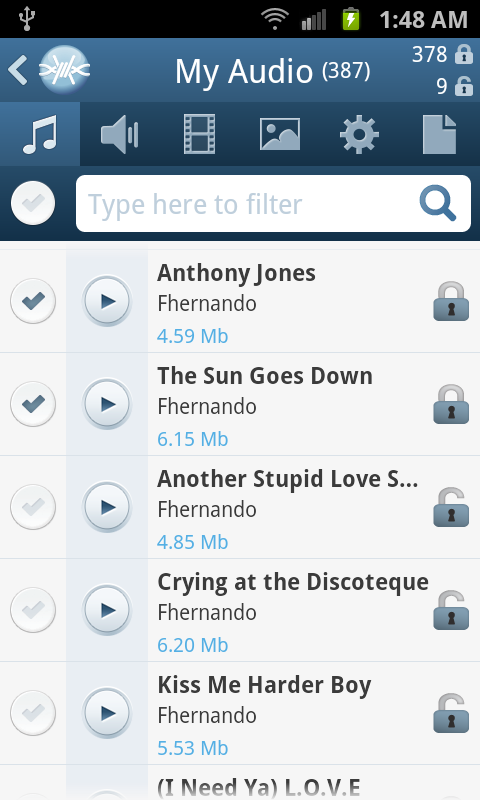
Just make files publicly available by opening padlock icons next to the files and every device running FrostWire will be able to download and even stream music or video from each other.

This makes it great for groups of people (work, school, home, party), now you only need to take only one photo and share it with everybody else next time you’re all connected to the same Wi-Fi hotspot.

Sending documents, music, family videos between your mobile, tablet or computer has never been easier or faster, best of all it doesn’t even matter what Operating system you’re running, Windows, Mac, Linux, it doesn’t matter, all you need is FrostWire and a Wi-Fi router. It just works.

World class Gesture Based Music Player

We’ve redesigned our music player for simplicity and convenience. FrostWire’s music player is the world’s first gesture based music player, we built it thinking of drivers in mind, no need to take your eyes off the road if you want to switch songs or pause/resume playback.

On this version we’ve introduced a beautiful new design with a 3D presentation of the album art currently being played. It also has functionality to share or un-share the file you’re currently listening to without having to browse or find the file on your device.

Easier Navigation
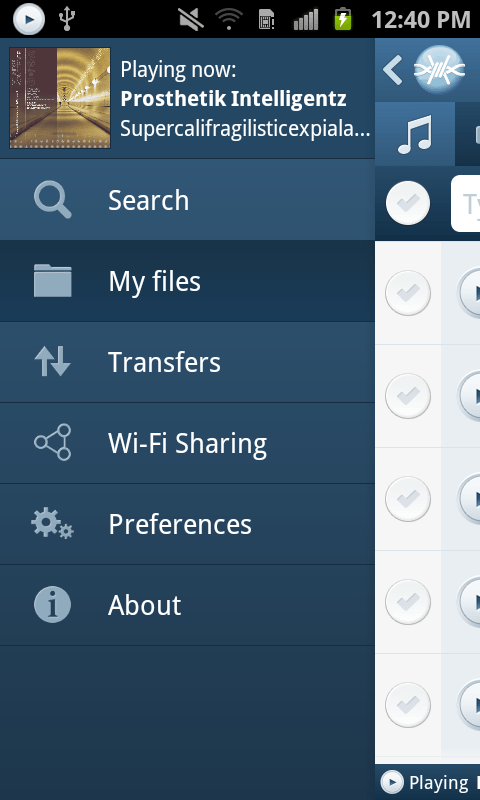
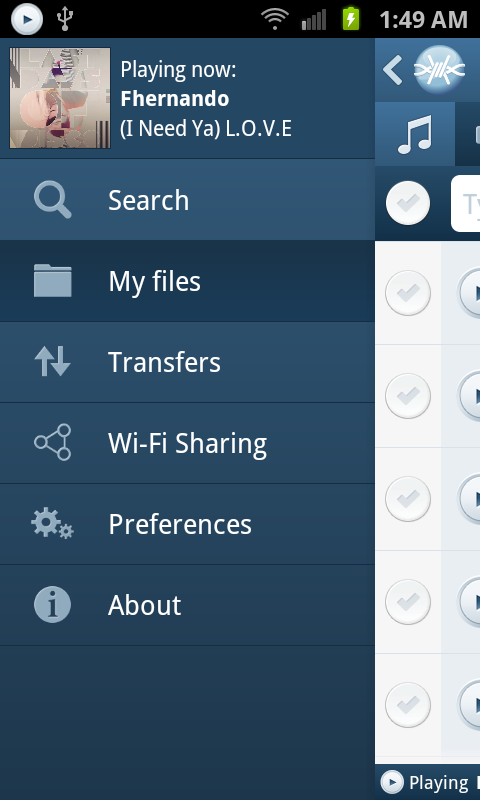
We’ve recreated the navigation system on the application, it now has a beautiful animated and responsive slide in menu that will take you anywhere in the app, with room for future functionality, and if you’re playing a song you will be able to see the album art of the song being played.

We’ve also implemented a custom “Back” history handler so that you can backtrack perfectly the screens you’ve navigated as you used the app. You now have random access navigation through the menu, and sequential access navigation through the Android’s back key.

We’ve added new controls to let you instantly filter your own files and see which are being shared on the Wi-Fi network and which aren’t in just one touch.

Install FrostWire on your Android and spread the word, the more the merrier, it’s absolutely free.

Install FrostWire via Google Play.

Download the .apk installer.

[1] FrostWire's Deep-Smart search uses the most popular torrent indexing services to fetch torrent files, then FrostWire opens these files and searches for the individual files indexed by the torrent. As FrostWire searches it remembers the files it's seen in the past to make your next searches instantaneous.

[2] Only on YouTube.com in 2012 it was announced users had shared over 4 million Creative Commons licensed videos. FrostWire also taps on SoundCloud.com, the internet's biggest sound and music community of content creators, bands, singers and DJs that pay to make their music available for free to the SoundCloud community. If you share your content on YouTube or SoundCloud you're automatically available to the millions of FrostWire users on both Desktop and Android. Integration with more popular cloud services to come in the next releases.

When you download and install FrostWire you must agree that you will not use it for the purpose of copyright infringement otherwise the software won't work. FrostWire condemns copyright infringement. Downloading FrostWire does not constitute permission or a license for obtaining or distributing unauthorized files. It is illegal for you to distribute copyrighted files without permission. If you want to know about legal content you can download and distribute legally please visit FrostClick.com, Vodo.net, ClearBits.net, LegitTorrents.info and CreativeCommons.org

FrostWire for Android 1.0 Screenshots

We’re only days away from releasing the best file sharing application for mobile devices in the world.

A full blown file sharing client, a file browser with clear privacy controls to share files with others via WiFi or via BitTorrent, a gesture based music player, all free.

New FrostWire 5.3.9 out (changelog)

Download it now, Free

frostwire (5.3.9) stable; urgency=high
  * BEP 34 compliant. FrostWire now checks DNS TXT records for tracker
    config.
  * Soundcloud integration (Search, Streaming and Downloads).
  * Fixes issue with partial download title window not showing the name
    of the torrent correctly.
  * UI Improvement: Action hints on top of search results to stream or
    download or see the contents of the torrent.
  * UI Improvement: Action hint on top of playable contents in the
    library.
  * UI Improvement: Search result Source now includes the name of the
    author if available.
  * UI Improvement: Search keywords are bolded in the titles of search
    results.
  * UI Improvement: Creation date for non-torrent search results available.
  * UI Improvement: File size of non-torrent search results available.
  * UI Improvement: Opening 'Configure Options' on the Library takes user
    to the Library Settings pane.
  * UI Improvement: Right clicking on the title	of a search tab	now
    shows the only action available (Repeat Search) directly.
  * UI Improvement: A FrostWire	update can now be invoked from the 'Tools'
    menu.
  * UI Improvement: New Notification update	button will	be available on	
    the	Window header to let the user know visually that there's a
    FrostWire update available.
  * UI Improvement: Added 'Cleanup Playlist' right click menu item in
    playlists.
  * UX Improvement: When saving	a newly created .torrent, FrostWire
    will make sure the file is saved with the .torrent extension.
  * Fixes issue	with file names	downloaded from	FrostWire for Android.
  * Fixes issue	adding new radio stations to the library.
  * Fix of MP3 ID3 tags unicode parsing.

 -- FrostWire Team   Fri, 24 Aug 2012 20:43:35 -0500