New FrostWire 6.2.1 [Windows, Mac, Linux] is out – Search, Download and Play today!

Download FrostWire 6.2.1 now

Have a happy week! Now you can download the latest release of FrostWire for Windows, Mac and Linux. This update has a lot of important fixes. It’s a really stable version that you will love. Also, if you like to create playlists on FrostWire, now the playlists will sort songs by track number if its available.

FW 6.2.1.

frostwire (6.2.1) stable; urgency=high
* Fixes issue where a corrupted .torrent inside the libtorrent folder
would make FrostWire crash on startup.
* Fixes issue where partial downloads from search results would download.
the rest of the .torrent files.
* Fixes bug on search results display where action cell would dissapear
when clicking on the play preview button.
* New jlibtorrent 1.1.0.19.
* New playlists now sort songs by track number if track number available.

— FrostWire Team <contact@frostwire.com> Wed, 13 Jan 2016 16:12:48 -0500


New FrostWire Plus for Android (1.7.0). Stable Release!

Download FrostWire Plus 1.7.0 now

Now it’s time to download a new FrostWire release. This is a major update. Now, FrostWire Plus for Android is very stable and you’re not going to have any problems when trying to search, download or play.

Also, now the torrent transfer are shown immediately when you click to download it. As well, when you click on “stop and delete data”, the corresponding torrent will be deleted too.

Screenshot_2016-01-11-16-06-41

FrostWire 1.7.0 – JANUARY/12/2016
– Updated to new jlibtorrent 1.1.0.19.
– Torrent transfers are now shown immediatly after they start.
– “Stop and Delete Data” now also deletes corresponding .torrent.
– Downloading two partial files from the same .torrent no longer
downloads the entire torrent.
– Lots of icons updated, unused ones pruned.
– Improved update notification for FrostWire plus users.

HOW TO INSTALL FROSTWIRE PLUS?

New FrostWire 6.2.0 [Windows, Mac, Linux] is out – Fixes YouTube issues and more

Download FrostWire 6.2.0 now

A new FrostWire update is available for Windows, Mac, Linux.  This is an urgent release that includes YouTube search fixed, TPB search fixed and also a search results issue fixed.

frostwire (6.2.0) stable; urgency=high
* Fixes issue where partial downloads from search results would download. the rest of the .torrent files.
* New jlibtorrent 1.1.0.16.
* Updated okhttp to 2.7.1.
* TPB fixed.
* YT fixed.

— FrostWire Team <contact@frostwire.com> Tue, 05 Jan 2016 20:40:10 -0500

What is FrostWire?

FrostWire, a BitTorrent Client & YouTube Downloader that makes it easier to search, download, play and share content from the BitTorrent network & cloud sources, all in one place, announced today its new ‘preview’ and ‘play as you download’ capabilities for Android phones and tablets. The new preview feature not just enables users with a more convenient way to find and discover content, it makes downloading optional in some cases.

New FrostWire Plus for Android (1.6.9) – First Release of 2016!

Download FrostWire Plus 1.6.9 now

Happy 2016! We hope this year brings you happiness.

We are proud to launch a new version of FrostWire Plus for Android. This release has some important search fixes, so you’ll want to get it right now!

Changelog

FrostWire 1.6.9 – JANUARY/05/2016
– Crash fix.
– Updated to new jlibtorrent 1.1.0.15.
– Updated to new okhttp 2.7.1.
– Fixes on torrenting settings that were not being correctly applied.
– TPB fixed.
– YT search fixed.

How to install FrostWire Plus?

New FrostWire Plus for Android (1.6.8) – Fixes search & download issues and more

Download FrostWire Plus 1.6.8 now

Happy Christmas! We’re very pleased to announce the launch of a new FrostWire Plus for Android release. This update includes several fixes (YouTube search is working again) and a lot of improvements on the interface.

Thanks for your patient and we hope you can enjoy this new release!

Changelog

FrostWire 1.6.8 – DECEMBER/22/2015

  • Fixes and improves YouTube search and download.
  • Updates to new jlibtorrent 1.1.0.15. Better connectivity, crash fixes.
  • Japanese translation update by @naofum.
  • Misc User Interfaces upgrades/adjustments.
  • Library upgrades for faster search, more reliable HTTP downloads & more responsive UI.
  • Fixes issue where after touching the FrostWire notification rotating the device would take you back to the Transfers screen.
  • Fixes multiple crashes.

Enjoy!
FrostWire Team.

How to install FrostWire Plus?

New FrostWire 6.1.9 [Windows, Mac, Linux] is out – Fixes YouTube issues and more

Download FrostWire 6.1.9 now

A new FrostWire update is available for Windows, Mac, Linux. (Android is coming very soon). This is an urgent release that includes YouTube search fixed.

Changelog

frostwire (6.1.9) stable; urgency=high
* Fixes Youtube search issues.
* New jlibtorrent 1.1.0.15
* Shared maglnk url shortening not done with Bit.ly anymore.
* Library now remembers your last media type selection for the next session.
* Fixes event handling bug on “Create New Playlist” dialog for MacOSX.
* New FrostWireInputDialog.

— FrostWire Team Mon, 21 Dec 2015 16:52:50 -0500

Get FrostWire 6.1.8. build 170 right now!

If you made a fresh install of FrostWire 6.1.8 build 169 you must have experienced a nasty crash on start. Users upgrading from previous versions were not affected by the bug.

FW

The crash has been fixed and you can download FrostWire 6.1.8 build 170 from our website, github.com or sourceforge.net


Introducing 1-click-seeding for Windows, Mac, Linux

Download FrostWire Plus 6.1.8 now

Today you can download the new FrostWire for Desktop (6.1.8.) release! This update a powerful new feature to help decentralize content without censorship with a simple click on every finished transfer.

one-click-seeding

Share and Seed any finished transfer in one click!

FrostWire has always allowed you to share or seed if you were a curious user, these actions were available for finished .torrent transfers, but now, they’re available to any finished transfer even if it came from a cloud service.

share-and-seed-any-download-with-frostwire

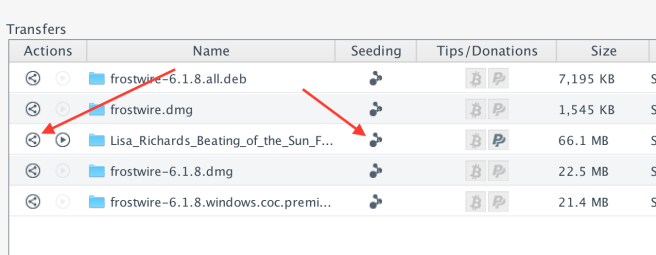
The seeding status icon is also a button you can use to start or stop seeding any transfer, no need to know about how to create a .torrent anymore, you just click and you’re seeding.

yoda_seed

If you want to share a transfer, or a big file from your computer with a friend, family member or co-worker, you can use the Share button on the actions column. FrostWire will make sure your transfer is a torrent (it will create one for you if it wasn’t a torrent download) and then it will provide you with means to share it through any channel, be it a tweet, a text message, email or other.
Screen Shot 2015-12-12 at 6.04.56 PM

and remember…

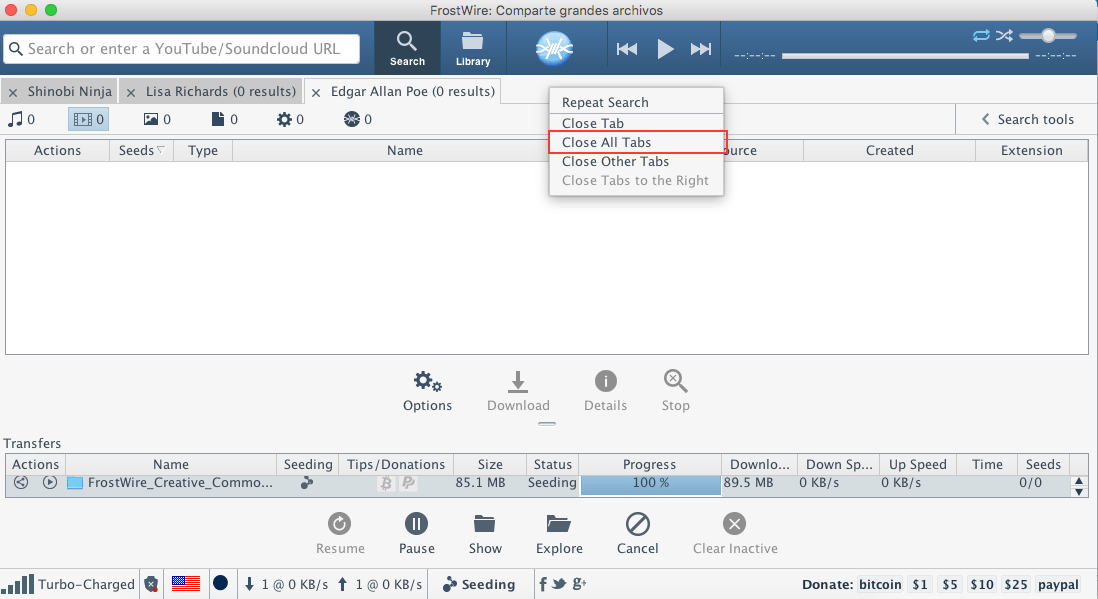
More improvements on Tab handling
frostwire 618

Changelog

frostwire (6.1.8) stable; urgency=high
* New status/control transfer buttons to Seed and Share transfers.
* New ‘Close All Tabs’ action for search result tabs.
* Youtube search updates.
* Fixes issues with playlists in Library.
* Minor user interface adjustments on Library tab.
* jlibtorrent library updates.

What is FrostWire?

FrostWire, a BitTorrent Client & YouTube Downloader that makes it easier to search, download, play and share content from the BitTorrent network & cloud sources, all in one place, announced today its new ‘preview’ and ‘play as you download’ capabilities for Android phones and tablets. The new preview feature not just enables users with a more convenient way to find and discover content, it makes downloading optional in some cases.

What is Seeding?

New FrostWire Plus (1.6.7) for Android released! YouTube Search Improvements!

Download FrostWire Plus 1.6.7 for Android now!

This new release of FrostWire Plus fixes a lot of issues (with YouTube search, Archive.org search, etc) and adds a new option: Select storage location.

ffw storageChangelog

FrostWire 1.6.7 – DECEMBER/03/2015
– New: Select storage location. Down to the folder where you want
your FrostWire download folders to be.
– New: Exit/Shutdown button replaces VPN button on FrostWire status
notification.
– YouTube search improvements.
– Library updates (support-v4, rxjava, gradle plugin)
– Fixes bug where invalid names could be used to rename files.
– Spanish translation update.
– Fixes issues with archive.org search, download. Thanks @X-NicON.
– Fixes back to home arrow dissapearing bug on My Music screens.


How to speed up your Android phone while using FrostWire!

Do you feel that your Android device is really slow? Do you like your FrostWire Plus app (or any app) but you are having problems because your device is not as fast as you want? Today we are going to give you a few tips in order to speed up your Android phone!

  1. Free up some space

    Screenshot_2015-12-02-12-28-41

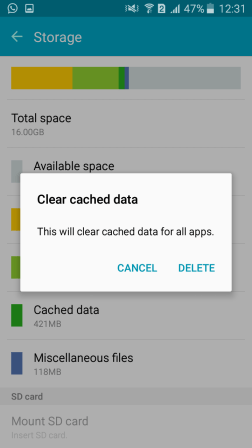
  2. Clean your Cached Data

    Screenshot_2015-12-02-12-31-34

  3. Disable animations

    1. Navigate to About Phone in settings.
      1
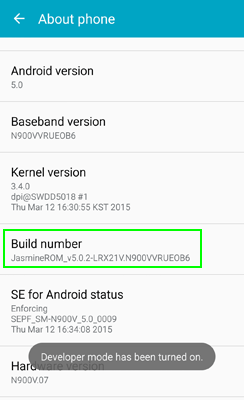
    2. Tap the Build number seven times. You’ll get a message saying that Developer Mode is enabled. If you already have Developer mode enabled on your phone, you don’t need to do this.
      2
    3. Navigate to Developer Options in settings. This menu only appears after you’ve enabled developer mode.
      3
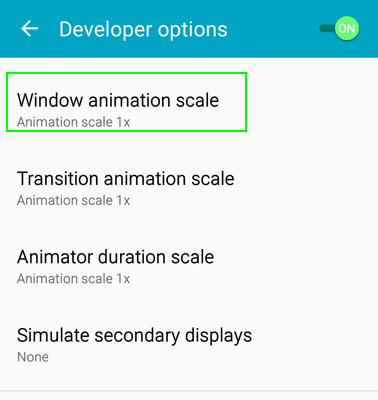
    4. Select Window animation scale.
      4
    5. Set Animation to off.
      5
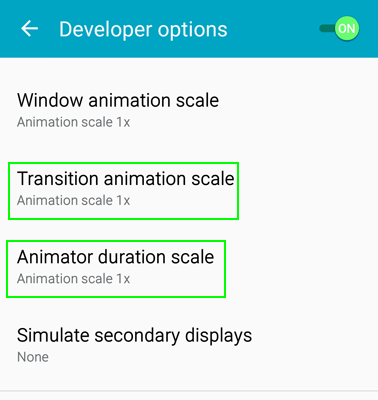
    6. Select Transition animation scale and Animation duration scale and set each to off.
      6
  4. Restart your phone

    Sometimes you only need to restart your phone  if you feel it slowly.

  5. Delete all apps that you don’t use anymore
    2015-12-02 18.28.23

  6. Update your smartphone firmware

    Screenshot_2015-12-02-13-18-48

Sources: TomsGuide, Wikihow

Get FrostWire Plus for Free!