– Transfer screen’s status bar now shows number of DHT hosts known
– New permanent notification lets you know FrostWire is running, how much bandwidth
it’s using and whether or not your connection is encrypted with a VPN to protect
your fundamental human right to privacy.
– jlibtorrent engine upgraded to version 1.1.0.10
This release makes FrostWire for Android compatible with the new Android 6 Marshmallow release. Now when FrostWire starts up for the first time, Android 6 users will be explicitely asked to let FrostWire have disk access to media files.
This is only asked once and this annoyance is there thanks to your friends at Google.
As a result FrostWire will no longer crash on startup on Android 6 devices.
Integration with search engines such as SoundCloud, TPB, BTJunkie, Torlock and TPB has been fixed.
A very annoying usability bug on which searches would appear never end has finally been fixed, we had users waiting for searches to end for over 12 hours!!! when all they had to do was click on other search result tabs to notice that the search had ended, but this was completely our fault.
Multiple rare crash fixes on the music player will continue to make the app more stable as we continue reach new lower records on daily crash reports.
Fixes a bug where FrostWire wouldn’t know how to open finished .apk files from the “Transfers” screen.
New .APK search result icon
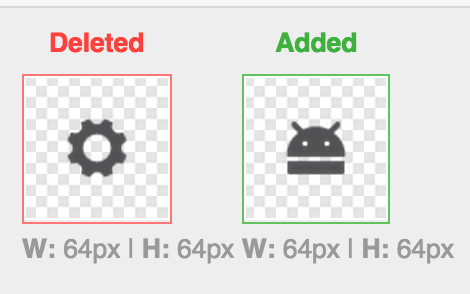
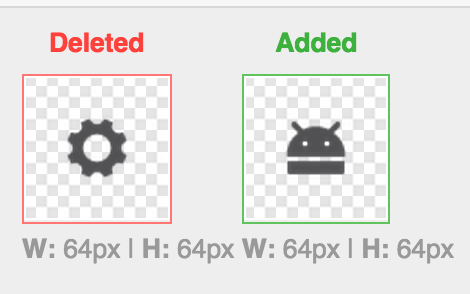
Apk search results icon is now an Android head, many users would think the former gear icon represented “settings”, our bad. Thanks for the feedback.
Let’s grow the community!
There’s a new “Keep In Touch” dialog after the installation wizard, we’d like to grow our community, many people think FrostWire is dead, but we never left, thanks media.
New: Copy Magnet, Copy InfoHash
We’ve added a couple of advanced torrent actions for users that may want to know the infohash of a torrent, or who may want to share the magnet link of a torrent with a friend for sharing content.
There are some moments —some sad moments— when you are away from home/work/school and you don’t have wi-fi to connect. If that’s the case, maybe your mobile phone will start consuming data. And if you run out of mobile data without realizing it, you may be in trouble.
So today we are going to explain how to save mobile data. Sometimes, you only to change a few settings on your Android in order to not use mobile data. For example, if you don’t want to use your mobile data downloading torrents. We made a very useful video explaining how to save mobile data downloading torrents from BitTorrent with FrostWire.
Como muchos de nuestros usuarios provienen de América Latina, o son hispanohablantes, hemos decidido hacer una versión en español de nuestros videos de ayuda de FrostWire. Puedes ver todos nuestros videos en YouTube y suscribirte a nuestro canal para no perderte ninguno. A continuación te dejamos algunos de los videos imperdibles que debes ver si usas FrostWire.
Do you get angry when your cellphone is running out of battery? Do you want to learn how to save battery on your Android device? We made a video that can help you! Sometimes you just need to do some little things in order to save battery!
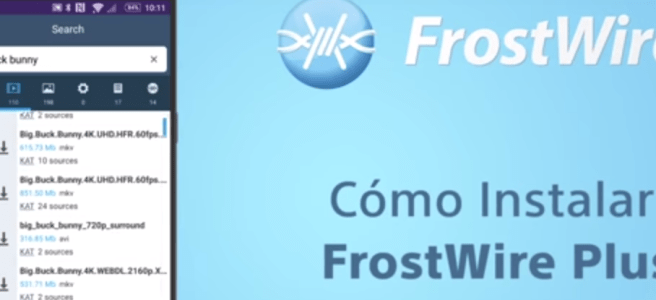
This video will show you how to save battery when downloading files from the BitTorrent Network and YouTube when using FrostWire Plus for Android
We’ve made this video to show you how to fix the ‘Can’t Open File’ error on Google Chrome when downloading .apk files on Android.
This tutorial works not just for the FrostWire installer but for any app installer (.apk file) you may have had to download from a website, and it works for every Android phone or tablet.
There’s no reason why Google Chrome should be blocking the installation of .apk’s with their browser which happens to be the default of most phones out there, any app can handle opening .apk files, Google has simply decided to have more control of the android ecosystem and is trying to force everyone to use their Google Play market.
If things keep going this way, Google will be able to censor app developers completely if apps don’t follow their whimsical market rules, eventually they’ll turn Android into an iOS like environment where you can’t simply install apps without using the official store, the biggest bait and switch in the history of personal computing. Google, don’t be evil.
We noticed a lot of people thought the previous icon meant “Setting results” which didn’t make much sense.
Now You will be able to see this new icon on the search page, and my file screen on our next Android release.
We want your feedback! If you think that FrostWire needs any feature or any change, please let us know!
(If you are on Android right now, don’t download it with Chrome, as Google now wants to censor out apps outside of Google Play and it will not open the installer after you download it, use Firefox instead, or a use File Explorer to open the .apk installer after you have downloaded it)
Saturday, Sep. 26th 2015
Miami, FL.
We have replaced our web engine and now we have an even better app.
This means, faster search results, faster-more reliable cloud downloads and previews, less memory usage, less battery usage.
We’ve also fixed several search sources, SoundCloud, Bitsnoop and KAT are back.
There’s also a ton of user experience details we’ve taken care of that we hope you don’t even notice, as everything should just work.
CHANGELOG:
FrostWire 1.6.4 – SEPTEMBER/24/2015
– New http engine based on okhttp, uses pooled connections, less threads, less memory.
– Visited previews also marked as visited and remembered during session.
– Fixes SoundCloud.
– Fixes KAT search.
– Fixes BitSnoop search.
– Browse and manage your .torrent files.
– Browsing document files now reveals all saved .apk files.
– Multiple crash fixes on audio player.
– No more annoying yellow notification messages when removing tracks.
– UX: My files won’t forget your search filter if you overscroll for a refresh.
This new release has a lot of fixes (EZTV, BtJunkie search, torrents issues, crash on audio player), also we upgraded Picasso library for image caching and did a significant update to the jlibtorrent library that improves memory handling and avoids a DDoS attack on the network.
The update is currently being rolled out in stages to a small percentage of users on Google Play so that we can fix any newly introduced bug without impacting the majority of users.
FrostWire 1.6.3 - SEPTEMBER/06/2015
- Upgraded Picasso library for image caching.
- Code/library cleanup.
- New 'Remove Torrent and Data' action on finished torrent transfers.
- Clicked search results are marked as visited and remembered during session.
- jlibtorrent update 1.1.0.7, rebuilt with new swig library, memory optimizations, crashes fixed.
- Fixes EZTV, BtJunkie search.
- Fixes issue where torrent downloads would start on 3g/4g disregarding setting.
- Multiple crash fixes on audio player.
What Is FrostWire?
FrostWire is the only BitTorrent Client and YouTube Downloader for both desktop and Android, featuring built in torrent & cloud search, preview functionality and integrated media player. For artists looking to share their content and consumers looking to access new content, FrostWire’s software is an easy-to-use gateway to the world of torrents, file-sharing and peer-to-peer content distribution.
Featuring a BitTorrent client, YouTube and SoundCloud downloader & Music Player, FrostWire is available as a desktop client or an Android application.
The fully featured FrostWire Plus app, is available for a free download at the official website frostwire.com/android
The FrostWire Basic app available on Google Play is mainly a BitTorrent Client and does not provide YouTube and SoundCloud support due to Google’s Developer Terms of Service.
MIAMI, FL (AUGUST 12, 2015) – FrostWire, a BitTorrent Client & YouTube Downloader that makes it easier to search, download, play and share content from the BitTorrent network & cloud sources, all in one place, announced today its new ‘preview’ and ‘play as you download’ capabilities for Android phones and tablets. The new preview feature not just enables users with a more convenient way to find and discover content, it makes downloading optional in some cases.
Preview Before Download
Available today only for FrostWire Plus* (v1.6.1+), the ‘Preview before download’ feature allows users to stream YouTube and SoundCloud content directly from search results. This convenient (and free) feature lets users determine if they want to download the file for offline access, move on to another search result or simply play it without keeping a copy on the device.
Play As You Download
Because of how file pieces are shared on the BitTorrent network it’s not possible to offer instant previews the same way it can be done for cloud sources.
However, with the new ‘Play as you download’ feature available through both FrostWire Plus and FrostWire Basic**, users can listen to music or watch videos as they are being downloaded.
With nearly 3 million active Android installs, FrostWire is excited to provide their users an experience every media lover will appreciate. This new update will allow Android users to make better choices when selecting files to download from the hundreds of often closely named search results, saving them both time and bandwidth and getting them exactly the files they want.
What Is FrostWire?
FrostWire is the only BitTorrent Client and YouTube Downloader for both desktop and Android, featuring built in torrent & cloud search, preview functionality and integrated media player. For artists looking to share their content and consumers looking to access new content, FrostWire’s software is an easy-to-use gateway to the world of torrents, file-sharing and peer-to-peer content distribution.
Featuring a BitTorrent client, YouTube and SoundCloud downloader & Music Player, FrostWire is available as a desktop client or an Android application.
The fully featured FrostWire Plus app, is available for a free download at the official website frostwire.com/android
The FrostWire Basic app available on Google Play is mainly a BitTorrent Client and does not provide YouTube and SoundCloud support due to Google’s Developer Terms of Service.









 Official FrostWire Blog