New FrostWire 5.7.7 available for Windows, Mac and Linux. Contributors now earn bitcoins instantaneously.

Download FrostWire 5.7.7 for Windows (Bitcoin enabled .torrent)
Download FrostWire 5.7.7 for MacOSX (.torrent)
Download FrostWire 5.7.7 for Debian/Ubuntu (.torrent)

This update focuses on fixing multiple user interface issues, mostly related to the media player. Libraries were updated, a nasty freeze when opening FrostWire out of a magnet link has finally been fixed, and new linux collaborators have given some love to our codebase.

Screen Shot 2014-10-02 at 9.50.11 AM

Like on Android, you can now fully stop the player
by long pressing the Play/Pause player button.

FrostWire now has a new feature in which it tries to detect wether or not you are using a VPN connection to warn you about the possibility of your privacy being at risk.

We recommend that whenever you are online you connect to the internet using an encrypted VPN connection to protect your identity and your privacy.

Build & Fix FrostWire, get paid in Bitcoins immediatly
If you are a developer/translator/graphic designer, you should know that now you can earn bitcoins when your patches and contributions are merged to the master branches of our open source projects on github.

You will automatically receive Bitcoins in your Bitcoin wallet, you just need to have a github account and a tip4commit account where you can register your Bitcoin wallet address. Payments are sent within minutes of your patches being merged.

FrostWire Bitcoin donations are being diverted into our main open source projects frostwire-desktop, frostwire-android, frostwire-common and frostwire-jlibtorrent.

Each merged commit gets 1% of what’s left on each fund.

Preparing for FrostWire 6

We are hard at work on the next generation of FrostWire 6, if you paid attention to the names of our repositories, or if you follow this blog, you may have read about the frostwire-jlibtorrent project. We have made a full featured Java wrapper API out of the C++ libtorrent library and the results of our tests have been phenomenal. We’re currently replacing all of our Bittorrent core for one that uses libtorrent and we’re pretty sure you will feel the difference.

Join the FrostWire Beta Testers group to help us release a steady FrostWire 6.

Changelog

frostwire (5.7.7) stable; urgency=high
  * New: VPN connection status indicator.
  * New: Stop media playback by long pressing play/pause button.
  * Fix: Freeze when opening FrostWire from the first time out of
    clicking on a magnet link or .torrent file.
  * Fix: Bug where files couldn't be played with the main player button.
  * Fix: Bug where the speaker icon on the library would still show
    after the media player had stopped.
  * Fix: Bug after 5.7.5 in which the buttons of the Create Torrent
    dialog were not visible unless the window was resized.
  * Fixes issue on Linux when player window pixel translucency could
    not be set. Thanks @foutrelis.
  * Fixes Null Pointer Exception when trying to shutdown and hide
    an MPlayerWindow that may have not been instantiated.
  * Fixes issue where user could not create new playlist by dropping
    songs from existing playlist into 'New Playlist' list item in
    the library.
  * Updated MigLayout source code to version 4.0

 -- FrostWire Team <contact@frostwire.com>  Wed, 01 October 2014 17:00:00 -0500
New FrostWire 5.7.5 for your desktop, now Java8 powered.

Download FrostWire 5.7.5 for Windows (Bitcoin, Litecoin, Dogecoin enabled .torrent)
Download FrostWire 5.7.5 for MacOSX (.torrent)
Download FrostWire 5.7.5 for Debian/Ubuntu (.torrent)

FrostWire 5.7.5 runs on Java 8, expect a faster and improved FrostWire overall.

frostwire-575-poly

We’ve upgraded our mp4 parsing libraries, this should solve some possible errors at the end of some media downloads.

We’ve also improved the quality of our cloud search results specially for music and video files.

Changelog

frostwire (5.7.5) stable; urgency=high

  * Improved mp4 parser.

  * Improved cloud search results.

  * Now FrostWire runs with Java8 technology.

  * Fixes player control layout issues when resizing the main window.

  * Fixes soundcloud url track/set downloads.

  * Fixes possible cloud download errors.


FrostWire is a free, open source BitTorrent client first released in September 2004, as a fork of LimeWire. It was initially very similar to LimeWire in appearance and functionality, but over time developers added more features, including BitTorrent support. In version 5, Gnutella support was dropped entirely, and FrostWire is only a BitTorrent client. Development of the program has been active since the program was first released in September 2004.

MacOSX Yosemite compatible FrostWire 5.7.4 (.dmg) installer.

We’ve finally solved the incompatibility issues with MacOSX Yosemite, we didn’t want to wait for FrostWire 5.7.5 to be finished to give you the chance to use FrostWire today on Yosemite.

Download MacOSX Yosemite Compatible FrostWire 5.7.4

12305_12567_Yosemite_Valley_md

One great plus, is that now FrostWire is Retina-display compatible, so no more visual torture for those of you with retina display when using FrostWire.


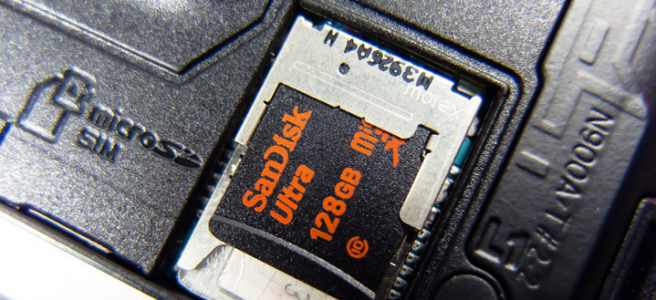
SD Card storage coming back to FrostWire for Android, but there’s a caveat.

Some Android phones are SD Card capable, and this storage extensibility is one of the key attractive features why people use Android and not iOS.

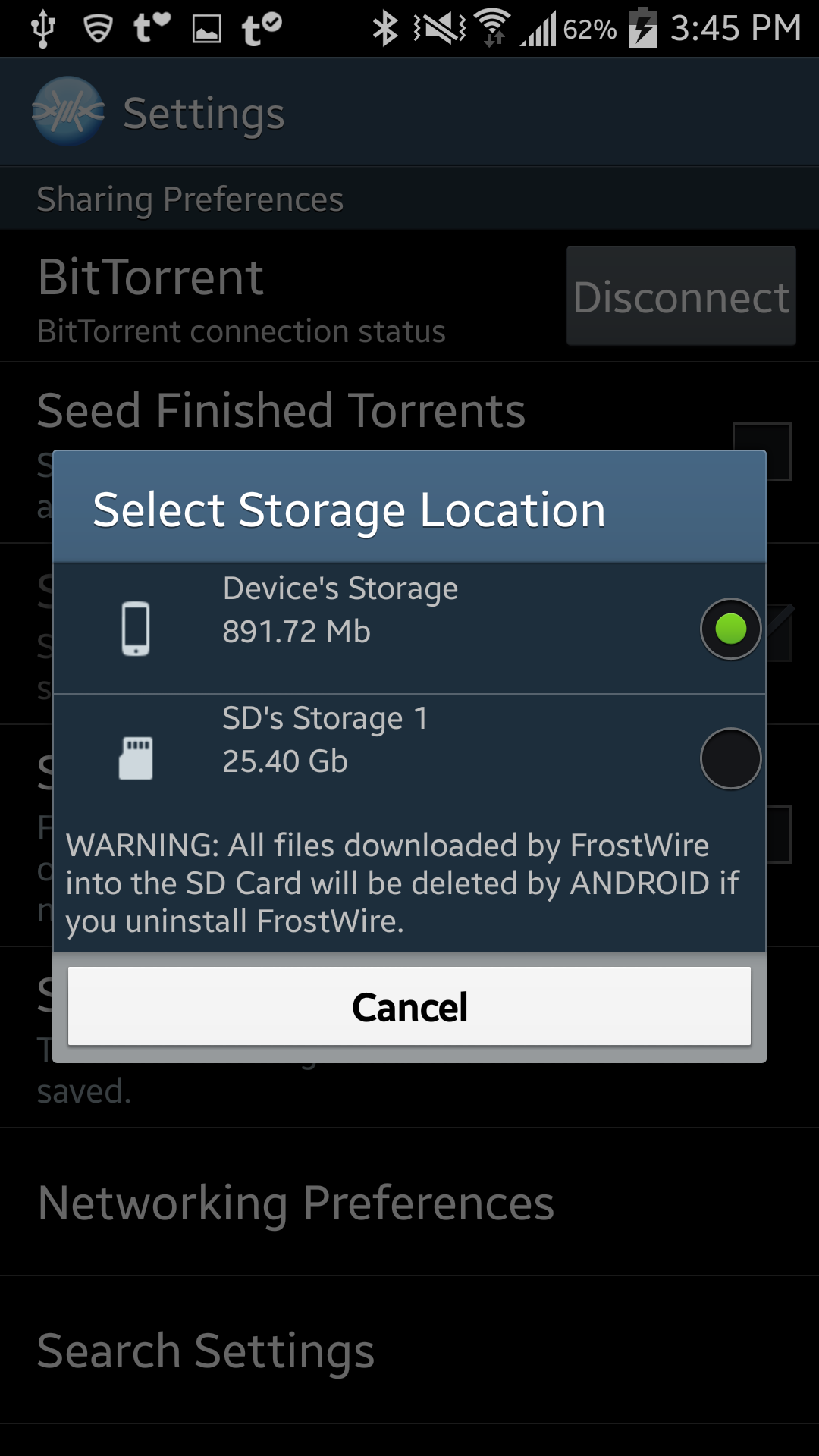
However, as of Android KitKat (4.4) Google removed the possibility for developers to be able to write files anywhere on the SD Card, instead they can now write to a specific location, and all the files written in it are deleted when the application is uninstalled by the user.

Screen Shot 2014-07-02 at 9.09.54 PM

The only two logical reasons we can understand Google did this are the following:

1. Cleanliness. Apps leaving a lot of app specific files in the SD card and not being able to clean up on uninstall (as Android does not notify the app that’s being uninstalled of such an important event)

2. Security. Apps being able to write on each other’s folders, which is unsafe and which can lead to other apps breaking.

Now developers can still write to the SD card, but only into a specific Private folder designated for each app, however there is one big caveat, when an app is removed, that private folder is removed and all files in it are lost forever.

but what about apps that need to leave files behind even after being unsintalled?
yeah, apps like photo apps, video apps, downloader apps like FrostWire…

Oh, for that you gotta use the “public folders” in the phone’s internal memory (which by some odd historical reasons they call “external storage”, which is very confusing) which runs out pretty quickly as every other app needs to do the same.

We’ve tried to exhaust every possible option to write files on the SD card on a location that won’t be deleted, but it’s really impossible to do so (and even though we could do it with a  hack, it wouldn’t work on all Android devices)

Google has removed an important freedom, instead of giving developers a persistent app related public location on the SD card that would survive after uninstalling, or to at least leave things the way they were before the KitKat update and add a new ON_UNINSTALL Intent for apps to have a chance to cleanup before being uninstalled.

SD Card Storage is Coming Back as a best effort solution.

device-2014-07-08-154508

We’ve decided to bring SD Card Storage back as an advanced option, it does not make sense to have a downloader application on a phone/tablet with lots of secondary storage and not use it.

We think many users are probably uninstalling FrostWire because they think “it takes too much space” even though this is not our intention, things are this way because Google decided it that way, a-la Apple.

In our next release,  you will be able to change the default storage location into your SD Card, but you will be warned and reminded of the risks you face by doing so, remember to synchronize your FrostWire downloaded files outside of your device, or to make a backup of the files before uninstaling FrostWire, which we hope you won’t have to as we’re working hard to give you the best downloader app in the world.

This is the best we can do at the moment, we hope Google changes its mind, we think these policies reflect poor judgement and decision making on their part, as they are continuosly removing important freedoms that make Android such an attractive platform in the first place.

Gubatron
Lead Developer

New FrostWire 5.7.3 for Windows, Mac and Linux out

Download FrostWire 5.7.3 for Windows (Bitcoin, Litecoin, Dogecoin enabled .torrent)
Download FrostWire 5.7.3 for MacOSX (.torrent)
Download FrostWire 5.7.3 for Debian/Ubuntu (.torrent)

4

This new FrostWire release leans up by removing several third party libraries to do more with less.

It addresses bugs and reported crashes by 5.7.2 users.

In matters of search it fixes EZTV search and introduces a new Yify torrent search.

Download, Install and spread the word.

Oh, and remember to be a good net-neighbor and seed as much as you can.

Picture Credits: Another Night in Paradise by Xavier Jamonet

FrostWire 1.3.1 for Android will have a new Music Player

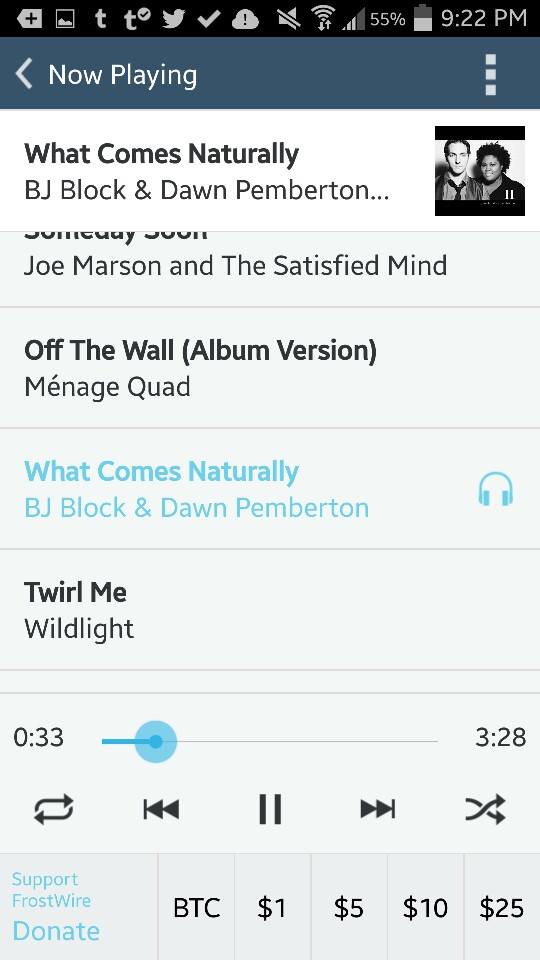
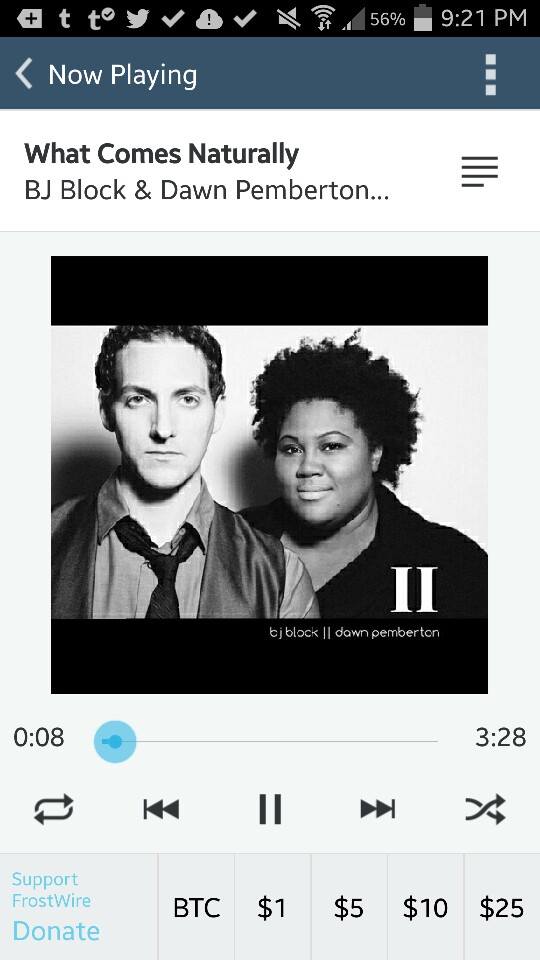
Here’s a few screenshots of our upcoming Android update, now featuring a full featured music player which sports a lot of new features, including Lock Screen Integration, notification window integration, gestured based skipping/pausing/resuming/stopping, playlist viewing, horizontal layouts and more.


ImageImageImageImage

New FrostWire File Downloader 1.3.0 for Android out

Install FrostWire now on your Android, 100% Free

A new major release of FrostWire for Android (1.3.0) is finally out after 5 long months of coding and testing. Thanks to everyone supporting the project! be it with code, translations, spreading the word or sending donations, without you this release wouldn’t be possible.

The most important changes done in this release have a lot to do with the Bittorrent core engine, significant improvements in memory handling (less unexpected crashes due to out of memory errors, and the app should feel a lot snappier than 1.2.2 when you switch screens and scroll through search results) and lots of details related to user experience.

BitTorrent Improvements

The entire BitTorrent core was replaced with the latest stable source code from the Azureus Project, during this integration we enabled a few features that we didn’t have before on Android, the most important ones being:

  1. uTP support (which helps FrostWire deal better with packet congestion issues resulting in a better Internet experience on your phone/tablet, even while you’re downloading seeding)
  2. DHT and Magnet support while on Wi-Fi. DHT/Magnet support was there but turned off as it doesn’t really work as expected when you are connected to the Internet via 3G/4G. After 1.3.0 we turn it on when you are connected on Wi-Fi networks, sort of a best-as-you-can approach.
  3. Now that we have DHT/Magnet support, we’ve added several popular Torrent/Magnet search indexes, so you will be getting a lot more search results than before if you are connected to Wi-Fi. Some of the search engines now available are: TPB, Torrents.fm, Monova and Yify.
  4. We’ve joined uTorrent in its initiaive to lower times while connecting to a swarm (which leads to faster downloads for everyone) and to avoid the possibility for a DDoS attack on swarms by implementing the BEP 040 proposal for “Canonical Peer Priority” when selecting what peers to connect to using a new peer prioritization algorithm.

User Interface/User Experience Improvements

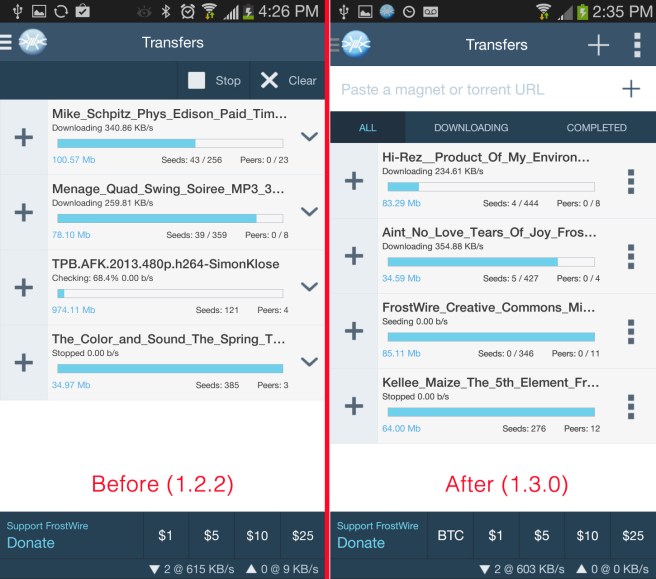
The “Transfers” screen got a lot of love.

frostwire_transfers_before_and_after_screenshots

  • You can now paste a magnet URI or .torrent URI to start a transfer from it.
  • Magnet URI Support. FrostWire will now start magnet downloads if you click on a magnet on a web browser
  • Smart Pause/Resume transfer. If you move from a Wi-Fi connection to a 3G/4G network, FrostWire will take a look at your preferences and if you don’t want to use BitTorrent while on a mobile network, we’ll automatically pause those transfers for you, if you come back to any other Wi-Fi network we’ll automatically resume those transfers for you.
  • Transfers can now be filtered by their status (All, Downloading, Completed)
  • Updated icons and new buttons for context menus, the downward arrow we used to have was a bit confusing when compared to the “+” to expand multiple-file transfers.

Other user experience improvements include search result thumbnails (when available), making the search experience more intuitive and less Reading-Intensive if you recognize the thumbnail of what you are looking for.

FrostClick/FrostWire promotional images are now displayed the same way across all devices when you first open the app, please support these artists by downloading and seeding their free content, you might discover a favorite new artist to follow.

You can get FrostWire for Android 1.3.0 on Google Play or on our website
(submission pending for the Amazon App Market)

Full Changelog

FrostWire 1.3.0 - APR/30/2014
 - Upgraded BitTorrent engine with latest code from Azureus project.
 - Added uTP packet congestion support.
 - Added Canonical Peer Priority support. (BEP40)
 - Upgraded Android SDK target to Ice Cream Sandwich's API (15 - Android 4.0.3).
   Users on Android devices running older versions will have to use FrostWire 1.2.3
   or upgrade their operating system to +4.0.3 to receive further updates.
 - Removed cling library for Local peer discovery, switched to JmDNS compatible with
   frostwire for desktop 5.7.1.
 - Considerable memory handling improvements, lots of leaks fixed which should lead
   to very little out of memory errors from crashing the app.
 - Added optional sponsored search results by Appia.
 - Minor upgrades to audio player and Frostclick.com's free promotional downloads.
 - Added TPB, Torrents.fm, Monova and Yify search. Search results available only when on a Wi-Fi connection.
 - Magnet URI support when touching a magnet link on a web site.
 - Paste a magnet or .torrent URI on the Transfers screen to start a download.
 - Some search results now have image thumbnails. More coming.
 - When internet connection is dropped, ongoing transfers are automatically paused and
   restored when internet connection comes back.
 - Corrected file sizes on SoundCloud search results.
 - Multiple bug fixes.

New FrostWire 5.7.2 with uTP support

Download FrostWire 5.7.2 for Windows (Bitcoin, Litecoin, Dogecoin enabled .torrent)
Download FrostWire 5.7.2 for MacOSX (.torrent)
Download FrostWire 5.7.2 for Debian/Ubuntu (.torrent)

This release is all about performance and stability.

Some users have complained about what happens to their internet connection when using FrostWire heavily, so we’ve finally added uTP support to solve these issues.

FrostWire can now deal with bandwidth congestion issues in a way that won’t compromise your internet experience while you use it.

You can, for example, see how FrostWire will automatically adjust its transfer speeds to cede network resources to other programs in your computer, like your web browser while surfing the web or streaming a movie from Netflix.

If the connection is not being used by any other software FrostWire will automatically use as much bandwidth as it can, and you don’t have to do this manually using the existing throttling controls, and all this while not clogging up your router’s memory.

Another benefit of having added uTP is that some WiFi/DSL/Cable routers won’t have issues with packet data overflow when torrenting with FrostWire, which in some cases can completely drop the internet connection forcing you to restart your router to reconnect to the Internet.

We’ve also taken care of very important user experience details, that should make FrostWire easier to understand for new users, as well as smaller usability bugs and crashes that have been fixed.

Here’s the full list of changes.

frostwire (5.7.2) stable; urgency=high
  * uTP support enabled.
  * Multiple crash fixes.
  * UX: playable single file torrents now can be played from transfer list.
  * UX: Fixes UI Thread freeze when opening Options > Search.
  * UX: Better error reporting when a torrent can't be fetched from a
        magnet connection.
  * Spanish translation update by @dennistobar.
-- FrostWire Team <contact@frostwire.com> Fri, 11 Apr 2014 14:22:10 -0500

Love FrostWire?
Consider donating. 
bitcoin – dogecoin – $1 – $5 – $10 – $25 – paypal

New FrostWire 5.7.1 with Bitcoin Integration is out

Download FrostWire 5.7.1 for Windows (Bitcoin, Litecoin, Dogecoin enabled .torrent)
Download FrostWire 5.7.1 for MacOSX (.torrent)
Download FrostWire 5.7.1 for Debian/Ubuntu (.torrent)

Mainstream centralized digital distribution platforms offer content creators means of monetization and discovery for their works, however these centralized systems often impose censorship and are ridden with middlemen which inevitably add up costs that have made it impossible for a digital media micro-tipping economy to be born.

With the combination of peer-to-peer file distribution through the BitTorrent network and peer-to-peer cryptocurrency networks such as Bitcoin, Litecoin and Dogecoin, our community can help bootstrap the largest micro-tipping economy of the Internet by enabling over a quarter of a billion BitTorrent users world wide to support content creators with tips of any amount, no middlemen involved, no chargebacks and no fees so content creators get 100% of the revenue collected, instantly.

With FrostWire 5.7.1 you will be able to attach Bitcoin, Litecoin, Dogecoin and donation/tipping urls to torrents, as well as Creative Commons, Open Source and Public Domain license metadata.

5.7.1. also improves local Wi-Fi sharing, does updates on search, bug fixes and performance improvements.

changelog

frostwire (5.7.1) stable; urgency=high
  * Wi-Fi sharing discovery improved considerably with JmDNS.
    Removed cling library.
  * Improvements in .torrent creation window:
     1. Web seed url(s) (GetRight style) support.
     2. Associate a Creative Commons, Open Source, or Public Domain license.
     3. Associate a Bitcoin address for Name-your-price/tips support.
     4. Associate a Litecoin address for Name-your-price/tips support.
     5. Associate a Dogecoin address for Name-your-price/tips support.
     6. Associate a Paypal url for Name-your-price/tips support.
  * Transfers and Library tables now able display Tips/Payment options column.
  * Transfers and Library tables now able display License column.
  * Updated Torrents.fm search engine.
  * Removed Clearbits search engine, service offline for ~2 months now.
 — FrostWire Team <contact@frostwire.com> Wed, 12 Mar 2014 16:25:42 -0500