FrostWire Splash Screens Gallery – Vol I

Since FrostWire 4.18.4, FrostWire related pictures sent to the FrostWire Photo Album are showed cased randomly every time FrostWire starts up in millions of computers all over the world.
FrostWire Splash Screen Images come from the community.

Here are the pictures distributed for FrostWire 4.18.4 an 4.18.5

Credits and more detailed descriptions of these pictures are available on the Flickr Group.

Submitting your pictures

If you want your picture to make it to the next FrostWire, join the FrostWire Photo Album Flickr Group and submit your pictures. Here are some tips to get your picture on the FrostWire splash screen:

  • Send us pictures of your FrostWire Stickers or Shirts. Get Free Stickers here, we ship worldwide.
  • The Higher the resolution the better.
  • Horizontal pictures work better for the Splash Screen.
  • Make sure you tell us where in the world you took the picture. If there’s a funny story related to the picture please share that on the description.
  • Tag your pictures. Some suggested “tags” for your pictures are: frostwire, filesharing, p2p, gnutella, bittorrent, frostwire stickers, frostwire.com

See the Splash Screen gallery of the next version FrostWire 4.18.6

FrostWire “Iced Torrent” 4.18.6 Released

The new FrostWire 4.18.6 (code named “Iced Torrent”) is out.

New Features include:

Easier Tab Navigation (Toggling)

Right click on a tab and you’ll have the option to hide or show any of the FrostWire tabs right there.

Improved .torrent metadata file sharing

Automatic .torrent sharing has been reimplemented to correctly share .torrent files you use, thus enabling more torrent metadata file content on the gnutella network as FrostWire 4.18.6 and further versions is adopted by the community.

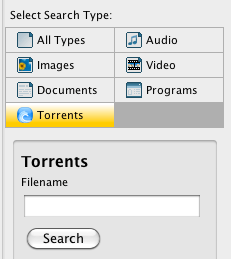
.torrent files have now been included as a search type

Being a BitTorrent client it was unnatural not having a .torrent file search.
The more the community uses FrostWire for BitTorrent, the more search results will be available under this search type.

Other important updates for this first release of 2010 include bugfixes on Theme Handling, the Console Tab dissapearing, a lot of code cleanup, 2 reported crashes fixed and a slightly smaller installer compared to the previous version.

Next releases will improve BitTorrent support and antivirus integration for windows users.

Download FrostWire, it’s absolutely free and open sourced.

About FrostWire

“FrostWire is a peer-to-peer file sharing program for the Gnutella and BitTorrent protocols. FrostWire is written in Java, and is a fork of LimeWire, another popular Gnutella client from which it was originally born. Released under the GNU General Public License, FrostWire is free software.”

Wikipedia

Download FrostWire Safely

You can download FrostWire for free safely from the official mirrors:
BrotherSoft.net, Download.com and SourceForge.net

Related Articles
BitTorrent’s Future? Decentralized Search and Hosting
Don’t pay for FrostWire, avoid scams

FrostWire “Arctic Shield” Released

Download FrostWire “Arctic Shield”

The newest FrostWire release “Arctic Shield” (version 4.18.5) has arrived.

By the request of our users the latest version adds some serious connection and anti-spam improvements.

FrostWire “Arctic Shield” is by far the most significant update of 2009 and we strongly recommend this update.

Continue reading “FrostWire “Arctic Shield” Released”

Snow Leopard users should download FrostWire 4.18.3

A bug on 4.18.2 was causing FrostWire on Snow leopard to not go past the “Starting Connection” state.

Please upgrade to FrostWire 4.18.3 and get Turbocharged in a matter of a few seconds.

Version 4.18.3 (August 2009)
- Fixes connectivity issues on Snow Leopard where FrostWire 
would not attempt to open any connections.
- Bug fix on Connection Doctor. It would continue to run even 
though FrostWire was already connected.


Mac OS X version 10.6 “Snow Leopard” is the seventh major release of Mac OS X, Apple’s desktop and server operating system

FrostWire 4.18.1 Coming Soon

We’ve heard your complaints about bugs and we’ve fixed some of them, we’re working on some more and soon we’ll release a new version, among some that have already been fixed:

– Updates on the “Connection Doctor” component, to address connectivity issues
– Updates on secondary (after-search) loading logic. Loads secondary overlay on the spot, more room for FrostClick artist promotions.
– Fixes a bug where the media player would loop non-stop without playing all the songs on a playlist once it found an mp3 it could not play
– Fixes a bug on for Mac OSX where FrostWire would only download torrents opened via Finder if it was already running. Torrents now launch FrostWire and start downloading at once.
– Updates video help link to point to YouTube video of how to install FrostWire on Mac. http://www.youtube.com/watch?v=hakWq8q8CHQ

Basically we’ll be addressing issues with Connectivity, Some Mp3 files not playing, and other usability issues.
There’s some other work on the way to cut about 80% to 90% of the fake search results, but it could make it on FrostWire 4.18.2 if we can’t have it done in time for 4.18.1.

FrostWire 4.18.1 will also have access to a new network of Community Hosted UHC servers that will allow many more peers to get Turbo Charged right away.

Thanks for the feedback, we appreciate it.

DownloadRoute.com also certifies FrostWire as 100% CLEAN

FrostWire received 100% CLEAN award on DownloadRoute.com

From George Zubor Senior Editor at DownloadRoute.com:

Hello!

We would like to inform you that FrostWire has successfully passed antivirus and antispyware tests and were so impressed that we decided to give you our 100% CLEAN award! We use for scanning now four of the best antivirus engines available on the market.

You must know that we’ve created the brand new and absolutely real reports. (Other sites usually offers only fake awards.) You may check your security reports on this URL: http://www.downloadroute.com/FrostWire-FrostWire-LLC/antivirus_report.html

We also remind you that FrostWire has been certified 100% clean by Softpedia

Pretty Cool, Keep those reports coming!

How to install FrostWire in Debian Lenny

The folks at TuxArena – Debian and Ubuntu articles, news and tutorials, Linux reviews have written a very cool tutorial on how to install FrostWire on Debian Lenny

Thanks to TuxArena for this wonderful howto, you can follow @TuxArena on Twitter for more Debian related information.

Tip: Block Spammers

If you are getting to many fake results, maybe you need to block a bunch of nasty hosts out there and use the “Mark as Junk” feature a little bit more. Here’s an updated list of Blocked IPs.

STEP 1
With a text editor open “frostwire.props”

Windows users:

%APPDATA%\FrostWire\frostwire.props

Mac Users:

~/Library/Preferences/FrostWire/frostwire.props

Linux Users:

~/.frostwire/frostwire.props

STEP 2
Look for “BLACK_LISTED_IP_ADDRESSES”, if you can’t find it, just paste the following list. If you already got some in there, copy the list of IPs and append at the end of your existing list (right after putting a “;” at the end of your existing list). It should all end up on a single line (no \n)

BLACK_LISTED_IP_ADDRESSES=64.46.32.0/19;24.44.237.*;82.69.119.*;70.15.80.0/21;204.11.216.0/21;64.210.192.*;201.13.65.*;70.47.0.0/16;207.99.0.0/17;216.17.104.0/21;24.15.205.*;83.22.155.*;64.231.202.*;96.194.45.91;142.164.*.*;207.248.32.0/20;88.102.6.*;66.254.96.0/19;68.188.91.*;213.121.151.*;149.76.162.*;68.59.87.*;24.63.26.*;87.117.192.0/18;68.80.186.*;122.2.58.*;69.44.158.*;65.206.51.*;85.0.88.*;208.100.0.0/18;160.10.7.*;216.139.208.0/20;206.48.0.*;149.254.192.*;62.101.124.0/22;75.111.128.*;209.51.160.0/19;61.63.32.0/19;24.138.128.0/18;216.240.128.0/19;212.76.37.*;76.177.26.*;67.193.47.*;88.63.219.*;67.15.66.*;81.152.16.*;69.44.156.*;66.225.168.*;91.34.191.*;46.46.*.*;200.77.161.*;85.92.156.0/22;206.223.156.*;207.150.176.0/20;82.109.207.*;216.151.63.*;141.117.28.*;89.244.230.*;24.62.58.*;72.16.216.*;217.75.4.*;142.177.136.0/22;66.28.207.*;72.24.250.*;71.87.71.*;153.5.20.*;66.203.189.*;8.17.1.*;24.36.141.*;72.236.184.*;74.208.0.0/18;64.124.0.0/15;66.135.32.0/19;174.36.163.21;205.209.128.0/18;75.42.28.208/29;121.91.91.*;209.237.224.0/22;63.216.0.0/13;87.236.192.0/21;216.166.159.*;142.177.156.*;152.9.102.*;72.13.143.*;130.192.157.*;144.26.129.*;68.37.42.*;216.211.73.*;196.207.45.*;72.158.46.*;68.149.65.*;70.69.180.*;209.67.0.*;24.90.134.*;67.81.145.*;82.148.111.*;72.159.145.*;24.57.54.*;142.166.0.0/15;208.107.164.*;206.161.0.0/16;216.219.96.*;58.13.92.0/22;206.108.253.*;78.63.137.*;85.88.2.*;81.110.162.*;161.31.240.*;83.78.155.*;90.200.66.*;83.79.188.*;216.171.176.0/20;24.117.29.*;78.129.137.*;69.41.160.0/19;68.51.86.*;76.76.0.0/20;219.17.82.*;67.183.178.*;158.103.0.*;142.177.231.*;75.209.52.0/22;216.66.0.0/18;69.44.157.*;72.39.51.*;194.126.193.*;121.156.65.*;187.22.19.31;54.28.106.216;201.8.117.*;206.222.0.0/19;66.232.96.0/19;204.111.*.*;206.71.56.*;68.178.128.0/17;207.134.9.*;64.27.0.0/19;65.56.0.0/14;76.98.150.*;201.58.164.*;89.244.221.*;65.206.55.*;75.63.77.*;203.87.184.0/22;196.40.10.*;67.172.29.*;24.231.64.0/19;216.118.64.0/18;209.87.248.*;208.0.231.*;81.23.40.0/20;78.111.64.0/20;128.108.*.*;82.37.91.*;98.142.216.129;79.13.68.*;206.169.230.*;64.89.27.*;216.7.80.0/20;71.214.186.*;98.142.216.132;134.129.*.*;98.142.216.136;207.189.232.*;66.160.128.0/18;75.164.67.*;196.207.32.*;61.129.251.*;60.190.222.0/23;62.90.172.0/22;80.218.228.44;98.142.216.137;69.90.242.*;64.5.64.0/18;86.127.221.*;70.44.88.*;74.254.71.*;208.53.128.0/18;64.62.128.0/17;200.140.63.*;213.156.52.*;193.120.116.*;74.195.51.*;72.63.47.*;74.139.162.0/23;209.190.0.0/17;65.39.185.*;207.7.135.*;161.31.226.*;201.86.254.*;199.120.31.*;76.25.126.*;74.60.79.*;98.142.216.144;216.232.244.*;67.55.64.0/18;65.171.151.*;66.246.248.*;66.211.0.0/20;204.8.32.0/22;208.54.240.0/20;216.158.128.0/19;67.163.243.*;98.142.216.159;82.80.4.*;81.190.139.*;205.129.164.*;24.80.116.*;61.211.131.*;66.115.128.*;121.1.52.0/20;208.99.192.0/19;71.238.152.*;144.80.248.*;89.246.0.0/18;121.3.31.*;69.10.128.0/19;65.19.128.0/18;201.150.79.*;142.162.*.*;98.142.216.152;64.61.25.192/26;70.71.160.91;208.115.234.*;72.9.109.*;205.177.186.*;144.80.132.*;208.109.*.*;69.146.145.*;60.190.220.0/23;72.9.108.*;216.255.176.0/20;82.79.63.*;61.224.228.*;66.90.64.0/18;71.95.242.143;155.47.149.*;98.142.216.163;219.107.128.*;98.142.216.165;156.34.27.*;64.208.0.0/16;66.195.171.*;72.172.88.0/22;66.30.80.*;69.64.64.0/19;83.110.232.*;65.49.0.0/18;68.180.0.0/22;69.50.160.0/19;75.74.83.*;129.47.128.0/17;64.93.89.*;64.21.0.0/17;65.72.0.0/16;209.217.223.*;216.104.224.*;142.177.185.0/21;201.9.120.*;72.36.128.0/17;85.17.155.*;213.22.162.*;84.130.118.*;69.44.155.*;64.111.192.0/19;66.207.254.*;216.25.44.*;64.61.25.160/29;61.129.70.*;60.254.213.*;156.34.240.0/22;209.115.255.*;64.234.98.5;12.1.42.0/23;71.6.128.0/17;63.243.181.*;213.47.248.0/22;69.85.192.0/18;84.181.212.*;76.166.215.*;216.130.64.0/19;216.231.162.*;69.42.128.0/19;78.129.136.*;85.88.9.*;209.237.240.0/20;216.7.183.*;69.248.209.*;208.122.192.0/19;222.73.192.0/18;24.100.7.249;201.95.128.*;205.177.0.0/16;209.59.110.*;64.203.191.*;210.132.220.*;209.143.224.*;64.56.64.0/21;69.119.111.*;205.139.208.0/22;206.75.43.*;69.72.161.*;90.193.8.*;74.63.64.0/19;83.20.112.*;68.96.101.*;66.199.176.0/23;82.83.208.*;69.87.230.*;70.84.0.0/14;83.148.8.*;208.9.112.0/21;167.216.232.*;71.120.54.*;65.120.42.*;205.211.145.*;206.132.32.0/20;208.101.0.0/18;85.124.173.*;24.94.7.*;64.93.88.*;24.114.252.*;72.35.224.0/20;209.160.35.*;216.218.128.0/17;93.114.253.248;208.50.0.*;65.16.61.*;9.88.78.245;201.9.128.0/17;84.10.36.*;66.79.160.0/19;200.210.234.*;216.166.216.*;130.49.116.251;90.240.187.206;67.56.0.0/15;24.213.149.*;64.25.180.*;216.159.201.*;69.248.198.*;79.184.7.*;66.193.224.*;67.202.64.0/19;209.160.32.*;67.159.0.0/18;81.76.91.*;63.79.245.*;216.66.64.0/19;66.220.0.0/19;216.205.217.*;83.142.224.0/21;64.210.144.*;130.117.*.*;71.68.34.*;206.132.0.0/19;61.129.51.*;68.42.176.*;58.168.29.*;220.239.43.*;212.25.103.*;24.227.222.*;99.35.18.113;213.167.96.*;216.169.96.0/19;63.243.162.*;64.61.25.72/28;75.126.*.*;63.47.128.*;89.244.240.*;24.65.77.*;125.0.0.0/15;66.28.203.*;66.171.74.0/23;24.10.160.*;208.71.114.*;209.237.232.0/22;91.189.104.0/21;209.172.60.*;8.133.69.*;71.199.250.*;74.13.181.*;72.93.75.140;24.76.95.*;216.17.100.0/22;206.132.48.0/20;66.103.32.0/19;66.11.112.0/20;66.71.219.*;209.123.0.0/16;69.9.160.0/19;85.17.0.0/16;91.34.192.0/18;69.59.16.0/20;72.11.143.*;67.196.0.0/16;24.128.176.*;82.208.40.0/22;85.18.*.*;62.219.79.*;122.22.36.*;195.226.227.*;72.231.234.*;64.93.90.*;68.114.198.*;74.194.71.*;124.24.230.0/23;213.162.67.*;87.106.63.*;38.0.0.0/8;75.111.97.*;64.71.128.0/18;200.119.217.*;204.9.117.*;204.9.118.*;74.216.0.0/16;67.167.179.*;66.29.0.0/17;4.43.119.*;70.118.92.70;78.129.128.0/17;125.205.100.0/22;77.78.96.*;66.212.224.0/19;64.61.25.176/28;200.7.33.*;211.1.193.*;24.144.140.*;208.98.0.0/18;75.73.30.*;8.3.218.*;64.21.128.0/18;205.146.0.0/16;24.141.186.*;206.169.225.*;72.51.32.0/20;205.252.0.0/16;212.179.18.*;221.117.233.*;210.199.86.*;209.8.0.0/15;147.197.190.*;65.98.0.0/17;213.52.227.*;67.191.31.*;72.40.107.*;66.160.158.*;61.63.51.*;76.93.75.0;207.176.0.0/17;81.208.64.0/18;72.52.64.0/18;58.194.237.*;216.221.96.*;88.86.109.*;253.58.185.248;206.225.103.*;216.230.150.*;217.75.112.0/20;74.79.242.*;142.177.239.0/22;66.199.224.0/19;64.72.112.0/21;125.2.0.0/15;72.11.128.0/19;64.20.32.0/19;61.63.251.*;205.144.218.*;216.229.193.*;64.210.63.*;72.22.192.0/20;189.13.147.*;83.88.208.*;69.72.168.*;77.97.212.*;121.54.64.0/22;12.197.253.*;216.37.237.*;203.84.170.*;74.43.221.*;81.152.104.*;24.57.23.*;216.28.31.*;85.176.128.0/18;83.23.173.*;168.215.140.0/23;213.254.232.0/22;189.5.160.*;209.145.88.*;131.162.153.*;121.119.182.*;216.139.224.0/19;208.63.90.*;209.195.128.0/18;74.52.0.0/15;168.215.129.*;68.3.168.*;216.84.49.*;209.97.192.0/19;88.104.63.*;207.226.0.0/16;85.17.19.*;70.118.90.7;209.163.218.*;66.212.128.0/19;66.250.46.*;201.83.118.*;142.163.*.*;131.104.*.*;212.179.133.*;66.154.96.0/19;70.49.239.*;24.1.175.*;66.246.0.0/16;216.151.128.0/19;69.66.252.*;58.88.42.*;24.31.205.*;125.1.108.*;213.140.0.0/19;66.240.192.0/18;64.61.25.128/29;203.87.176.*;85.176.110.*;216.46.133.*;218.223.197.*;70.99.*.*;211.1.219.*;74.220.173.*;206.188.129.*;8.17.0.*;216.86.144.0/20;70.247.148.*;64.89.16.*;71.188.255.157;202.208.32.0/19;85.214.0.0/15;72.16.214.*;66.155.211.*;63.100.44.*;209.200.0.0/18;208.101.82.*;85.92.158.*;63.138.0./15;63.246.128.0/19;208.99.64.0/20;209.205.246.*;83.79.152.*;216.130.176.0/20;92.48.64.0/18;71.60.61.*;60.12.182.*;208.122.0.0/18;125.0.151.*;125.60.192.0/18;204.13.55.*;195.242.153.*;139.78.10.*;81.23.48.0/20;83.133.126.*;64.89.41.*;74.54.0.0/16;24.85.45.*;206.169.170.*;204.52.215.*;66.109.16.0/20;72.22.0.0/19;74.110.99.*;64.40.96.0/19;222.6.170.147;217.171.128.0/23;206.51.230.*;64.72.120.0/21;121.54.0.0/22;212.120.109.*;203.111.232.0/21;64.251.0.0/19;66.128.227.*;64.247.0.0/18;72.172.64.0/19;64.34.*.*;76.74.128.0/17;69.46.0.0/19;71.240.88.*;72.51.192.*;84.40.30.*;216.144.64.*;189.13.36.0/22;24.172.68.*;64.210.128.0/19;24.229.179.*;86.107.221.*;216.167.153.*;208.116.0.0/18;24.63.186.*;216.105.184.0/22;72.0.105.*;207.106.123.*;216.69.164.0/22;66.160.192.0/20;64.209.0.0/17;66.194.155.*;12.202.0.0/17;67.18.0.0/15;24.127.151.*;216.177.64.*;72.242.239.*;189.4.183.*;76.19.83.*;66.165.205.*;66.118.242.*;74.222.0.0/20;203.87.192.0/20;72.11.48.0/20;142.204.87.*;206.193.224.0/20;79.185.105.*;66.37.48.0/20;216.150.79.*;66.27.148.182;68.99.1.*;209.205.247.*;85.12.46.*;68.231.63.*;204.10.88.0/21;74.60.158.*;24.106.140.*;64.61.25.0/25;142.177.90.*;84.40.205.*;66.63.160.0/19;82.78.245.*;189.18.116.0/22;81.169.128.0/20;12.197.204.*;121.117.77.*;64.92.224.0/20;64.59.64.0/18;138.243.245.*;83.133.127.*;58.188.13.*;68.32.23.*;41.221.16.0/20;72.167.0.0/16;124.97.37.*;85.176.63.*;64.37.192.*;209.203.99.*;69.42.64.0/19;68.81.82.93

The next version FrostWire will update this list automatically for you, for now, you’ll have to hack away a little bit your frostwire.props file and restart FrostWire.

Photography licensed under Creative Commons by ianlloyd

New FrostWire 4.18.0

FrostWire 4.18 Splash screen

FrostWire 4.18.0 is finally out for Windows, Mac and Linux. Among the most important changes are:

  • Fixes Bittorrent Incompatibilities.
  • Mac launcher fixes bug where FrostWire would not allow itself to run on a external disk.
  • Fixes bug on Welcome Screen, now you don’t need to open FrostWire twice to get the latest welcome screen.
  • FrostWire caches the last 2 images shown on the Welcome Screen to save bandwidth from static servers.
  • Tools > Check for Updates. Now FrostWire can check for configuration updates, community messages, new FrostWire releases and welcome screen promotion updates during runtime.
  • The welcome screen can be customized for every language, giving the chance to more content creators to be promoted every week to different audiences that speak their language.
  • The Buttons of the Download Manager have been rearranged to avoid mistakes when trying to resume downloads. The Clear and Cancel Buttons are all the way to the right. Thanks to ‘ssome’ for the suggestion.
  • New Splash Screen.
  • Anti spam filters updated to filter out new keywords used by spammers.
  • New “Buy” icon.
  • The community chat ‘Connect’ button now checks if a nickname has been set and helps the user set a default nickname using an input dialog.
  • When users issue the “/nick” command on the chat, FrostWire will remember the new nickname as the default nickname.

A little more on these updates
Some bugs on the Bittorrent implementation were causing CPU usage to go to 100%, also torrents created with KTorrent presented some incompatibilities that are now fixed. Thanks to FTA for these patches. There’s also some work that exists on the code that will allow FrostWire to let the user download only certain files shared by a torrent. This is useful if you find a torrent with multiple files and you only care about a few of them. Since we need a little more testing for this feature it’s dormant on 4.18.0. FrostWire hackers can play with the code and enable it.

After Unpack200 was introduced for all the FrostWire jars to reduce the installer size we imposed a limitation on the Mac installer that allowed FrostWire to be run (the first time) only from the Applications folder. This limitation is now gone thanks to users that complained when 4.17.2 came out. You can now install FrostWire on your Mac on any folder, including external drives, USB drives, etc.

The integration between FrostClick.com and the FrostWire welcome screen will be far more effective as of 4.18.0. Before 4.18.0 FrostWire users would not see the latest promotion from FrostClick.com downloads until they’d open FrostWire a second time. Now, the minute a promotion is launched from FrostClick, 4.18.0 will be able to display the featured download and independent artists and free content owners will see the benefits of FrostWire/Frostclick free promotions a lot faster. Also, promotions can now be distributed to different languages so FrostWire communities in other countries will also be able to enjoy content in their own language, opening the stage for more artists per month. The images for promotions are now cached on disk, thus giving a much needed bandwidth relief to the Frostclick/FrostWire servers.

A subtle change on the interface has been implemented. Some users complained about the ordering of the buttons on the download manager, it was causing some of the users to get confused and cancel their downloads. Buttons have been re-arranged so that this doesn’t happen. Also the “Buy Item” button has a more visible icon now.

New users not familiar with IRC terminology got lost in the process of setting up a nickname joining the chat community (since they’d skip steps on the setup wizard and not enter a default nickname). Now FrostWire checks if you have set up or not your chat nickname. If you have not, a friendly dialog will let you set your default nickname before Connecting to the Chatroom. No more, Tools > Options … and restarting needed to join the chat for the first time. Also, when you change your nick using the “/nick” irc command, FrostWire will notice the nick change, and save the new nickname as the new default nickname. Next time you open frostwire, you won’t have to issue the “/nick” command again.

Other than these there are a lot of internal updates and new dormant functionality that subversion followers may have noticed in the code base during the winter months. These game changing upgrades are of such importance that we are leaving them for the FrostWire 5.0 series.

Stay tuned for a few 4.18 releases that will deal directly with spam issues, and order your free stickers before they run out, make sure you send us your pictures.

Download FrostWire 4.18.0 From The Official Website