Get FrostWire 1.0 for Android

If you are getting an Android device this holiday season, we’ve spent the last 5 months building a must-have app for it.

Install FrostWire via Google Play.

Download the .apk installer.

Here’s a few things you can do with our completely re-designed and easy to use file sharing client and media player.

Improved search that integrates with the cloud.

Search results are faster than ever (instant in most cases) and not only you’ll have the most powerful BitTorrent Deep-Smart search[1] featured in previous versions, now FrostWire integrates with popular cloud services where content creators from all over the world share millions of legally available files[2].

The fastest downloads ever on any FrostWire for Android.
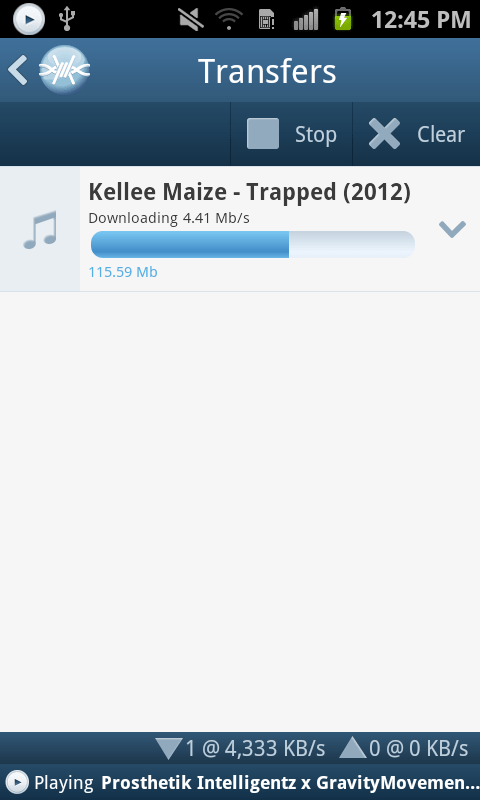
Be it on Wi-Fi, 3G or 4G you will experience in most cases downloads that are so fast you won’t even see the progress bar begin to move, by the time the transfer screen is opened the file will already be on your device. Specially when sharing files with other FrostWire devices (PCs too) on the same Wi-Fi network.

Share files between phones, tablets and computers without any networking know-how
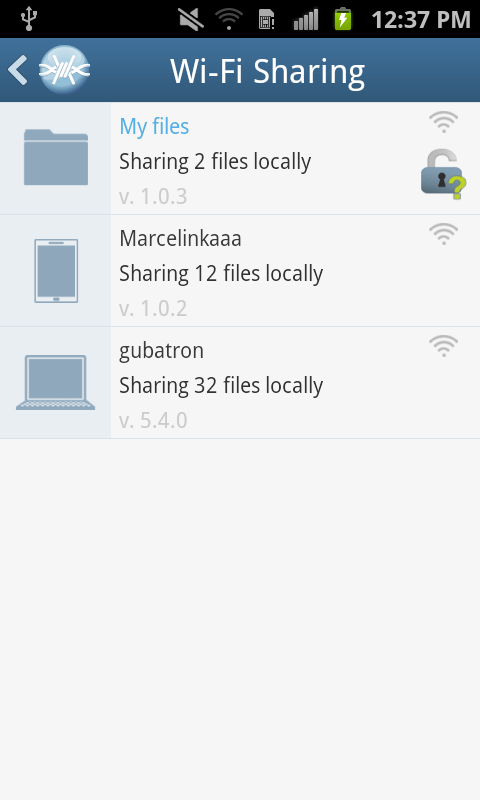
You don’t have to use cables or become a computer guru to share files between your phones, tablets or computers. We’ve also been working on FrostWire for desktop so that when you open FrostWire on your phone or computer you will be able to see every device automatically.

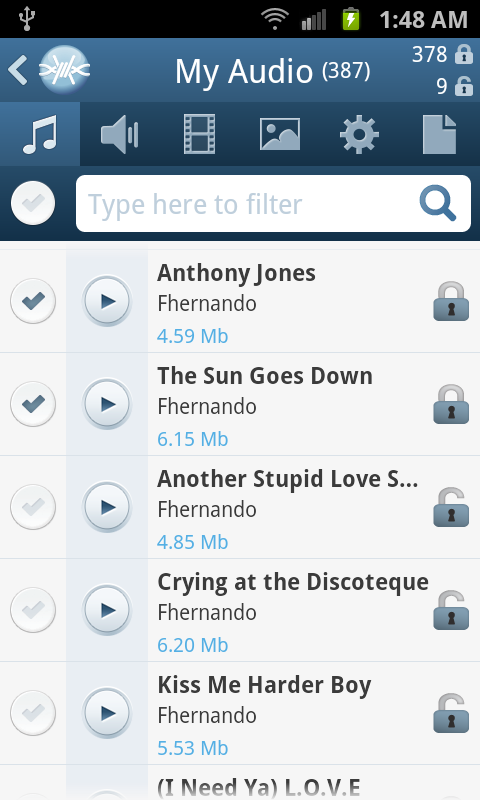
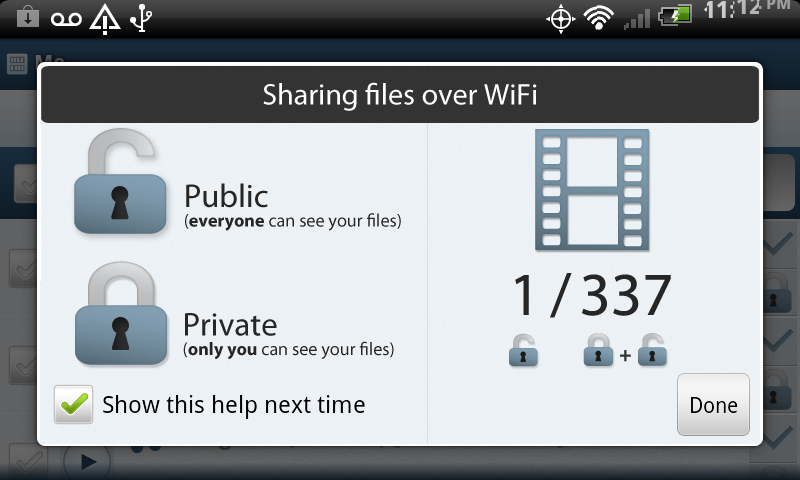
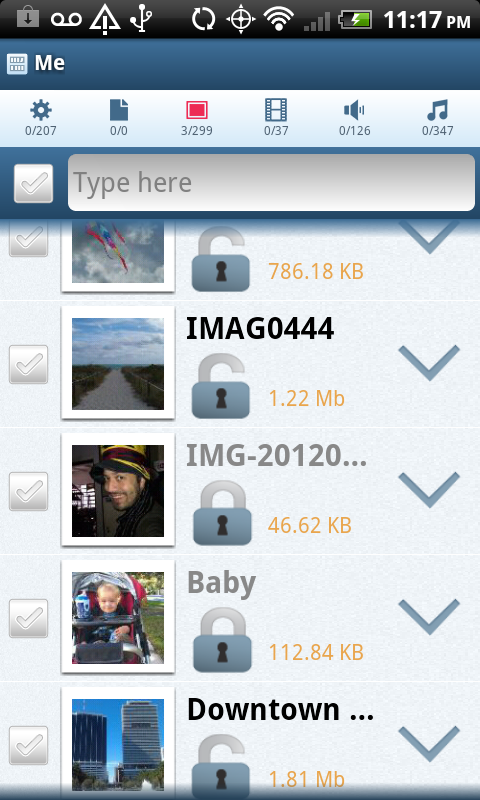
Just make files publicly available by opening padlock icons next to the files and every device running FrostWire will be able to download and even stream music or video from each other.

This makes it great for groups of people (work, school, home, party), now you only need to take only one photo and share it with everybody else next time you’re all connected to the same Wi-Fi hotspot.

Sending documents, music, family videos between your mobile, tablet or computer has never been easier or faster, best of all it doesn’t even matter what Operating system you’re running, Windows, Mac, Linux, it doesn’t matter, all you need is FrostWire and a Wi-Fi router. It just works.

World class Gesture Based Music Player

We’ve redesigned our music player for simplicity and convenience. FrostWire’s music player is the world’s first gesture based music player, we built it thinking of drivers in mind, no need to take your eyes off the road if you want to switch songs or pause/resume playback.

On this version we’ve introduced a beautiful new design with a 3D presentation of the album art currently being played. It also has functionality to share or un-share the file you’re currently listening to without having to browse or find the file on your device.

Easier Navigation
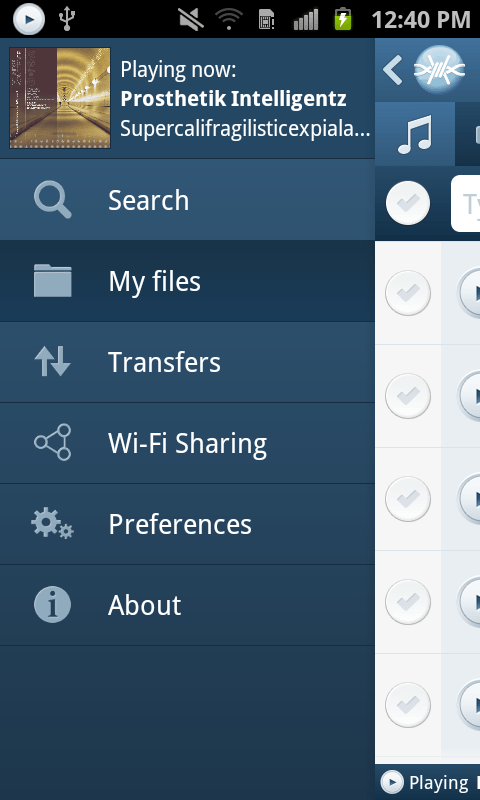
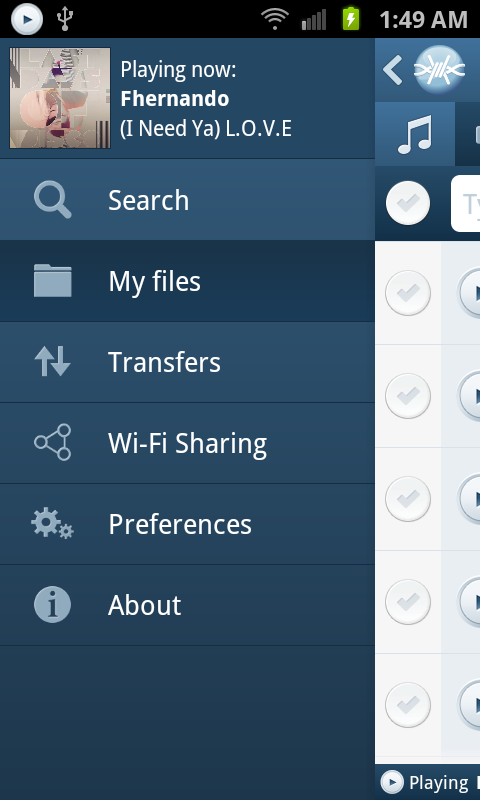
We’ve recreated the navigation system on the application, it now has a beautiful animated and responsive slide in menu that will take you anywhere in the app, with room for future functionality, and if you’re playing a song you will be able to see the album art of the song being played.

We’ve also implemented a custom “Back” history handler so that you can backtrack perfectly the screens you’ve navigated as you used the app. You now have random access navigation through the menu, and sequential access navigation through the Android’s back key.

We’ve added new controls to let you instantly filter your own files and see which are being shared on the Wi-Fi network and which aren’t in just one touch.

Install FrostWire on your Android and spread the word, the more the merrier, it’s absolutely free.

Install FrostWire via Google Play.

Download the .apk installer.

[1] FrostWire's Deep-Smart search uses the most popular torrent indexing services to fetch torrent files, then FrostWire opens these files and searches for the individual files indexed by the torrent. As FrostWire searches it remembers the files it's seen in the past to make your next searches instantaneous.

[2] Only on YouTube.com in 2012 it was announced users had shared over 4 million Creative Commons licensed videos. FrostWire also taps on SoundCloud.com, the internet's biggest sound and music community of content creators, bands, singers and DJs that pay to make their music available for free to the SoundCloud community. If you share your content on YouTube or SoundCloud you're automatically available to the millions of FrostWire users on both Desktop and Android. Integration with more popular cloud services to come in the next releases.

When you download and install FrostWire you must agree that you will not use it for the purpose of copyright infringement otherwise the software won't work. FrostWire condemns copyright infringement. Downloading FrostWire does not constitute permission or a license for obtaining or distributing unauthorized files. It is illegal for you to distribute copyrighted files without permission. If you want to know about legal content you can download and distribute legally please visit FrostClick.com, Vodo.net, ClearBits.net, LegitTorrents.info and CreativeCommons.org


FrostWire for Android 1.0 Screenshots

We’re only days away from releasing the best file sharing application for mobile devices in the world.

A full blown file sharing client, a file browser with clear privacy controls to share files with others via WiFi or via BitTorrent, a gesture based music player, all free.

Quick Peek at the next generation of FrostWire for Android (1.0.x)

Test the 1.0.0 beta installer

Here’s a sneak peak of the next generation flagship file sharing client for the mobile world.
This next generation will include a brand new user interface with a more streamlined experience, you’ll be able to search, access and consume your files better than ever with FrostWire for Android, which will integrate tightly with FrostWire for Desktop, no matter on what operating system you run, with absolutely no setup required, just run and share.

Get the current version of FrostWire for Android free today, as soon as 1.0 is out you will receive the update message.

FrostWire 5.3.9 helps trackers save bandwidth

Download FrostWire here

Updating to FrostWire 5.3.9 will help the BitTorrent network as a whole to perform a lot better.

A few weeks ago some of the major trackers went offline on strike to get the attention of the BitTorrent community, their goal was to get everyone to understand a problem that was causing trackers to loose a lot of money in bandwidth costs thanks to old or mislabeled torrents that were still pointing to HTTP tracking addresses.

HTTP traffic is a lot more verbose than the UDP traffic that occurs between BtiTorrent trackers and trackers.

Now FrostWire has implemented a BitTorrent protocol extension that allows all FrostWire clients to check a TXT DNS record that will let all BitTorrent clients know if they should override the torrent announcement url to use UDP instead of the old HTTP addresses stored in older .torrent files.

Before FrostWire attempts to connect to the tracker URL, it’ll first check that DNS configuration to see what the wishes of the tracker administrator are, now tracker admins can override the behavior of all FrostWire clients and FrostWire could potentially ignore the HTTP based handshake and perform the handshake in UDP saving tracker operators a great deal of bandwidth costs.

Update now and make the BitTorrent network better

New FrostWire for Android with improved search

Download FrostWire for Android now

The latest version of FrostWire for Android addresses very important issues affecting search experience.

We’ve made a number of improvements in our search algorithm, we’ve improved local indexing (the more you search the better it gets) and we’ve made the process of searching a bit more interactive so you have a clue what’s going on during search.

International users should be able to find more files as we’ve fixed a few UTF-8 encoding issues we found on the Azureus core, so files with non western characters should be easier to find.

The response from users that installed or upgraded the app during this week tells us that we’re on the right path to a 1.0 release.

If you also have a desktop computer running FrostWire and you’re not using FrostWire to transfer files from or to your PC, boy, are you missing out, take a look at these videos.

Full Changelog

FrostWire 0.9.12
– Search performance improvements.
– Better international search thanks to improved special character support.
– Search status UI feedback improvemens.
– Search results remain on screen when the device is tilted.
– Search results remain after a transfer has been started.
– New animated media player status bar for easy access to media player.

New FrostWire 5.3. Easier, Nicer, Better.

Here’s what’s coming on the next update.

FrostWire's new search now with hints (powered by Google's frequent searches)
Better search results and usability Users coming from FrostWire 4 have complained about ease of use and search results. We’ve made our search algorithm more powerful and our user interface friendlier so that you won’t get lost finding the files that you need. We’re bringing a bit of the FrostWire 4 feel to the search form and you’ll have even more control of the search results you see as they are retrieved.

Now you will be able to choose exactly what file types you're interested in

Send files and folders to friends, no size limits, no ads, no third parties involved. And the more friends you send, the better it gets.Sending files to friends. No need to upload your files to sketchy websites that are a pain in the ass for your friend to find the download button among so many ads. Not only you can send files as big as your computer can hold, you can also send entire folders and subfolders. The more friends you send your files, the faster they get it because they collaborate. You and your friends make a little cloud when sending files to each other with FrostWire.

Mobile Integration You can now browse, stream or download the files made public by Android devices nearby. Best part, no cables necessary. Samsung users on Mac will love this, as we’ve experienced impossible to fix issues with the Galaxy Tab 10″ which just won’t share files even with the Kies app that Samsung provides.

Screenshot of FrostWire 5 streaming from an Android Tablet

FrostWire for Android implements an open, simple, HTTP/JSON based file sharing protocol that ANYBODY can work with, so we hope to see Web developers, and why not even iOS developers making clients that can talk to FrostWire for Desktop and FrostWire for Android. And if nobody builds them we’re trying to free some time later in the year to make a light version of FrostWire for iPhone/iPod/iPad so that you can send files from your iOS device to your PC, Mac, Linux or Android devices, all wirelessly (no need for USB and iPhoto, no need to cut your videos or to downgrade their quality to upload them to youtube if all you want is to send that HD video to your mom’s)

Make over

New Fueled skin appears on FrostWire 5.3.0. The screenshot shows a new application header, with the media player present at all times and a lot more polish with respect to custom made icons and backgrounds, textures. More to come.

Those and a lot of other features and fixes are ready. If you cannot wait to try these, you can always download the sources and build FrostWire yourself in two steps (ant; ./run)

frostwire (5.3.2) stable; urgency=high
  * Reverted H2 library to v1.3.160

 -- FrostWire Team   Sun, 12 Feb 2012 09:09:46 -0500

frostwire (5.3.1) stable; urgency=high
  * Updated default album cover image with an anti-aliased frostwire sphere.
  * Fixes bug where clicking on the current song would switch to the library
    but the button on the top would not be selected.
  * Adds missing icon for "copy magnet" on Send file dialog.
  * Library explorer and Playlist explorer are now divided by a split pane
    for a better experience.
  * Hides hints popup when search is triggered with a mouse click.
  * Updated search icon (magnifier).
  * Fonts are reset when the setup wizard is shown so the wizard can work
    properly.
  * New View > Reset Font Sizes action.
  * The first time the Library button is used "Finished Downloads" is
    preselected to give the user a clue of what can be done.
  * When a new playlist is created, a graphic is shown to hint the user
    about dragging audio files there.
  * Updated H2 library to v1.3.164

 -- FrostWire Team   Sat, 11 Feb 2012 18:22:15 -0500

frostwire (5.3.0) stable; urgency=high
  * Search form looks similar to FrostWire 4 but now allows user to search
    for more than one file type at once.
  * Improvements in search algorithm.
  * Send file/folder feature more effective between just 2 peers.
  * Simplification of search form interface, looks similar to FrostWire 4
  * Phone & Tablets tab is gone, integration with Android devices is now
    part of the Library under a "Devices" tree item.
  * Browses, Streams audio, and downloads files made public by Android devices
    in the same network.  
  * When entering a search hints are shown to type less (powered by Google).
  * Sorts transfers by "Seeds" correctly.
  * Improvements on Library action buttons, now a "Launch" action is available
    and buttons are shown/hidden depending on context.
  * Fixes bugs where files on a audio playlist could not be dragged out.
  * Fixes bugs where deleted files would still appear on the library.
  * When right clicking on selected finished transfers and copying an infohash
    you won't end up with a trailing newline on the clipboard.
  * Sharing ratio of a torrent that you stopped and started seeding again
    will not be infinite and will be based on the total sizes of the files
    being shared.
  * Now when the transfer split pane is dragged up, the pane border is painted
    correctly on top of the image overlay.
  * Fixes repainting glitch when moving split pane on top of promotional 
    graphic.
  * Lots of icons have been revamped for a more uniform look.
  * Null Pointer Exception issues #100, #103, #104.
  * Fixes issue #93 chat action causing frostwire crash.
  * Flickering issue on song progress bar resolved.
  * Simplified torrent creation. User now doesn't have to make up her mind
    about choosing a file or a folder, the file selection dialog now
    handles this for her.
  * Brought back "Stop" search button.
  * Removed lingering "Show/Hide player" menu entry on status bar context menu.
  * If seeding transfers are meant to be finished, newly finished transfers
    are not hidden for that session.
  * Audio files can be launched using the operating system's default player
    Right click on a file "Launc in "
  * Removed BTJunkie search engine.
  * Added KickAssTorrents (kat.ph) search engine.
  * Fixes issue where downloading removing a partial transfer would
    delete previously completed downloads of that same torrent.
  
 -- FrostWire Team   Fri, 8 Feb 2012 21:07:56 -0500

Paulo Coelho featured on FrostWire

The way of the Bow as featured on FrostWire 5
Paulo Coelho as featured on FrostWire for Android

More information and live download numbers of this release on FrostClick.

Thank you Paulo Coelho, you are a gift to mankind.

Update: Paulo has ReTwitted a FrostWire user!

FrostWire for Android (Beta) Screenshots

Update (February 2012)
Get it now from the Android Market or Download the APK

FrostWire for Android is back, and currently under a rigorous beta testing period before we release it back into the Android Markets.

As promised, FrostWire for Android is now open source. Android Hackers welcome for patch submissions.

FrostWire 5.1.x – A new era for BitTorrent Search

Download FrostWire 5.1.x

We heard the confusion and the complains on how FrostWire 5 search results work and we decided to take it up a notch (out of many many to come)

The next series of FrostWire 5.1.x improves the way files are found on the BitTorrent network.

In short 2 things have happened:

1. FrostWire now finds single files that match your searches.

2. FrostWire learns as you use it to deliver instant single file search results (under 100ms on average, but you’ll see a lot of search results appearing under 5ms)

Getting a little more into details:

FrostWire performs a Smart Search upon the most relevant torrent search results that come from BitTorrent search engines, meaning it remembers every file contained by every torrent it scans increasing greatly the chance to find what you are looking for, super fast.

As FrostWire fetches search results from the search engines, it uses these results to crawl the Azureus DHT to learn
about the contents indexed by these torrents. FrostWire will not use the bandwidth of the search engines in this process,
it will only use the torrent info hash to perform DHT queries, meaning, .torrent files are fetched only from the DHT, not from search engine’s web servers, it’s searching powers will not depend from a central entity.

So…

The more you use FrostWire the more it learns about the contents available on the BitTorrent network.

The more you use FrostWire the faster search results will be.

We believe now FrostWire is one of the most powerful information discovery tools ever created, on it’s path to becoming a distributed file search engine. In fact, we’re now fully confident that getting rid of gnutella was the right choice since you will see that the effectiveness of 5.1.x when it comes to search makes Gnutella irrelevant, specially to find and seed rare content. This is the FrostWIre we always dreamed of building and there’s so much more coming.

Other than performance and numerous user experience upgrades that you will probably notice we’ve added a new little search engine by popular demand, TPB.

In the near future we’ll be adding tools to export the Smart Search database, and to import and merge Smart Search databases from other computers.

CHANGELOG


frostwire (5.1.5) stable; urgency=high

* Bug fix on setup wizard for some window configurations where controls
would not appear unless the user resized the window.
* Bug fix on keyword search filter, wrong keyboard event was being used.
* UX adjustement in the way transfers are sorted when the application is
launched.
* UX upgrade where Search Field on the Library now reacts to the DELETE key.
* UX upgrade where the FrostWire left hand side components are laid out
correctly after the user resizes the window from much smaller dimensions.

-- FrostWire Team Fri, 16 Sep 2011 18:1:34 -0500

frostwire (5.1.4) stable; urgency=high

* Bug fix where it would not index torrents when the
file type filter was in use.
* Bug fix when downloading a secondary file from the second torrent
download would not start and would appear as seeding.
* Cleans all empty folders created by a partial download once the download
is removed from the transfer manager.
* Fixes issue with transfer manager resetting the order of columns.

-- FrostWire Team Wed, 24 Aug 2011 00:57:38 -0500

frostwire (5.1.3) stable; urgency=high

* Search results now arrive under 200ms, aka, Instant Search.
* New FrostWire "Smart Torrent" search. FrostWire will search inside
top matching torrents for individual files matching the current query.
* Core upgrade, if a .torrent fails to download from its HTTP location
FrostWire will download it from the DHT if it can find it there.
* Functionality to see the size of the Search DB and to reset it.
* UX upgrade, ability to hide/show seeding torrents on transfer manager.
* UX upgrade, Phone & Tablets desktop explorer asks before deleting files.
* UX upgrade, New file "Extension" column on search results.
* UX upgrade, Search tabs now have animated indicator to let user know
a search is still going on.
* UX upgrade, New filter by file type. Filter controls re-arranged.
* UX fix, search results can now be sorted by file type.
* TPB has been added to the list of search engines.
* Mininova is back.