The next release of FrostWire 5 will feature a completely new Library Tab, one rewritten from scratch to suit your media management needs.
Before and After(click on the image to enlarge)
It features a full blown audio player, with convenient playlist management at every drag and drop or right click you ever need to organize and enjoy your media.
This new Library (code named “Alexandria”) is still under development and test binaries will be distributed in a few days (or hours) to the beta testing group.
However, remember FrostWire is open source and you can build and run it yourself. Here’s how:
If you want to hack FrostWire and send patches you will need a Bitbucket account.
Get the code
With you favorite Mercurial client, clone the official repository
hg clone https://bitbucket.org/frostwire/frostwire.desktop cd frostwire.desktop
Switch to the alexandria branch hg update fw5-alexandria
Build it! ant
Run it
On Windows: cd gui run.bat
On Mac or Linux: ./run
Hack it!
If you want to be part of the development team, the process is very straight forward.
1. Fork the project in BitBucket using your account.
2. Clone your fork locally.
3. Create a branch for your hack/bug-fix/enhancement
4. Code, commit and push to YOUR fork.
5. Send us a Pull request of your branch.
We will check your patch, be clean and explain as much as you can what you did. Do not repeat code and look at the current code to follow our current style.
In case you’re curious, the real sign belongs to “Rue Soufflot” near the Luxembourg Gardens in Paris, France.
Photo composition sent by an anonymous user in Paris.
Send your fake FrostWire Signage pictures to contact@frostwire.com if this gives you any ideas.
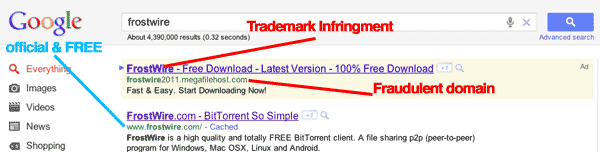
If you search for “frostwire” on Google today, you will still get one of the fake/fraudster ads, but this time the scammers went a little too far infringing our trademark.
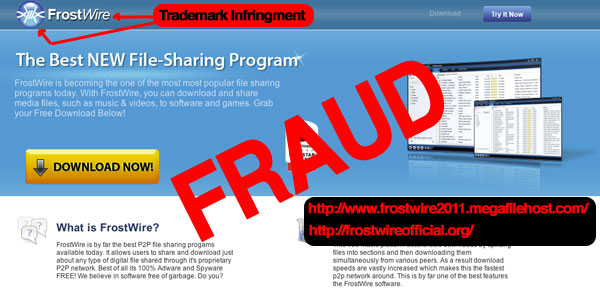
On top of this, they’re charging users for a product that is not FrostWire but uses our trademarked logo and name.
They have their own windows installer which installs something that they call “FrostWire Pro”, this is how it looks:
Not only they blatantly use our trademark on the name of the software, the icon, logo, they also charge for it, and then we are the ones getting user’s emails asking for money back.
It doesn’t end there
A simple reverse DNS search on their IP address let’s us know that they’re not only doing this with the FrostWire trademark, they’re also usurping the identify of other software like Ares and LimeWire.
We are sending cease & desist letters to them and their hosting company to see if we can do something to protect you guys from these scammers.
The most ironic part of all of this, is that we then tried to put an ad on Google for users to find out about FrostWire’s new File and Folder sending capabilities, and our ads are being denied for “Copyright” while fraudsters that infringe on our trademark and damage our name can advertise freely to prey on clueless users.
DO NOT PAY FOR FROSTWIRE
Here’s a video we posted 2 years ago, and these people keep scamming thousands of people every year.
We heard the confusion and the complains on how FrostWire 5 search results work and we decided to take it up a notch (out of many many to come)
The next series of FrostWire 5.1.x improves the way files are found on the BitTorrent network.
In short 2 things have happened:
1. FrostWire now finds single files that match your searches.
2. FrostWire learns as you use it to deliver instant single file search results (under 100ms on average, but you’ll see a lot of search results appearing under 5ms)
Getting a little more into details:
FrostWire performs a Smart Search upon the most relevant torrent search results that come from BitTorrent search engines, meaning it remembers every file contained by every torrent it scans increasing greatly the chance to find what you are looking for, super fast.
As FrostWire fetches search results from the search engines, it uses these results to crawl the Azureus DHT to learn
about the contents indexed by these torrents. FrostWire will not use the bandwidth of the search engines in this process,
it will only use the torrent info hash to perform DHT queries, meaning, .torrent files are fetched only from the DHT, not from search engine’s web servers, it’s searching powers will not depend from a central entity.
So…
The more you use FrostWire the more it learns about the contents available on the BitTorrent network.
The more you use FrostWire the faster search results will be.
We believe now FrostWire is one of the most powerful information discovery tools ever created, on it’s path to becoming a distributed file search engine. In fact, we’re now fully confident that getting rid of gnutella was the right choice since you will see that the effectiveness of 5.1.x when it comes to search makes Gnutella irrelevant, specially to find and seed rare content. This is the FrostWIre we always dreamed of building and there’s so much more coming.
Other than performance and numerous user experience upgrades that you will probably notice we’ve added a new little search engine by popular demand, TPB.
In the near future we’ll be adding tools to export the Smart Search database, and to import and merge Smart Search databases from other computers.
CHANGELOG
frostwire (5.1.5) stable; urgency=high
* Bug fix on setup wizard for some window configurations where controls
would not appear unless the user resized the window.
* Bug fix on keyword search filter, wrong keyboard event was being used.
* UX adjustement in the way transfers are sorted when the application is
launched.
* UX upgrade where Search Field on the Library now reacts to the DELETE key.
* UX upgrade where the FrostWire left hand side components are laid out
correctly after the user resizes the window from much smaller dimensions.
-- FrostWire Team Fri, 16 Sep 2011 18:1:34 -0500
frostwire (5.1.4) stable; urgency=high
* Bug fix where it would not index torrents when the
file type filter was in use.
* Bug fix when downloading a secondary file from the second torrent
download would not start and would appear as seeding.
* Cleans all empty folders created by a partial download once the download
is removed from the transfer manager.
* Fixes issue with transfer manager resetting the order of columns.
-- FrostWire Team Wed, 24 Aug 2011 00:57:38 -0500
frostwire (5.1.3) stable; urgency=high
* Search results now arrive under 200ms, aka, Instant Search.
* New FrostWire "Smart Torrent" search. FrostWire will search inside
top matching torrents for individual files matching the current query.
* Core upgrade, if a .torrent fails to download from its HTTP location
FrostWire will download it from the DHT if it can find it there.
* Functionality to see the size of the Search DB and to reset it.
* UX upgrade, ability to hide/show seeding torrents on transfer manager.
* UX upgrade, Phone & Tablets desktop explorer asks before deleting files.
* UX upgrade, New file "Extension" column on search results.
* UX upgrade, Search tabs now have animated indicator to let user know
a search is still going on.
* UX upgrade, New filter by file type. Filter controls re-arranged.
* UX fix, search results can now be sorted by file type.
* TPB has been added to the list of search engines.
* Mininova is back.
4. New looks and better media support by the music player
Most of these updates and changes were the product of community feedback, long debates and hard decisions made to help shape the future of our file sharing community.
Let’s review each one of these in detail.
Faster, cleaner search results
The number one complaint from our user base was spam. Without much development muscle in our community after LimeWire was shutdown, all of our updates and heuristics were unable to upkeep with the never ending battle against spam. Power users were able to fine-tune their FrostWires with what we had provided, but the mainstream users were falling constant victims of spam and fake search results.
With the landscape of file sharing shifting to BitTorrent we saw the opportunity build up on it’s strengths and to make the BitTorrent experience a lot easier and simpler, one that your mom can handle.
We dropped Gnutella search and replaced it with the curated indexes of major HTTP BitTorrent Search Engines (and we’ll keep adding more with each release). The results are instant search results, and no spam or fakes.
As always, a portion of users might still have to go through a bit of a learning curve transitioning to a BitTorrent only application. First-time BitTorrent users might not initially realize that most torrents contain more than one file, for example, or know that you can selectively download files from a single torrent. We’ve included all sorts of tools to let users filter search results and filter the content inside torrents as well.
FrostWire 5 combines the search results of all of listed engines in one place so you don’t need to leave your FrostWire window and figure out which torrent search engine to use. When you start a download, FrostWire will show you from which webpage the torrent came from, giving the search engine a deserved page view for each download started from FrostWire 5. We hope this will foster more competitiveness in the BitTorrent indexing community and more even better indexed content. As those search engines see what kind of searches are coming in, we believe that they’ll start adjusting their practices to attract more FrostWire users to download their torrents and both, the torrent indexing community and the torrent content consumer, will benefit from FrostWire 5 fully entering the BitTorrent community.
Send large files and folders
We think one of the biggest, most common and at the same time the simplest problems on the Internet is sending large files between computers. If you often work with large files (and files are getting larger and larger as computing gets better, storage cheaper, cameras have better image resolutions for both video and stills) and you need to send them to your clients, friends, coworkers or family, email just may not be an option.
What’s the alternative?
There are many services where you can upload your files for others to download. The problem is, which service do I use? Many of the free file upload sites are simply too difficult or even close to impossible to use because they are overloaded with deceptively placed ads, pop-ups, timeouts and other file size and bandwidth limitations. They also constantly nag you to purchase paid versions, making it extremely frustrating for free users. There are of course paid and enterprise alternatives that do work, but not everybody wants to or simply can pay for the subscription. The services simply cannot allow free accounts because of the high storage and bandwidth costs.
Because FrostWire works on the distributed BitTorrent network, you can literally grab terabytes of data and make them easily available to friends and family right from your computer at no cost. Best of all, the more people you share this data with, the faster they can download. They will collaborate with each other as they download the pieces and pass portions of the files along to others.
You can have your latest and greatest HD Viral Video, in all it’s quality and glory, sent to millions of computers just by sending out a link that FrostWire will create for you in seconds. The receiving parties will need to use FrostWire, and they will be able to pause/resume the download and help you seed the content for others. Yes, you can distribute a file to millions of people, right from your computer. No need to sign up to any service and no need to pay for anything (maybe excluding your Internet connection!) FrostWire 5 allows you not only send a file, but to send entire folders of content. No more limits on file size, type, video duration or quality! You can start a revolution right from your home computer – the possibilities are unlimited!
The process is super simple. All you gotta do is drag and drop the file or folder you want to send onto the FrostWire window, and FrostWire will, under the hood, create and seed a torrent for you. It will then give you the option to Copy the text with a HTTP link or a Magnet link that you can later send to your friends and family. There’s even a Send to Twitter option in case you have something important to share with the world.
Improved BitTorrent Support
We rewrote our BitTorrent integration with Vuze’s core, a powerful, stable and fast BitTorrent core library, from scratch. We also added many features related to BitTorrent that FrostWire 4 didn’t have.
Some of the new features include easy torrent creation (both decentralized torrents and tracker based torrents), sending large files and folders (which, as we have explained is also done on top of BitTorrent, but the technology aspects have been hidden from the user), being able to filter and download individual files from torrents, easy magnet link creation, DHT support and more.
New Looks & Better Media Support
We removed of the old skinning system and integrated a technology called “Substance” that allows us to paint the FrostWire interface however we want. It also adds a nice animation effects to improve the user experience. FrostWire 5 comes with over 25 new substance skins.
We are in the process of designing a beautiful new skin for both our desktop and android products to give you a more uniform experience across the platforms and are planning some major UX updates to Library Tab, but that’s scheduled to come out in the following releases.
We’ve also given our barbed wire sphere a well deserved make over, we hope you like it too.
The FrostWire 5 installer dropped about 50% of it’s size when compared to FrostWire 4, so we decided to use the space we had lost for something very useful and we tackled another part of the software that was not performing up to our standards – the media player.
Library Tab, but that’s scheduled to come out in the following releases.
We’ve also given our barbed wire sphere a well deserved make over, we hope you like it too.
The FrostWire 5 installer dropped about 50% of it’s size when compared to FrostWire 4, so we decided to use the space we had lost for something very useful and we tackled another part of the software that was not performing up to our standards – the media player.
The old media player was a 100% Java MP3 decoder which wasn’t 100% compatible with all mp3 files. We have decided to bring a project on board that knows how to playback all media well, so now FrostWire comes with a binary build of mplayer that supports the most popular audio codecs flawlessly. For now we’ve decided to leave video playback out of the picture to keep the size of the installer to the bare minimum.
The Future
This release of FrostWire 5 is merely a beginning of many ideas that can and will happen on top of the BitTorrent network. We believe that BitTorrent is a great technology that is being majorly underutilized. In time, we’ll show you what we mean, just stay tuned.
What’s new?
> Uses way less memory per connection.
> It’s able to support more connections.
> It browses and downloads faster
> See what’s being uploaded
> FrostWire for Android just turned 1 year old (~950,000 total installs as of this post)
Geek Speak
Basically we rewrote the entire networking core using a nonblocking io framework called Netty.
In the past FrostWire did a lot over UDP to avoid creating threads, then little by little we started migrating some of the messages over to TCP and things started working better, however we had to keep the number of peers you connected to a bare minimum since each connection required us to create a new thread. In theory the linux kernel used by most android should be able to handle lots of threads without much cost but in reality this is not so pretty.
With Netty we’ve gotten rid of a lot of threads and we’re able to use the network interface very efficiently to deliver and receive messages in just a few threads. This results in a lot more free memory and the new version of FrostWire (if connected to less than 20 peers) should feel a lot snappier, browsing (as more people upgrade) should work better, and the same with downloads and search.
On the UI side, we fixed a lot of crashes you guys reported (thanks) and now if you Touch the green Upward arrow when someone is uploading files from your Android, you will be able to see what files are being uploaded, at what speed and what the progress is. We didn’t add a “cancel” because we figured the new sharing policies are so strict now, that there should be no reason why you’d be sharing something you didn’t want to share in the first place, and if you did, you can always disconnect or exit the application and the transfer will be killed.
More coming
A hell of a lot more coming, with this release we’re now 1 year and 1 month old. We hope to regain the lost speed/time spent on the FrostWire 5 for desktop release. Expect a lot of changes during the next months in the UI, we’re thinking of new ways (probably UI rewrite) to make sharing both easy and safe. The last updates were meant to keep your files safe so that nothing would be shared unintentionally, however we know the UI is probably a bit hard to grasp for regular users but this will change soon.
We do read all the feedback you leave in the android market, wish we could leave responses, but just know we care a lot about this project and we are working hard to make it better with each release.
If you like this release don’t forget to rate us in the android market, we keep our fingers crossed that you’ll feel the difference.
Full Changelog
FrostWire 0.6.0:
– Core-Upgrade: Inspired by Twitter’s Engineering blog http://goo.gl/bg5jk the protocol stack
was rewritten using NIO/Netty. Reducing the numbers of threads, memory and battery consumption
considerably. The Application should now be able to browse more peers and feel a lot snappier.
– UX-upgrade: See what files are being uploaded.
– UX-upgrade: The multiple selection checkboxes are now available for unshared files.
– UX-upgrade: Long pressing on an unshared file and sharing it will now ask
to enable sharing for the file type if it was disabled, just like on the padlock icon.
The current file type being browsed will also be reloaded to show the user this file type
is now available for sharing.
– Core-fix: Makes sure FrostWire won’t go beyond the max number of peers.
– Bug-fix: Crash when trying to check all files when there are no files.
In case you don’t notice many of the changes, the most important ones are:
Send File & Send Folder
Available on the “File” Menu or by right clicking on an active torrent in the transfer manager.
This feature allows you to send a file or a folder, no matter its size to another person using a simple http:// link. The other person needs to have FrostWire +5.0.6 running to receive the file.
The page shown on the link you send will guide the receiving person through the process with a series of live notifications. The moment FrostWire starts running it’ll automatically start downloading the file or folder over the bittorrent network. You as an user will never have to deal with .torrent files, trackers, or anything, it’s all transparent and it rocks.
With this new feature we hope we can give “normal people” a new and convenient alternative to the nuisance of sending large files over the internet.
Here’s a few benefits of using FrostWire to send files to friends:
No file size limits (in theory up to 16TB but we don’t have a harddrive that large to test)
You can send entire folders!
No need to register or have your files uploaded to a third party service.
The more people you send the file, the faster it gets because each FrostWire will collaborate as a swarm
The receiving party won’t get lost with Advertisement or will have to wait minutes before the download starts
The receiving party can pause and resume the download
The receiving party can select which files to download (if you send a folder)
No ads
The downers?
You need to leave FrostWire running for others to get the file (until there’s enough people sharing that is)
If your friend doesn’t have FrostWire she’ll have to install it and run it to receive the file
We don’t recommend using this feature for private files since anybody with the link can download the file as well
Partial Downloads are now an obvious feature
Now all search results have [+] icon left of the search result name, if you click there the Partial Download window opens to let you see the contents of the torrent. If the torrent has way too many files and you’re just interested in a few you can use a type as you text search filter to find what you need in the torrent easily.
And for the curious, here’s the full changelog for this release
FrostWire 5 changelog:
frostwire (5.0.7) stable; urgency=high
* UX upgrade, send file or send folder support when a file or folder
is dropped on FrostWire.
* UX upgrade, file choosing dialogs on Mac now also show mounted volumes.
* UX upgrade, playback support for m4a files.
* UX upgrade, search result filters re-arranged.
* UX upgrade, main search button gone, updated search text box to include
clickable search icon.
* UX upgrade, filters re-arranged.
* UX upgrade, searches can be up to 50 characters long.
* UX upgrade, either disconnected or turbocharged, no idle state.
* UX upgrade, search as you type on the library, no more search button.
Disconnected only if it cannot connect to the internet.
* UX bugfix, iTunes options were not visible for Windows users.
* UX bugfix, fixes possible UI freeze on startup.
* UI bugfix, sending songs to iTunes on Mac is now done in a single process.
* Mac OSX Lion compatible.
* Bugfix, issue where opening a torrent from maglnk.com would result in a
double invocation of the Partial Dialog window.
* Bugfix, when user didn’t start a partial download the torrent wouldn’t be
deleted.
— FrostWire Team Fri, 15 Jul 2011 15:13:16 -0500
frostwire (5.0.6) stable; urgency=high
* New feature, Send file. Available on File Menu and Transfer Manager.
* New feature, Send folder. Available on File Menu and Transfer Manager.
* UX upgrade, we now have a [+] icon next to search result file names to
show partial download dialog.
* UX upgrade, when a partial download is cancelled, the entry is removed
from transfers.
* UX update on partial download dialog. Includes new text filter.
* UX fix, Library search now also looks for .torrents on “Torrents” folder.
* UX fix, Mac OSX file menu does no longer show “Exit” action.
* Fixes bug, incomplete files are no longer exported to iTunes playlist.
* UX update, Help Menu now says “Sharing Help”. Items rearranged.
* UX update, rearranged View options into single panel.
* UX update, torrent seeding settings are now a control of its own with
an explanation of what seeding is.
* UX update, the installation wizard now forces the user to decide if
she wants to seed or not seed to continue. Links to what is seeding
are in place.
* UX update, in Windows and Linux, when the user Xs the window the user is
explained that the application will be hidden and is given the option
to exit.
* UX bugfix, font size can now be increased.
— FrostWire Team Mon, 27 Jun 2011 10:57:00 -0500
frostwire (5.0.4) stable; urgency=high
* UI upgrade, Create and seed New Torrents.
* UI upgrade, Ability to throttle torrent transfer speeds
* UI upgrade, Copy info hash from torrent.
* UI upgrade, Copy magnet link url from torrent.
* UI upgrade, Searchable library. Searches recursively downloaded
files, folders and torrents.
* UI upgrade, Search results filterable by Torrent Search Engine.
* UI upgrade, Search results filterable by file size.
* UI upgrade, Search results filterable by number of seeds.
* UI upgrade, Search results filterable by keywords as you type.
* UI upgrade, Ability to download partial files.
* UI upgrade, Promotional slides can now be switched by the user.
* UI upgrade and bug fixes on Phone & Tablets tab.
* UI upgrade, Ability to rebuild “FrostWire” playlist on iTunes.
* UI upgrade, Replaced legacy skinning code for “Substance” skinning system.
* Core update, audio playback is now done using mplayer.
* Core update, Vuze core integration with transfer manager.
re-written from scratch.
* Core update, No Gnutella support. Multiple library dependencies gone.










 Official FrostWire Blog