How to build FrostWire on Windows

This guide will teach you how to build FrostWire on a Windows computer, assuming you have none of the requirements to build it and you don’t want to spend any money on development tools.

To build FrostWire, you will need the source
1. Download and install the Java SE Development Kit for x86
(our binary dependencies are 32-bit to maximize compatibility and we don’t distribute multiple builds)

2. Download and install IntelliJ CE

3. Download and install Git

4. Open the git console and clone the frostwire repository to your computer:

git clone https://github.com/frostwire/frostwire

Inside the new “frostwire” folder you will have all the necessary code to build both FrostWire Desktop and FrostWire Android.

5. Download and install gradle

This step means downloading a .zip file from the gradle website, and unzipping it on a folder of your preference in your computer. We recommend that you use the “Git Bash” program to do all the work, and that you unzip the gradle folder inside:

/c/Users/yourUserName/bin/

so you will end up with your gradle executable at:

/c/Users/yourUserName/bin/gradle-2.11/bin

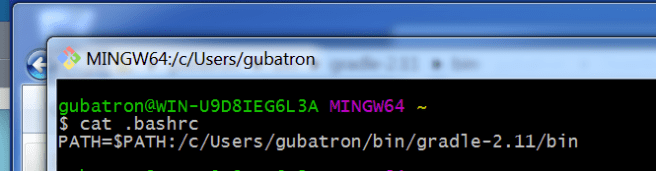
Make sure you will have that path on your $PATH variable. To do this, create a “.bashrc” file inside /c/Users/yourUserName/

My ~/.bashrc looks like this:

Screen Shot 2016-02-20 at 9.02.43 AM

6. Set your JAVA_HOME variable.

Now that you have a .bashrc file, let’s add there a JAVA_HOME variable. It must point to the path of your Java Development Kit’s folder (JDK)

On my default JDK installation my JAVA_HOME is
“/c/Program Files (x86)::/Java/jdk1.8.0_74”

Your .bashrc should look like below.

Screen Shot 2016-02-20 at 3.53.27 PM


Don’t forget to reload the .bashrc into the environment do so with
source .bashrc


BUILDING FROSTWIRE FOR DESKTOP

Change directories into the “frostwire” cloned code repo, and type

gradle build

Screen Shot 2016-02-20 at 9.30.38 AM

now that it’s built, go into the “desktop” folder and execute the run script.

cd desktop

./run.bat

Screen Shot 2016-02-20 at 3.56.36 PM


How to Add Royalty Free Music to Videos with FrostWire (1 minute video tutorial)

Avoid this from happening, play by the rules:
ytcbs-2652

Learn in 1 minute how to avoid getting flagged on YouTube for copyright infringement for the background music you use with this tip.

Use FrostWire to find and download copyright/royalty free music for your video creations.


New FrostWire pre-releases for the start of 2017

If you’re having issues with the number of search results available, we hear you, your 2016 FrostWire is already getting rusty and you need to update.

Please try our new pre-release today (we’re doing the final tests to launch it today)

Installers for For Windows, Mac, Linux (6.3.4)

frostwire (6.4.3) stable; urgency=high
  * Fixes issue with YouTube search
  * Fixes issue with ExtraTorrent search
  * Fixes issue where trackers would not be saved correctly when creating a torrent
  * New jlibtorrent 1.2.0.5

 -- FrostWire Team <contact@frostwire.com>  Thu, 12 Jan 2017 18:52:00 -0600

Installer For Android (plus / 1.8.7)

FrostWire 1.8.7 - JAN/12/2017
 - Fixes issues with YouTube search
 - Fixes issues with ExtraTorrent search
 - New Bulgarian, Belarusian, Slovak, Thai, Malaysian, Norwegian, Swedish, Finnish, Hebrew and Serbian translations
 - Every existing translation synced to 100%, Croatian and Urdu benefit the most
 - About screen make over with material design
 - Fixes bug where main navigation menu wouldn't close on back pressed.

Notice:
When you download and install FrostWire you must agree that you will not use it for the purpose of copyright infringement otherwise the software won’t work. FrostWire condemns copyright infringement.
Downloading FrostWire does not constitute permission or a license for obtaining or distributing unauthorized files. It is illegal for you to distribute copyrighted files without permission. If you want to know about legal content you can download and distribute legally please visit FrostClick.com

About FrostWire
FrostWire Plus for Android is a native Android BitTorrent Client+YouTube downloader. It allows you to find & download any file from the distributed peer-to-peer BitTorrent Network – music, movies, apps, ebooks, images. . In addition, FrostWire is also a cloud downloader – fetching results and downloading files from two main cloud based sources – YouTube and SoundCloud. FrostWire also includes a featured Music Library & Music Player.


How to solve recent FrostWire Freeze/Render issues/crashes on Windows 10 (FrostWire 6.3.5, 6.3.6, August 2016)

Around August 2016 several reports of slowdowns, freezes, crashes and UI rendering issues started being reported by several Windows 10 FrostWire users.

If you’re having issues please do the following:

1. Run a file system scan and a system file check
Run cmd.exe as an Administrator and issue the following commands

chkdsk

sfc /scannow

this will help you find any corrupted system files and any other issues in your file system.

2. Make sure to install the latest Windows Upgrades to fix Windows File System issues, in order to do this you have to update to at least the one released on August 31, 2016

August 31, 2016 — KB3176938 (OS Build 14393.105)
Key changes include:
Improved reliability of Windows Ink Workspace, Microsoft Edge, File Server, Windows kernel, Microsoft Component Object Model (COM), Cluster Health Service, Hyper-V, multi-factor authentication (MFA), NTFS file system, PowerShell, Internet Explorer 11, facial recognition, graphics, Windows Store, and Windows Shell.

3. If you have an NVIDIA GeForce graphics card installed, please make sure to have your drivers updated to at least the updates released in September 2016.


How to read FrostWire’s Executable stdout output

Screen Shot 2016-08-29 at 4.13.54 PM

If you sudo lsof -n | grep FrostWire | grep "/dev/null" on a Mac to see where the stdout is going to, you will see that FrostWire’s console output is going to /dev/null, and redirecting a process output in OSX isn’t something at least we could find was easy to do as in Linux, where several developers have created utilities for this purpose.

Luckily, if you run the Mac FrostWire executable manually on your terminal, you will be able to see the stdout output being redirected to your terminal window (e.g. /dev/ttys004)

So simply do the following if you’d like to read the  stdout output.

1. Open Terminal

2. cd /Applications/FrostWire.app/Contents/MacOS (or wherever else you may have dropped the FrostWire.app)

3. ./FrostWire

Listo! you should now be reading FrostWire’s stdout output.

#CODE libtorrent 1.1.1 released

You can download it from github at:

https://github.com/arvidn/libtorrent/releases/tag/libtorrent-1_1_1

Changes since the 1.1 release.

* update puff.c for gzip inflation
* add dht_bootstrap_node a setting in settings_pack (and add default)
* make pad-file and symlink support conform to BEP47
* fix piece picker bug that could result in division by zero
* fix value of current_tracker when all tracker failed
* deprecate lt_trackers extension
* remove load_asnum_db and load_country_db from python bindings
* fix crash in session::get_ip_filter when not having set one
* fix filename escaping when repairing torrents with broken web seeds
* fix bug where file_completed_alert would not be posted unless
file_progress
had been queries by the client
* move files one-by-one when moving storage for a torrent
* fix bug in enum_net() for BSD and Mac
* fix bug in python binding of announce_entry
* fixed bug related to flag_merge_resume_http_seeds flag in
add_torrent_params
* fixed inverted priority of incoming piece suggestions
* optimize allow-fast logic
* fix issue where FAST extension messages were not used during handshake
* fixed crash on invalid input in http_parser
* upgraded to libtommath 1.0
* fixed parsing of IPv6 endpoint with invalid port character separator
* added limited support for new x.pe parameter from BEP 9
* fixed dht stats counters that weren’t being updated
* make sure add_torrent_alert is always posted before other alerts for
the torrent
* fixed peer-class leak when settings per-torrent rate limits
* added a new “preformatted” type to bencode entry variant type
* improved Socks5 support and test coverage
* fix set_settings in python binding
* Added missing alert categories in python binding
* Added dht_get_peers_reply_alert alert in python binding
* fixed updating the node id reported to peers after changing IPs


Arvid Norberg

All of the changes above are already available on our Open Source Java wrapper Jlibtorrent.

Changes in JLibtorrent 1.1.1.37


JLibtorrent is a Java interface for libtorrent by us, the makers of FrostWire, with it you can develop libtorrent based apps and services with the joy of coding in Java.

jlibtorrent_logo_color

On this 1.1.1.37 release we’ve integrated significant updates from libtorrent’s RC_1_1 branch. If your app/service uses jlibtorrent you’ll be ahead of the curve by upgrading to 1.1.1.37 with respect to the majority of bittorrent clients out there that are built in C++, this is the beauty of using jlibtorrent, you’ll always have the safest and fastest bittorrent engine under the hood without compilation and linking nightmares.

- don't perform expensive hash of piece data for logging
- fixed popcnt asm for x86 and gcc/clang
- move storage "file-by-file"
- fix file_completed_alert, it would not be posted unless file_progress had been queries by the client
- fix filename escaping when repairing torrents with broken web seeds
- fix crash in session::get_ip_filter when not having set one
- fix mutable dht_get_item failure when salt is non-empty
- fix range of lsd::cookie
- don't send bitfield to peers whose handshake we haven't fully received yet
- update our id in the rpc manager when it changes
- make local service discovery cookie support not so random numbers
- fix value of current_tracker when all tracker failed
- hack to allow timeout utp sockets that are about to be closed
- fix re-prioritizing a piece while it is downloading
- handle short reads when exporting a file
- make pad-file and symlink support conform to BEP47

Re-release: FrostWire 6.3.3 build 190 for Linux

FrostWire Contributor deivid-rodriguez found issues on the .deb and .rpm installers of FrostWire 6.3.3 build 189 and sent us a fix.

We’ve bumped the build number (as no upcoming changes have been included in this build), and we’ve proceeded to re-release the linux installers on our official website frostwire.com, on sourceforce.net and on github.com

FrostWire’s improved Magnet URI support (BEP 0009)


As of FrostWire +6.3.0 for Desktop, and FrostWire +1.7.4 for Android, all FrostWire clients can now interpret the new peer= parameter

magnet:?xt=urn:btih:<info-hash>&dn=<name>&tr=<tracker-url>&peer=<peer-address>

Where <peer-address>…

<peer-address>A peer address expressed as hostname:port, ipv4-literal:port or [ipv6-literal]:port. This parameter can be included to initiate a direct metadata transfer between two clients while reducing the need for external peer sources. It should only be included if the client can discover its public IP address and determine its reachability. Note: Since no URI scheme identifier has been allocated for bittorrent xs= is not used for this purpose.

The immediate result of being able to pass and receive this parameter on magnet addresses is that FrostWire will try to include as many ip:port available it can find so that others can connect to your peer, try sharing files on your local Wi-Fi network now, vs doing the same on older networks.

We don’t know if other BitTorrent clients already support this parameter, therefore we suggest that when sharing Magnets from your computer, you tell the other party to use a new version of FrostWire and you’ll have a greater chance of connecting right away.

libtorrent team announces 1.1 release

Arvid Norberg, lead developer of libtorrent, the library FrostWire’s jlibtorrent wraps into has announced today a 1.1 release. In the paragraph’s below Arvid’s words from the BitTorrent developer mailing list.

You can get it here:

https://github.com/arvidn/libtorrent/releases/tag/libtorrent-1_1

HIGHLIGHTS

Since this major release has been in the works for quite a while, the
changelog is too long to include here. Instead, here are the highlights:

* disk I/O and piece hashing can now be done in multiple threads.

* The internal allocation of alerts is a lot more efficient now, and
requires alerts to be owned by libtorrent. The pop_alerts() function that
returns a container of raw alert pointers are owned by libtorrent and will
be freed by the subsequent call to pop_alerts(). The previous alert popping
functions will still be around when deprecated functions are enabled, but
they will cause more copying and likely have worse performance.

* experimental support for BEP 38 (mutable torrents). Basically this will
attempt to merge torrents that share files.

* there’s a new bdecoder which is a lot quicker than the previous
lazy_bdecode() ( http://blog.libtorrent.org/2015/03/bdecode-parsers )

* improved shutdown delay by canceling unimportant DNS lookups. (stalled
DNS lookups for tracker announces can cause significant delays when
shutting down).

* verbose logging is now done through alerts (which is possible now since
alerts are a lot more efficient). This means a production build can have
logging enabled at compile time, and enabled on demand when trouble
shooting.

* SSL over uTP connections is now supported.

* settings of various kinds have moved into the session_settings structure
(proxy settings, listen-interface, protocol encryption). A session can now
be constructed from a session_settings object, allowing for single-phase
initialization. (no more setting settings on the session object right after
constructing it).

* support for part-files. This is still a bit rough on the edges. Files
with priority 0, will have their pieces stored away in a single
consolidated file of partial pieces.

* there’s been countless scalability improvements. It’s possible to seed
tens of thousands, if not hundred of thousands torrents in a single
libtorrent instance. (Just make sure to use efficient APIs when interacting
with such instance, to not make yourself the bottleneck).
http://blog.libtorrent.org/2011/11/scalable-interfaces
http://blog.libtorrent.org/2012/01/seeding-a-million-torrents/

* A lot of build configuration defines have been removed or moved out of
public headers (to not affect ABI), as ABI incompatibility caused by
configuration options is a common mistake.

API compatibility:

I’ve tried hard to keep this release API compatible the the 1.0.x series.
If you find a function that behaves differently in 1.1, please file a
ticket on github or bring it up on the mailing list. There are definitely
cases where using deprecated APIs will have worse performance now (because
they’re implemented on top of a new, higher performance, API).

There are some noteworthy exceptions though, that were hard to keep
compatible:

* Instead of using boost.intrusive_ptr<> for torrent_info objects,
boost.shared_ptr<> is used. (this is a step in the direction of adopting
std::shared_ptr).

* the storage_interface has changed, to support multi-threaded disk I/O.

* the declarations of some functions and classes have been factored out
into their own header files. You may find yourself having to include some
new headers.

Deprecated features:

* deprecated adding torrents by URL. This feature introduced a lot of
complexity and does not fit well at the libtorrent layer. It’s often easier
for a client to download a .torrent file anyway, and then add it to
libtorrent.

* sparse-regions feature was removed. This was a feature that attempted to
keep the number of extents per file low, to circumvent a bug in early
versions of vista.

* deprecated RSS feeds. The API for RSS feeds was awkward and did not fit
well with libtorrent. It’s likely easier for clients to use a separate RSS
feed library.

* deprecated lazy_bdecode and lazy_entry, as it’s been replaced by
bdecode() and bdecode_node.

* deprecated time functions in favor of using boost.chrono.

* compact file allocation was removed (it was deprecated in 1.0 iirc)

* deprecated explicit cache feature

* deprecated resolve-countries feature (not in scope of libtorrent, can
easily be done by client)

* deprecated set_tracker_login() (to use basic auth with http trackers).

* deprecated session_status, cache_status and session::status() (use
post_session_stats() instead)