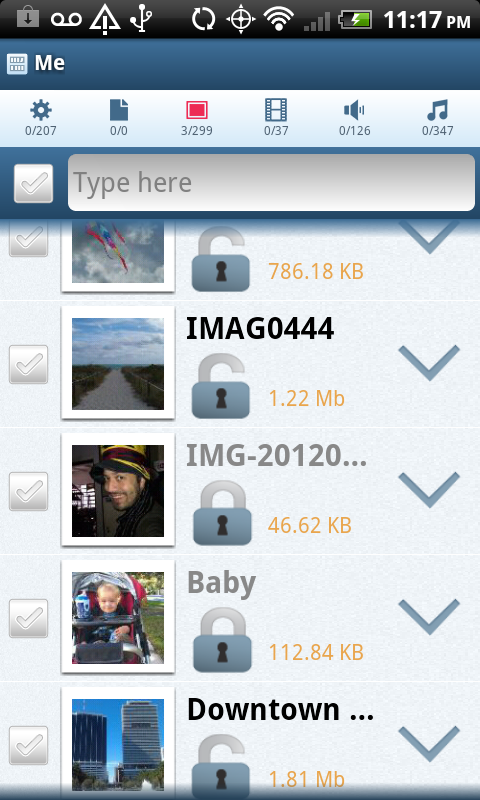
Now when you’re browsing “My Files”, you will see indicators on the top right corner of the screen letting you know how many files are shared and how many files are not shared. If you touch the indicators, FrostWire will show you only the shared ones, the un-shared ones, or all the files.
Very useful if you just shared a file and you want to unshare it, or viceversa, specially when you have hundreds or thousands of files in your device.
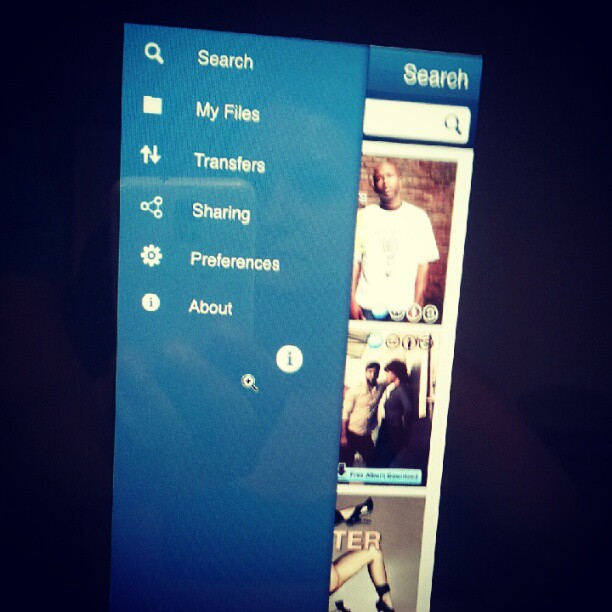
Here’s a sneak peak of the next generation flagship file sharing client for the mobile world.
This next generation will include a brand new user interface with a more streamlined experience, you’ll be able to search, access and consume your files better than ever with FrostWire for Android, which will integrate tightly with FrostWire for Desktop, no matter on what operating system you run, with absolutely no setup required, just run and share.
New simpler and more capable navigation controls are coming to Android. (Yes this will solve the issue on some devices that no longer have a “Menu” button). Coming soon.
The latest version of FrostWire for Android addresses very important issues affecting search experience.
We’ve made a number of improvements in our search algorithm, we’ve improved local indexing (the more you search the better it gets) and we’ve made the process of searching a bit more interactive so you have a clue what’s going on during search.
International users should be able to find more files as we’ve fixed a few UTF-8 encoding issues we found on the Azureus core, so files with non western characters should be easier to find.
The response from users that installed or upgraded the app during this week tells us that we’re on the right path to a 1.0 release.
If you also have a desktop computer running FrostWire and you’re not using FrostWire to transfer files from or to your PC, boy, are you missing out, take a look at these videos.
Full Changelog
FrostWire 0.9.12
– Search performance improvements.
– Better international search thanks to improved special character support.
– Search status UI feedback improvemens.
– Search results remain on screen when the device is tilted.
– Search results remain after a transfer has been started.
– New animated media player status bar for easy access to media player.
If you use your Android device as your car music player and you have nobody next to you it’s always dangerous to take your eyes away from the road to unlock the phone, tilt it the right way and eventually find the “Skip” button to change the song.
We decided to fix this issue by making the FrostWire audio player driver friendly.
When you are playing music on FrostWire it will prevent your Android from locking so it can receive gesture input during playback (the screen will go off but it will still receive input).
Gestures supported
It’s very simple, swipe to the sides to change the song, or swipe down with two fingers to pause/resume playback.
FrostWire's new search now with hints (powered by Google's frequent searches)Better search results and usability Users coming from FrostWire 4 have complained about ease of use and search results. We’ve made our search algorithm more powerful and our user interface friendlier so that you won’t get lost finding the files that you need. We’re bringing a bit of the FrostWire 4 feel to the search form and you’ll have even more control of the search results you see as they are retrieved.
Now you will be able to choose exactly what file types you're interested in
Sending files to friends. No need to upload your files to sketchy websites that are a pain in the ass for your friend to find the download button among so many ads. Not only you can send files as big as your computer can hold, you can also send entire folders and subfolders. The more friends you send your files, the faster they get it because they collaborate. You and your friends make a little cloud when sending files to each other with FrostWire.
Mobile Integration You can now browse, stream or download the files made public by Android devices nearby. Best part, no cables necessary. Samsung users on Mac will love this, as we’ve experienced impossible to fix issues with the Galaxy Tab 10″ which just won’t share files even with the Kies app that Samsung provides.
Screenshot of FrostWire 5 streaming from an Android Tablet
FrostWire for Android implements an open, simple, HTTP/JSON based file sharing protocol that ANYBODY can work with, so we hope to see Web developers, and why not even iOS developers making clients that can talk to FrostWire for Desktop and FrostWire for Android. And if nobody builds them we’re trying to free some time later in the year to make a light version of FrostWire for iPhone/iPod/iPad so that you can send files from your iOS device to your PC, Mac, Linux or Android devices, all wirelessly (no need for USB and iPhoto, no need to cut your videos or to downgrade their quality to upload them to youtube if all you want is to send that HD video to your mom’s)
Make overNew Fueled skin appears on FrostWire 5.3.0. The screenshot shows a new application header, with the media player present at all times and a lot more polish with respect to custom made icons and backgrounds, textures. More to come.
Those and a lot of other features and fixes are ready. If you cannot wait to try these, you can always download the sources and build FrostWire yourself in two steps (ant; ./run)
frostwire (5.3.2) stable; urgency=high
  * Reverted H2 library to v1.3.160

 -- FrostWire Team   Sun, 12 Feb 2012 09:09:46 -0500

frostwire (5.3.1) stable; urgency=high
  * Updated default album cover image with an anti-aliased frostwire sphere.
  * Fixes bug where clicking on the current song would switch to the library
    but the button on the top would not be selected.
  * Adds missing icon for "copy magnet" on Send file dialog.
  * Library explorer and Playlist explorer are now divided by a split pane
    for a better experience.
  * Hides hints popup when search is triggered with a mouse click.
  * Updated search icon (magnifier).
  * Fonts are reset when the setup wizard is shown so the wizard can work
    properly.
  * New View > Reset Font Sizes action.
  * The first time the Library button is used "Finished Downloads" is
    preselected to give the user a clue of what can be done.
  * When a new playlist is created, a graphic is shown to hint the user
    about dragging audio files there.
  * Updated H2 library to v1.3.164

 -- FrostWire Team   Sat, 11 Feb 2012 18:22:15 -0500

frostwire (5.3.0) stable; urgency=high
  * Search form looks similar to FrostWire 4 but now allows user to search
    for more than one file type at once.
  * Improvements in search algorithm.
  * Send file/folder feature more effective between just 2 peers.
  * Simplification of search form interface, looks similar to FrostWire 4
  * Phone & Tablets tab is gone, integration with Android devices is now
    part of the Library under a "Devices" tree item.
  * Browses, Streams audio, and downloads files made public by Android devices
    in the same network.
  * When entering a search hints are shown to type less (powered by Google).
  * Sorts transfers by "Seeds" correctly.
  * Improvements on Library action buttons, now a "Launch" action is available
    and buttons are shown/hidden depending on context.
  * Fixes bugs where files on a audio playlist could not be dragged out.
  * Fixes bugs where deleted files would still appear on the library.
  * When right clicking on selected finished transfers and copying an infohash
    you won't end up with a trailing newline on the clipboard.
  * Sharing ratio of a torrent that you stopped and started seeding again
    will not be infinite and will be based on the total sizes of the files
    being shared.
  * Now when the transfer split pane is dragged up, the pane border is painted
    correctly on top of the image overlay.
  * Fixes repainting glitch when moving split pane on top of promotional
    graphic.
  * Lots of icons have been revamped for a more uniform look.
  * Null Pointer Exception issues #100, #103, #104.
  * Fixes issue #93 chat action causing frostwire crash.
  * Flickering issue on song progress bar resolved.
  * Simplified torrent creation. User now doesn't have to make up her mind
    about choosing a file or a folder, the file selection dialog now
    handles this for her.
  * Brought back "Stop" search button.
  * Removed lingering "Show/Hide player" menu entry on status bar context menu.
  * If seeding transfers are meant to be finished, newly finished transfers
    are not hidden for that session.
  * Audio files can be launched using the operating system's default player
    Right click on a file "Launc in "
  * Removed BTJunkie search engine.
  * Added KickAssTorrents (kat.ph) search engine.
  * Fixes issue where downloading removing a partial transfer would
    delete previously completed downloads of that same torrent.

 -- FrostWire Team   Fri, 8 Feb 2012 21:07:56 -0500
Screenshot of featured content on an Android Smartphone
All content creators featured on FrostWire for Desktop will now reach the FrostWire for Android user base.
Before the old FrostWire for Android was taken out of the Android market it had already surpassed a million installs, and over 250,000 daily active users.
We don’t know at this point how many people still have it installed, but it’s well over 100k users that will get the update message guaranteed when the new release is out.
FrostWire for Android will be a great channel for independent content creators to reach worldwide audiences wherever they are via BitTorrent.
If you are a content creator (Musician, Film Maker, Writer, Software Developer, Photographer) willing to share content under Creative Commons or some form of free license contact the FrostClick Team now, promotions are absolutely free, but only world class quality content will be accepted.
Here are a few screenshots of how it’s like to get your featured content on FrostWire for Android.
First touch promotional graphic, FrostWire will ask you for confirmation before starting a download and shows how much space this will take locally after it’s done.
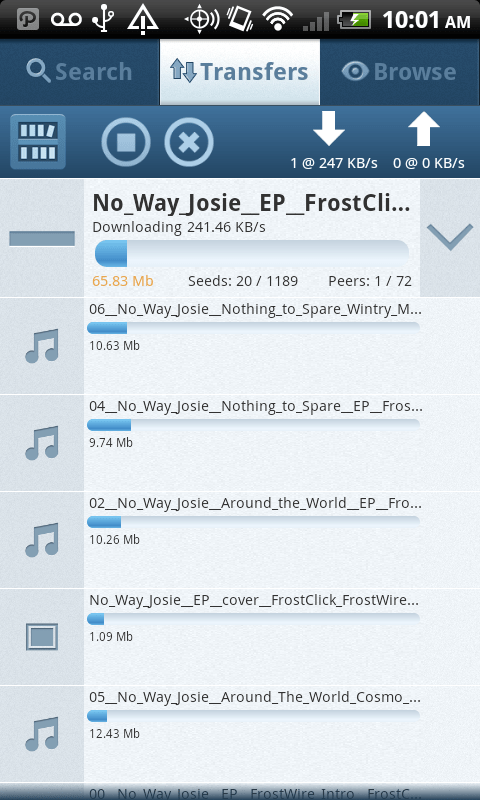
The download starts, details about progress, the number of seeds and peer connected to us are shown in real time.
You can expand to see individual file download progress for that transfer if the transfer contains more than 1 file.
You can cancel or pause (resume) the transfer anytime.
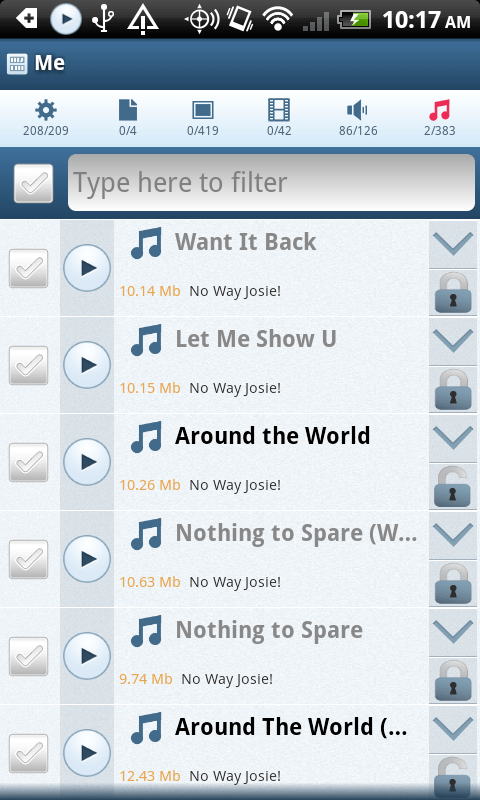
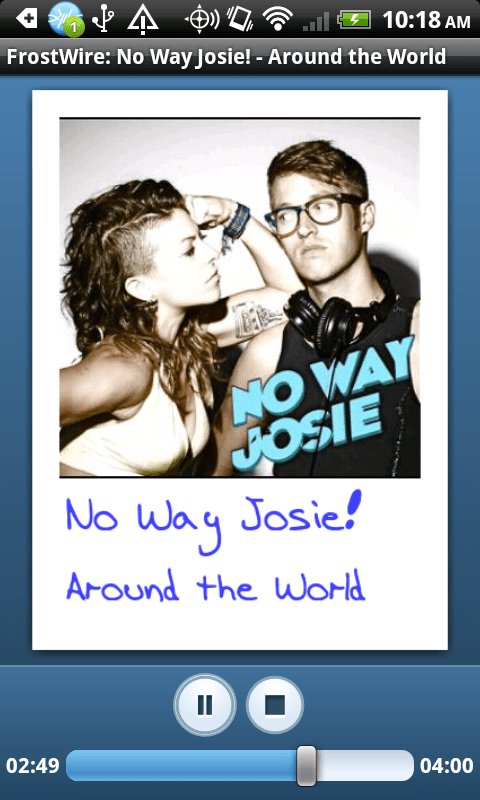
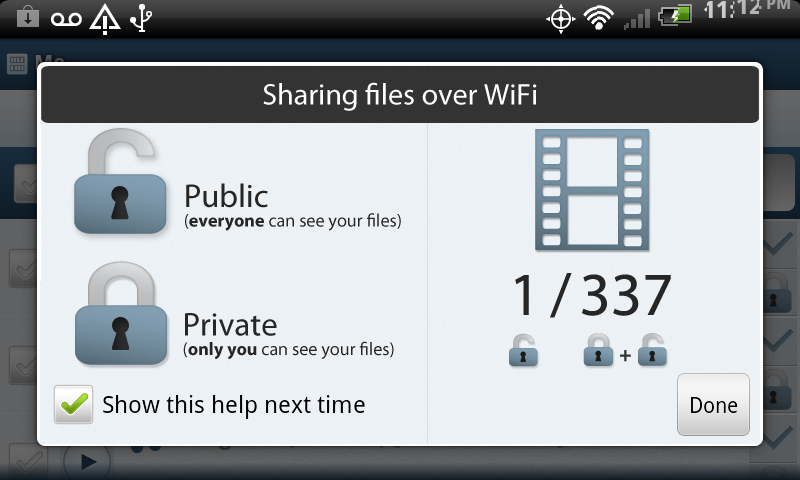
After the download is done, files will be on your “Library”, browse your audio files, hit Play. By default finished downloads will be PRIVATE (but you can configure all your downloads to be automatically public on the local WiFi network). If you make your files public, friends running FrostWire for Android, or FrostWire +5.2.12 will be able to stream your files or download them from your phone. On the screenshot below, we’ve made the song “Around the World” by No Way Josie public on the WiFi network.
And this is how it looks on the audio player (accesible through the Android notification pane)
What’s new?
> Uses way less memory per connection.
> It’s able to support more connections.
> It browses and downloads faster
> See what’s being uploaded
> FrostWire for Android just turned 1 year old (~950,000 total installs as of this post)
Geek Speak
Basically we rewrote the entire networking core using a nonblocking io framework called Netty.
In the past FrostWire did a lot over UDP to avoid creating threads, then little by little we started migrating some of the messages over to TCP and things started working better, however we had to keep the number of peers you connected to a bare minimum since each connection required us to create a new thread. In theory the linux kernel used by most android should be able to handle lots of threads without much cost but in reality this is not so pretty.
With Netty we’ve gotten rid of a lot of threads and we’re able to use the network interface very efficiently to deliver and receive messages in just a few threads. This results in a lot more free memory and the new version of FrostWire (if connected to less than 20 peers) should feel a lot snappier, browsing (as more people upgrade) should work better, and the same with downloads and search.
On the UI side, we fixed a lot of crashes you guys reported (thanks) and now if you Touch the green Upward arrow when someone is uploading files from your Android, you will be able to see what files are being uploaded, at what speed and what the progress is. We didn’t add a “cancel” because we figured the new sharing policies are so strict now, that there should be no reason why you’d be sharing something you didn’t want to share in the first place, and if you did, you can always disconnect or exit the application and the transfer will be killed.
More coming
A hell of a lot more coming, with this release we’re now 1 year and 1 month old. We hope to regain the lost speed/time spent on the FrostWire 5 for desktop release. Expect a lot of changes during the next months in the UI, we’re thinking of new ways (probably UI rewrite) to make sharing both easy and safe. The last updates were meant to keep your files safe so that nothing would be shared unintentionally, however we know the UI is probably a bit hard to grasp for regular users but this will change soon.
We do read all the feedback you leave in the android market, wish we could leave responses, but just know we care a lot about this project and we are working hard to make it better with each release.
If you like this release don’t forget to rate us in the android market, we keep our fingers crossed that you’ll feel the difference.
Full Changelog
FrostWire 0.6.0:
– Core-Upgrade: Inspired by Twitter’s Engineering blog http://goo.gl/bg5jk the protocol stack
was rewritten using NIO/Netty. Reducing the numbers of threads, memory and battery consumption
considerably. The Application should now be able to browse more peers and feel a lot snappier.
– UX-upgrade: See what files are being uploaded.
– UX-upgrade: The multiple selection checkboxes are now available for unshared files.
– UX-upgrade: Long pressing on an unshared file and sharing it will now ask
to enable sharing for the file type if it was disabled, just like on the padlock icon.
The current file type being browsed will also be reloaded to show the user this file type
is now available for sharing.
– Core-fix: Makes sure FrostWire won’t go beyond the max number of peers.
– Bug-fix: Crash when trying to check all files when there are no files.








 Official FrostWire Blog