FrostWire 5, BitTorrent So Simple

After over 6 months of work the first FrostWire 5 release is finally out with over 50 upgrades, fixes and new features.

The most important new features of FrostWire 5 are:


1. Faster and richer curated search results from the top file sharing engines of the Internet

2. The ability to send large files or entire folders to other people with a simple HTTP link

3. Improved BitTorrent Support, including creating torrents & downloading partial torrents

4. New looks and better media support by the music player

Most of these updates and changes were the product of community feedback, long debates and hard decisions made to help shape the future of our file sharing community.
Let’s review each one of these in detail.

Faster, cleaner search results

The number one complaint from our user base was spam. Without much development muscle in our community after LimeWire was shutdown, all of our updates and heuristics were unable to upkeep with the never ending battle against spam. Power users were able to fine-tune their FrostWires with what we had provided, but the mainstream users were falling constant victims of spam and fake search results.

With the landscape of file sharing shifting to BitTorrent we saw the opportunity build up on it’s strengths and to make the BitTorrent experience a lot easier and simpler, one that your mom can handle.
We dropped Gnutella search and replaced it with the curated indexes of major HTTP BitTorrent Search Engines (and we’ll keep adding more with each release). The results are instant search results, and no spam or fakes.

As always, a portion of users might still have to go through a bit of a learning curve transitioning to a BitTorrent only application. First-time BitTorrent users might not initially realize that most torrents contain more than one file, for example, or know that you can selectively download files from a single torrent. We’ve included all sorts of tools to let users filter search results and filter the content inside torrents as well.

FrostWire 5 combines the search results of all of listed engines in one place so you don’t need to leave your FrostWire window and figure out which torrent search engine to use. When you start a download, FrostWire will show you from which webpage the torrent came from, giving the search engine a deserved page view for each download started from FrostWire 5. We hope this will foster more competitiveness in the BitTorrent indexing community and more even better indexed content. As those search engines see what kind of searches are coming in, we believe that they’ll start adjusting their practices to attract more FrostWire users to download their torrents and both, the torrent indexing community and the torrent content consumer, will benefit from FrostWire 5 fully entering the BitTorrent community.

Send large files and folders

We think one of the biggest, most common and at the same time the simplest problems on the Internet is sending large files between computers. If you often work with large files (and files are getting larger and larger as computing gets better, storage cheaper, cameras have better image resolutions for both video and stills) and you need to send them to your clients, friends, coworkers or family, email just may not be an option.

What’s the alternative?
There are many services where you can upload your files for others to download. The problem is, which service do I use? Many of the free file upload sites are simply too difficult or even close to impossible to use because they are overloaded with deceptively placed ads, pop-ups, timeouts and other file size and bandwidth limitations. They also constantly nag you to purchase paid versions, making it extremely frustrating for free users. There are of course paid and enterprise alternatives that do work, but not everybody wants to or simply can pay for the subscription. The services simply cannot allow free accounts because of the high storage and bandwidth costs.

Because FrostWire works on the distributed BitTorrent network, you can literally grab terabytes of data and make them easily available to friends and family right from your computer at no cost. Best of all, the more people you share this data with, the faster they can download. They will collaborate with each other as they download the pieces and pass portions of the files along to others.

You can have your latest and greatest HD Viral Video, in all it’s quality and glory, sent to millions of computers just by sending out a link that FrostWire will create for you in seconds. The receiving parties will need to use FrostWire, and they will be able to pause/resume the download and help you seed the content for others. Yes, you can distribute a file to millions of people, right from your computer. No need to sign up to any service and no need to pay for anything (maybe excluding your Internet connection!) FrostWire 5 allows you not only send a file, but to send entire folders of content. No more limits on file size, type, video duration or quality! You can start a revolution right from your home computer – the possibilities are unlimited!

The process is super simple. All you gotta do is drag and drop the file or folder you want to send onto the FrostWire window, and FrostWire will, under the hood, create and seed a torrent for you. It will then give you the option to Copy the text with a HTTP link or a Magnet link that you can later send to your friends and family. There’s even a Send to Twitter option in case you have something important to share with the world.

Improved BitTorrent Support

We rewrote our BitTorrent integration with Vuze’s core, a powerful, stable and fast BitTorrent core library, from scratch. We also added many features related to BitTorrent that FrostWire 4 didn’t have.

Some of the new features include easy torrent creation (both decentralized torrents and tracker based torrents), sending large files and folders (which, as we have explained is also done on top of BitTorrent, but the technology aspects have been hidden from the user), being able to filter and download individual files from torrents, easy magnet link creation, DHT support and more.

New Looks & Better Media Support

We removed of the old skinning system and integrated a technology called “Substance” that allows us to paint the FrostWire interface however we want. It also adds a nice animation effects to improve the user experience. FrostWire 5 comes with over 25 new substance skins.

We are in the process of designing a beautiful new skin for both our desktop and android products to give you a more uniform experience across the platforms and are planning some major UX updates to Library Tab, but that’s scheduled to come out in the following releases.

We’ve also given our barbed wire sphere a well deserved make over, we hope you like it too.

The FrostWire 5 installer dropped about 50% of it’s size when compared to FrostWire 4, so we decided to use the space we had lost for something very useful and we tackled another part of the software that was not performing up to our standards – the media player.

Library Tab, but that’s scheduled to come out in the following releases.

We’ve also given our barbed wire sphere a well deserved make over, we hope you like it too.

The FrostWire 5 installer dropped about 50% of it’s size when compared to FrostWire 4, so we decided to use the space we had lost for something very useful and we tackled another part of the software that was not performing up to our standards – the media player.

The old media player was a 100% Java MP3 decoder which wasn’t 100% compatible with all mp3 files. We have decided to bring a project on board that knows how to playback all media well, so now FrostWire comes with a binary build of mplayer that supports the most popular audio codecs flawlessly. For now we’ve decided to leave video playback out of the picture to keep the size of the installer to the bare minimum.

The Future

This release of FrostWire 5 is merely a beginning of many ideas that can and will happen on top of the BitTorrent network. We believe that BitTorrent is a great technology that is being majorly underutilized. In time, we’ll show you what we mean, just stay tuned.

Download FrostWire 5

Changelog

Follow @frostwire on Twitter.

FrostClick.com

FrostWire 5 Now with “Send File” capabilities #frostwire5 #bittorrent

Download FrostWire 5

In case you don’t notice many of the changes, the most important ones are:

Send File & Send Folder

Available on the “File” Menu or by right clicking on an active torrent in the transfer manager.

This feature allows you to send a file or a folder, no matter its size to another person using a simple http:// link. The other person needs to have FrostWire +5.0.6 running to receive the file.

The page shown on the link you send will guide the receiving person through the process with a series of live notifications. The moment FrostWire starts running it’ll automatically start downloading the file or folder over the bittorrent network. You as an user will never have to deal with .torrent files, trackers, or anything, it’s all transparent and it rocks.

With this new feature we hope we can give “normal people” a new and convenient alternative to the nuisance of sending large files over the internet.

Here’s a few benefits of using FrostWire to send files to friends:

  • No file size limits (in theory up to 16TB but we don’t have a harddrive that large to test)
  • You can send entire folders!
  • No need to register or have your files uploaded to a third party service.
  • The more people you send the file, the faster it gets because each FrostWire will collaborate as a swarm
  • The receiving party won’t get lost with Advertisement or will have to wait minutes before the download starts
  • The receiving party can pause and resume the download
  • The receiving party can select which files to download (if you send a folder)
  • No ads
  • The downers?

  • You need to leave FrostWire running for others to get the file (until there’s enough people sharing that is)
  • If your friend doesn’t have FrostWire she’ll have to install it and run it to receive the file
  • We don’t recommend using this feature for private files since anybody with the link can download the file as well
  • Partial Downloads are now an obvious feature

    Now all search results have [+] icon left of the search result name, if you click there the Partial Download window opens to let you see the contents of the torrent. If the torrent has way too many files and you’re just interested in a few you can use a type as you text search filter to find what you need in the torrent easily.

    And for the curious, here’s the full changelog for this release

    FrostWire 5 changelog:

    frostwire (5.0.7) stable; urgency=high

    * UX upgrade, send file or send folder support when a file or folder
    is dropped on FrostWire.
    * UX upgrade, file choosing dialogs on Mac now also show mounted volumes.
    * UX upgrade, playback support for m4a files.
    * UX upgrade, search result filters re-arranged.
    * UX upgrade, main search button gone, updated search text box to include
    clickable search icon.
    * UX upgrade, filters re-arranged.
    * UX upgrade, searches can be up to 50 characters long.
    * UX upgrade, either disconnected or turbocharged, no idle state.
    * UX upgrade, search as you type on the library, no more search button.
    Disconnected only if it cannot connect to the internet.
    * UX bugfix, iTunes options were not visible for Windows users.
    * UX bugfix, fixes possible UI freeze on startup.
    * UI bugfix, sending songs to iTunes on Mac is now done in a single process.
    * Mac OSX Lion compatible.
    * Bugfix, issue where opening a torrent from maglnk.com would result in a
    double invocation of the Partial Dialog window.
    * Bugfix, when user didn’t start a partial download the torrent wouldn’t be
    deleted.

    — FrostWire Team Fri, 15 Jul 2011 15:13:16 -0500

    frostwire (5.0.6) stable; urgency=high
    * New feature, Send file. Available on File Menu and Transfer Manager.
    * New feature, Send folder. Available on File Menu and Transfer Manager.
    * UX upgrade, we now have a [+] icon next to search result file names to
    show partial download dialog.
    * UX upgrade, when a partial download is cancelled, the entry is removed
    from transfers.
    * UX update on partial download dialog. Includes new text filter.
    * UX fix, Library search now also looks for .torrents on “Torrents” folder.
    * UX fix, Mac OSX file menu does no longer show “Exit” action.
    * Fixes bug, incomplete files are no longer exported to iTunes playlist.
    * UX update, Help Menu now says “Sharing Help”. Items rearranged.
    * UX update, rearranged View options into single panel.
    * UX update, torrent seeding settings are now a control of its own with
    an explanation of what seeding is.
    * UX update, the installation wizard now forces the user to decide if
    she wants to seed or not seed to continue. Links to what is seeding
    are in place.
    * UX update, in Windows and Linux, when the user Xs the window the user is
    explained that the application will be hidden and is given the option
    to exit.
    * UX bugfix, font size can now be increased.

    — FrostWire Team Mon, 27 Jun 2011 10:57:00 -0500

    frostwire (5.0.4) stable; urgency=high
    * UI upgrade, Create and seed New Torrents.
    * UI upgrade, Ability to throttle torrent transfer speeds
    * UI upgrade, Copy info hash from torrent.
    * UI upgrade, Copy magnet link url from torrent.
    * UI upgrade, Searchable library. Searches recursively downloaded
    files, folders and torrents.
    * UI upgrade, Search results filterable by Torrent Search Engine.
    * UI upgrade, Search results filterable by file size.
    * UI upgrade, Search results filterable by number of seeds.
    * UI upgrade, Search results filterable by keywords as you type.
    * UI upgrade, Ability to download partial files.
    * UI upgrade, Promotional slides can now be switched by the user.
    * UI upgrade and bug fixes on Phone & Tablets tab.
    * UI upgrade, Ability to rebuild “FrostWire” playlist on iTunes.
    * UI upgrade, Replaced legacy skinning code for “Substance” skinning system.
    * Core update, audio playback is now done using mplayer.
    * Core update, Vuze core integration with transfer manager.
    re-written from scratch.
    * Core update, No Gnutella support. Multiple library dependencies gone.

    — FrostWire Team Fri, 24 Jun 2011 12:00:00 -0500

    FrostWire 5 BETA Testers wanted – BitTorrent So Easy

    Sign up for the beta test

    FrostWire 5 (BETA) is a new generation of our file sharing software that does away with the old and broken to adjust to the requests of the user community throughout the years. We need your feedback to make sure the final release will meet all the goals we’re trying to accomplish with this next generation of P2P software.

    With FrostWire 5 you can:

  • Get search results without fakes or spam.
  • Get much faster search results with plenty of seeders.
  • Download partial files out of torrents.
  • Playback audio files without any issues (now powered by mplayer)
  • Create and seed torrents.
  • Send files to friends using magnet links (direct integration with Facebook coming soon)
  • Enjoy a new look with new “Substance” skins (more skins available with final release)
  • FrostWire 5 is a safer, faster, cleaner and lighter P2P client. It will feature a few surprises that we hope will reshape the landscape of legal file sharing, free content discovery and a massive expansion of Creative Commons content to the world.

    New FrostWire 4.21.8

    A new FrostWire for Desktop is out with lots and lots of bug fixes that had a long time coming as well as some new policies to better protect you from sharing unwanted files by mistake.

    New UI Elements have been added or modified for your convenience and better understanding of the application.

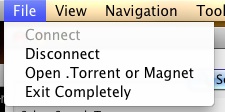
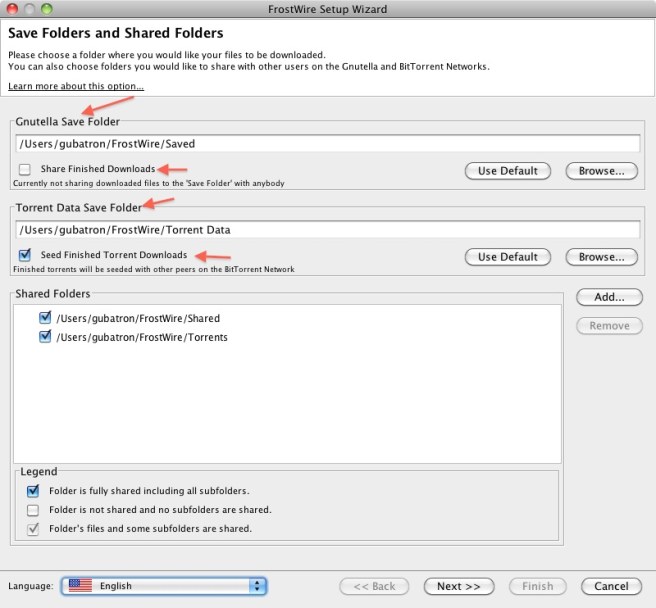
    Take a look at the changes on the File Menu, and all the better explained Sharing options for Gnutella files as for Torrent Seeding control.


    With the changes done to the File Menu, many new users will easily know how to completly shutdown FrostWire if they want to, no need to right click the FrostWire Icon on the Icon Tray if you want to leave.

    We also changed the wording from “Download Torrent/Magnet” to “Open Torrent/Magnet” to better follow the old school tradition of File -> Open across many software applications.

    One bug that had a long time coming had to do with choosing your Torrent Data Save Folder path, now you’ll be able to select an external drive if that’s where you choose to save your Torrent Data files, thanks to all the people on the forum that reminded us of these and many other issues.


    Now, from the Library you can intuitively find the Sharing Options with a new “Options” button that’ll take you to the Sharing Options of the application. Also, you will be able to see the files downloaded via BitTorrent on the Library Tree Node named “Torrent Saved Files”

    Updated Policies

    When you go through the configuration Wizard, you will see a clear difference between your “Save Folder” and your “Shared Folder”. You will be able to choose wether or not you want to share gnutella downloads as individual files or not. By default you won’t be sharing finished downloads. Incomplete files will also not be shared by default.

    Also, if you decide to not share new finished downloads, all previously shared individual downloads that were on the default Saved folder won’t be shared any more.

    Your Torrent Data Folder cannot be shared in Gnutella. This is to avoid any inconsistencies that may arise when a user doesn’t want to seed a torrent. We have tried to make a clear distinction between Gnutella Sharing and BitTorrent Seeding.

    You can now choose wether or not you want to seed finished torrents or not. By default you will be seeding torrents but you’ll be able to turn this off during the configuration wizard. We have made this decision so that you’re not catalogued as a “Leech” by torrent trackers and you have the best experience when it comes to using bittorrent.

    Spam Results are also now hidden by default. You will know how many results are being hidden by looking at the numbers on your Search Result Tab Title. If you see something like “my keywords (7/234)” on the title, that means that you’re looking at 7 results and 234 Spam results detected and hidden from you for a better experience. You can always display Junk Results by Going to Tools -> Options -> FIlters -> Junk -> Display.

    Also, you can now Block malicious hosts right after marking their Search Results as Spam, no need to right click on them after you’ve marked them as Spam, FrostWire will show you the option to block malicious hosts if you haven’t blocked them already.

    A lot more coming, stay tuned.

    4.21.8 Changelog

    frostwire (4.21.8) stable; urgency=high
    * Fixes a possible freeze reported by some users when the configuration
    wizard is shown.
    * Fixes issue when a user changes default Gnutella Save Folder
    and unchecks Sharing finished downloads. Individually shared
    files from the old Save Folder would still be shared.
    Now all individually shared files will be unshared if you uncheck
    this setting.
    * Now users don’t have to re-start to stop seeding after they’ve changed
    their torrent Seeding Configuration. All torrents old and new will stop
    seeding as soon as the setting is applied.
    * Better wording to explain on which networks files are being shared on,
    Gnutella or BitTorrent.
    * Changed color of “Sharing Options” gear icon to blue, gray
    icon may have seemed as if the button was disabled.
    * Added “Sharing Options” gear button on Search Tab. It’s only visible
    once a search has been started.
    * Added Help Menu options to learn about how to share/unshare files,
    torrent seeding, and how to avoid being scammed into paying for
    FrostWire. DO NOT PAY FOR FROSTWIRE.

    — FrostWire Team Thu, 16 May 2011 17:40:20 -0500

    frostwire (4.21.7) stable; urgency=high

    * Makes sure cancelling torrents that have finished are not deleted.
    * Folders created by torrents that are cancelled during download are deleted to avoid any unwanted file sharing.
    * Fixes a bug when migrating from an older version of FrostWire on which previously Saved and individually shared files would still be shared after not sharing finished downloads on the migration wizard.
    * Fixes a bug on configuration screens that could make the application freeze for a few seconds before moving towards the next screen.
    * Migration wizard will always be shown to make sure users are aware of what they’re sharing.
    * Sharing completed files is always set to off by default on the configuration wizard.

    — FrostWire Team Thu, 16 May 2011 17:10:25 -0500

    4.21.6 Changelog

    frostwire (4.21.6) stable; urgency=high

    * Fixes a bug where some Debian systems that didn’t support the Icon Tray would crash on startup.
    * Fixes a bug where running FrostWire for the very first time (and later) display Uploads number -1 in the bottom status bar.
    * UX improvement Junk & Block. When marking Junk Results UI offers to block malicious hosts that haven’t blocked already.
    * Policy update, Incomplete files are not shared by default to avoid sharing files you started downloading and didn’t want.
    * Policy update, Finished downloads are not shared by default to avoid confusion between files on Shared folder versus files on Save folder.
    * UX improvement, better explanation and option to turn on/off individual sharing of finished downloads (that end up in Saved Folder) during FrostWire setup wizard.
    * UX improvement, when user turns off Finished Download sharing those files that were shared as individual files inside the ‘Saved Folder’ will not be shared anymore.
    * UX improvement, File menu now has option to Exit FrostWire completely.
    * UX improvement, File menu now says “Open Torrent/Magnet” instead of “Download Torrent/Magnet” for clarity.
    * Bug Fix: The Torrent Save folder is now considered correctly, now users can set a Torrent Save folder on external drives.
    * Bug Fix: Slideshow component had an issue where it would not update correctly the URL of the currently displayed slice if it had issues fetching the image file, this could in turn sometimes cause 100% CPU utilization.

    — FrostWire Team Thu, 5 May 2011 11:03:14 -0500

    About FrostWire
    “FrostWire is a Peer-to-Peer file sharing program for the Gnutella network and BitTorrent protocol. It is built on the Limewire source code, and it is written in the Java programming language. Development of the program has been active since the program was first released in September 2004.” Wikipedia.

    Download FrostWire

    Do not pay for FrostWire, FrostWire is absolutely Free as in Free Beer

    FrostWire “Torrent Joint” v4.20.9 Released – (Now powered by Vuze Technology)


    The Internet – Team FrostWire – Last Update July 3rd 2010

    The FrostWire team is constantly on top of the P2P & file sharing news striving to keep the application on the edge of technological developments. We have always had a clear vision of where things are headed in our little part of the Internet and we’re proud to be a part of community that can adapt to changes very quickly.

    In 2009 we saw a lot of talk about and many changes ocurrying to the most popular torrent tracker websites. We also observed an increase in general usage and understanding of the underlying technology and it’s benefits. Until now, FrostWire used legacy LimeWire technology to support torrent downloads and was able to decently serve our community torrent needs. We thought that decent was not enough.

    Now FrostWire’s BitTorrent engine has been entirely replaced and features all the power of a lightweight version of the Azureus BitTorrent Core under the hood.

    Not only all the prior issues our users reported with torrents are gone, but downloading torrents with FrostWire is faster than ever. Torrent Bootstrapping has also significantly improved and in some cases the average download speeds are even 3x faster than with our previous torrent technology.

    The introduction of gnutella based .torrent file search with our last release clearly stated our direction, a truly decentralized P2P network with the best of the BitTorrent and Gnutella networks.

    BitTorrent Magnet Links Support
    The new version of FrostWire also supports BitTorrent Magnets, meaning you only need to get special URL (no initial file downloads necessary) and FrostWire will fetch the Torrent Metadata on the P2P network (using the Azureus DHT technology).

    .torrents can survive also in Gnutella
    Now, not only will .torrent files survive in the Gnutella network, but they will be fully searchable [in gnutella] and ready to aid in BitTorrent downloads may those torrents ever be removed from web based indexing services.
    Every member of the file sharing community will be able to share both the .torrent files as well as the actual content files allowing for the BitTorrent traffic to be fully de-centralized, thanks to Gnutella search and the BitTorrent DHT.

    Get high on the BitTorrent DHT with FrostWire “Torrent Joint” version 4.20.1 and update your client now.

    Other User Experience Updates
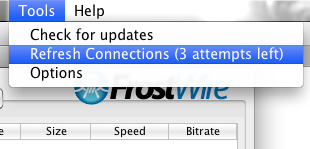
    If you’re not getting enough search results from your peers, or you are seeing too many spam and fake results, it’s a good idea to Refresh your connections. FrostWire will fetch a list of healthy and recently crawled ultrapeers willing to take more peers.


    Our community members repeatedly told us that the percentage indicator for download progress was not enough, so we added a new column that shows the progress of the download in bytes. Thanks for your feedback.

    If you speak geek, here’s the changelog.

    Changelog:
    Version 4.20.9 "Torrent Joint" (August 2010)
    - Fixes bug where FrostWire would not try to open exclusively UDP tracked torrents.
    - New option -Dultrapeer=1 forces FrostWire to run as Ultrapeer. Only for hackers that build FrostWire.
    
    Version 4.20.8 "Torrent Joint" (August 2010)
    - Upgrades search, now powered with ClearBits.net results a service
       that indexes thousands of legal torrent files. (formerly known as
       LegalTorrents.com)
    - New BitTorrent Connection Settings Available.
    - New ability to configure the max. number of active torrent downloads.
    - New ability to configure the max. number of peers per torrent.
    - New ability to configure the max. number of torrent connections.
    - New ability to configure the max. number of torrent uploads.
    - Fixes torrent auto resume bug.
    
    Version 4.20.7 "Torrent Joint" (July 2010)
    - Improves torrent search dramatically.
    - Upgrades to protect search results from spam.
    - Source packaged (.dsc) for Debian/Ubuntu.
    
    Version 4.20.6 "Torrent Joint" (April 2010)
    - Upgrades Azureus Core to version 4.4.0.0 - Thanks to the Vuze/Azureus team for their hard work.
    
    Version 4.20.5 "Torrent Joint" (March, April 2010)
    - Fixes audio player issues. Now all MP3s should support skipping and gain control.
    - Fixes bug on status bar speed meter. Now BitTorrent uploads speeds are added up and shown correctly in it.
    - Fixes High CPU usage bug while loading hostiles ip list.
    - Fixes a bug on MacOSX on which FrostWire would only start downloading a .torrent only if FrostWire was already running.
    - The FrostWire windows installer will now clean FrostWire Desktop shortcuts if uninstalled.
    
    Version 4.20.4 "Torrent Joint" (March 2010)
    - Fixes connectivity issues for Mac version.
    
    Version 4.20.3 "Torrent Joint" (March 2010)
    - Fixes a bug where files couldn't be dragged out of the Library.
    - Fixes a bug where opening a magnet link would freeze the UI while it was being fetched in the DHT.
    - Fixes a bug where magnet links that were dropped on FrostWire wouldn't start downloading.
    
    Version 4.20.2 "Torrent Joint" (HotFix)
    - Fixes a bug on torrent resume.
    - Installer sizes reduced over 58%
    
    Version 4.20.1 "Torrent Joint" (February 2010)
    - Major Upgrade: BitTorrent Engine replaced for a lightweight version of the Azureus BitTorrent core.
      FrostWire has become a far superior BitTorrent client starting version 4.20.x now supporting:
            - Trackerless Torrents (via Azureus DHT)
            - Improved Magnet link support (BTIH Magnet Links)
            - SuperSeeding
            - +100% Faster Torrent Connection Bootstraping  (No more "More Sources Needed" for .torrents that failed before)
            - +100% Faster Torrent Downloads in some occasions than 4.18.x
            - Transport Encryption capabilities
            - Improved UPnP implementation
    - New Feature: The Download Manager now has a new column showing the amount of bytes downloaded per download.
    - Update: The "Refresh Connections" Tool is now available even if you are Turbo Charged.
    - Fixes a bug where Crash Reports would show an old version number. 


    Screenshot of FrostWire “Torrent Joint” v4.20 – Click to enlarge

    Related Posts
    FILEnetworks Blog: FrostWire Torrent Joint – Powered By Azureuz BitTorrent Technology

    New FrostWire 4.20.5 out

    Download FrostWire v4.20.5

    FrostWire v4.20.5 is available now for Windows, MacOSX and Linux operating systems.

    FrostWire is absolutely free DO NOT PAY for FrostWire.

    If a company charged for it ask them for your money back.

    Make sure you download FrostWire only from the official mirrors:
    frostwire.com
    brothersoft.com
    download.com
    sourceforge.net

    Find out more about FrostWire “Torrent Joint” v4.20 series

    Support FrostWire

    You can support FrostWire by recommending it to your friends, you can get these Free FrostWire Stickers* to make that more fun.

    Another way to support development and distribution costs is to get your self a new t-shirt to wear.

    Stickers and T-Shirts are shipped worldwide.

    Changelog

    Changelog for v4.20.5

    Version 4.20.5 "Torrent Joint" (March, April 2010)
    - Fixes audio player issues. Now all MP3s should support skipping and gain control.
    - Fixes bug on status bar speed meter. Now BitTorrent uploads speeds are added up and shown correctly in it.
    - Fixes High CPU usage bug while loading hostiles ip list.
    - Fixes a bug on MacOSX on which FrostWire would only start downloading a .torrent only if FrostWire was already running.
    - The FrostWire windows installer will now clean FrostWire Desktop shortcuts if uninstalled.
    

    FrostWire is licensed under the GPLv3.
    Browse the FrostWire Source Code

    * Stickers are free, you only pay for the postage or you can send a self addressed stamped envelope.

    FrostClick celebrates it’s first million free legal downloads with Free Music Compilation

    Download Torrent

    We’ve put together a compilation album with the hit songs of each one of the artists promoted on FrostWire and FrostClick to add up to the first million downloads.

    All the music in this compilation available for free or under creative commons by these 21 wonderful artists. Their music has been distributed through the BitTorrent and Gnutella networks with FrostWire. Continue reading “FrostClick celebrates it’s first million free legal downloads with Free Music Compilation”

    FrostWire “Arctic Shield” Released

    Download FrostWire “Arctic Shield”

    The newest FrostWire release “Arctic Shield” (version 4.18.5) has arrived.

    By the request of our users the latest version adds some serious connection and anti-spam improvements.

    FrostWire “Arctic Shield” is by far the most significant update of 2009 and we strongly recommend this update.

    Continue reading “FrostWire “Arctic Shield” Released”

    FrostWire shares over 1/2 million free legal downloads via BitTorrent

    At the end of November 2008 the FrostWire and FrostClick team set out on a mission to find talented unsigned and indie artists and labels that were willing to share their music under a Creative Commons license or for some form of free distribution agreement.

    We’re proud to announce that today March, 31st 2008, we’ve been able to share over 500,000 copies of free music and video. The amount of data shared so far is well over 47 Terabytes, at absolutely no cost to the content creators. Another plus of this content being shared over FrostWire is that all this content now has thousands of seeds in Gnutella as well, where it’s now available to millions of Gnutella users.

      Name Type Completed Downloads
    512,056
    1 ESPSIX “Collection of House Music” Music 67,190
    2 Back ELement, A Major Minority Music 60,553
    3 Ray Sytes, Guyanese Pride Music 49,672
    4 Farkus, Thought you should know Music 41,184
    5 Cartel, Tha Throwback Music 38,944
    6 Matt Pond, The Freeep Music 38,447
    7 Sean Fournier, Oh My Music 35,374
    8 Brad Sucks, Out of It Music 34,758
    9 Mike Falzone, Fun With Honesty Music 32,256
    10 Audra Hardt, Superficial Superstar Music 30,447
    11 K Sparks and DJ Pajozo, Definition Music 25,754
    12 Tiara Wiles, This is Tiara Music 19,724
    13 Big Buck Bunny High Definition Short Film/3D Animation 19,088
    14 Sagaboy, Evolution Music 13,670
    15 Georgia Wonder, Hello Stranger Music 4,995 (*)

    If you are an artist or content creator willing to share some of your work for free so that others experiment and get to know your work you should take a look at the requirements to be promoted on FrostClick and FrostWire.

    (*) Georgia Wonder’s Torrent file was hosted and tracked by The Pirate Bay, therefore we don’t have the number of completed downloads.
    We know it was a very popular torrent the week of the promotion because it was among the top 20 seeded music torrents.
    This torrent also was also published to the Mininova tracker where it shows another 9,232 completed downloads as of March 31st, 2009.

    Related Posts
    FrostWire hits the half-million BT mark by p2pnet
    How to Promote your Content on Frostclick/FrostWire
    FrostWire P2P Client Starts Artist Promotion by TorrentFreak
    Saturday in NY: launch party for the Free Music Archive
    Interview with Cory Doctorow, Part 1: Copyfight and Creative Commons
    Sean Fournier Blog: Contributing to FrostWire’s Milestone

    Black ELement free album blasts on FrostWire

    Download Torrent
    Follow Black ELement on Twitter

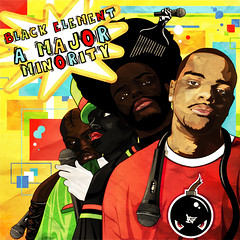
    I’m truly excited to have the opportunity to introduce Black ELement and its free album A Major Minority to the FrostWire community.

    I first had the chance to listen to this album last year and it went straight to my iPod because of Black ELement’s innate energetic talent to rap and to make really good hip hop. It truly stands out from the hundreds of wanna-be-rappers we’ve had to listen to in order to make our FrostWire featured picks every month.

    Continue reading “Black ELement free album blasts on FrostWire”