FrostWire for Android 1.0 preview: Quickly checking what files are shared.

Try it now on your Android (Before the rest gets it on Google Play)

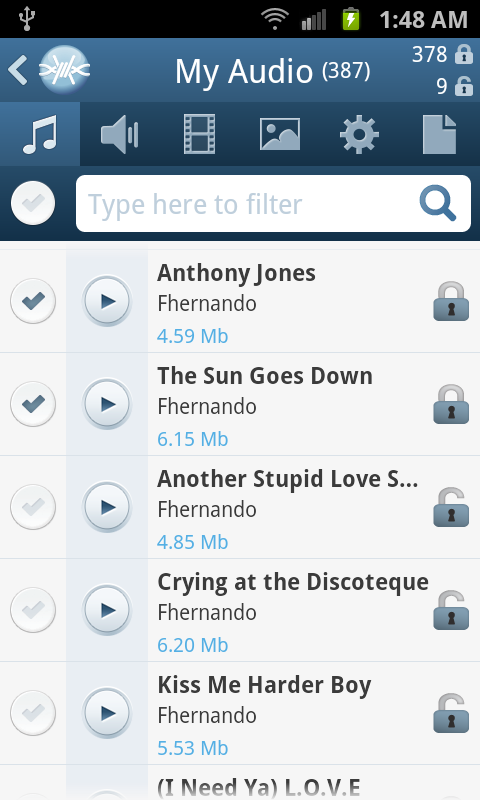
Now when you’re browsing “My Files”, you will see indicators on the top right corner of the screen letting you know how many files are shared and how many files are not shared. If you touch the indicators, FrostWire will show you only the shared ones, the un-shared ones, or all the files.

Very useful if you just shared a file and you want to unshare it, or viceversa, specially when you have hundreds or thousands of files in your device.

Quick Peek at the next generation of FrostWire for Android (1.0.x)

Test the 1.0.0 beta installer

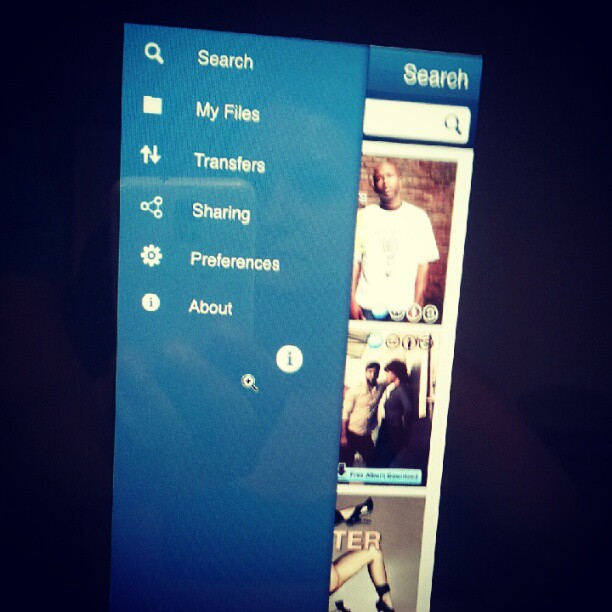
Here’s a sneak peak of the next generation flagship file sharing client for the mobile world.
This next generation will include a brand new user interface with a more streamlined experience, you’ll be able to search, access and consume your files better than ever with FrostWire for Android, which will integrate tightly with FrostWire for Desktop, no matter on what operating system you run, with absolutely no setup required, just run and share.

Get the current version of FrostWire for Android free today, as soon as 1.0 is out you will receive the update message.

New FrostWire 5.4.0 available now

Download FrostWire 5.4.0 for free on the official website

An easier to use, with better search results FrostWire is out and about.
Make sure to grab the update.

Here’s the full changelog:

frostwire (5.4.0) stable; urgency=high
  * No more sound distortion with the FrostWire player volume levels.
  * Search engines update.
  * UX Upgrade: Only one file type per search. Users were getting confused
    with mixed file types in results.
  * UX Upgrade: Forbid multiple selection on partial file selection dialog.

 -- FrostWire Team   Mon, 17 Sep 2012 18:00:00 -0500

Mac OSX 10.8.1: FrostWire is “damaged”??? Not at all, just allow applications downloaded from everywhere.

Users that upgraded to Mac OSX 10.8 or who recently got a new Mac will probably get a nasty message that won’t let them run FrostWire.
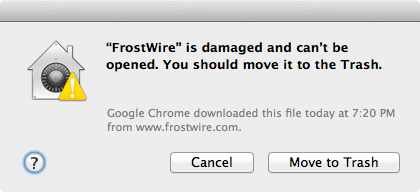

If you see that dialog on your Mac, it’s an EVIL LIE. The App is not “damaged”, we’re not sure why Apple would lie in such a way to users instead of just letting them know that this app didn’t come from their “App Store”.

Basically the geniuses at Apple decided to impose a new setting to not let you run software that doesn’t come from their App Store (next thing we know we won’t be able to run software that doesn’t come from the App Store just like on iOS (iPhones/iPads) and people will have to jail break their desktop/laptops…*sigh*)

To solve the issue, on your mac, go to:

System Preferences > Security & Privacy

and tell your Mac to open apps downloaded from everywhere, like you’ve been doing for the last… well since Macs were macs.
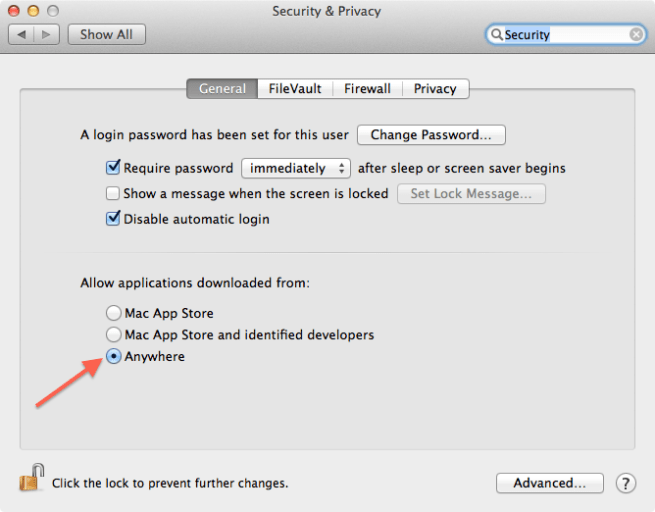
Let’s hope Apple won’t start forcing every app out there to be inside their App Store and then impose draconian rules to enter the App Store, this will be the beginning of the end of Mac OSX if it happens, please let users run the software they’ve downloaded on their computers.

Do not download X3 Codec, It’s a Trap!

Some users have reported that there’s a recent trend in fake audio files that say something along the lines of:

“To listen to this file you need the X3 Codec”

First off, you’re already listening to the file with the audio player that you’re using. If you go to the website they tell you, what you’ll end up getting will be a trojan or malicious file.

What to do?

1. Remove the transfer so you don’t seed the malicious file and make sure the files are deleted from your computer.
2. Go to the “Source” (listed in the search result) and report the .torrent as a fake/trojan/malicious file.

The more you guys report malicious files, the easier it is for indexes and search engines to keep everyone safe.

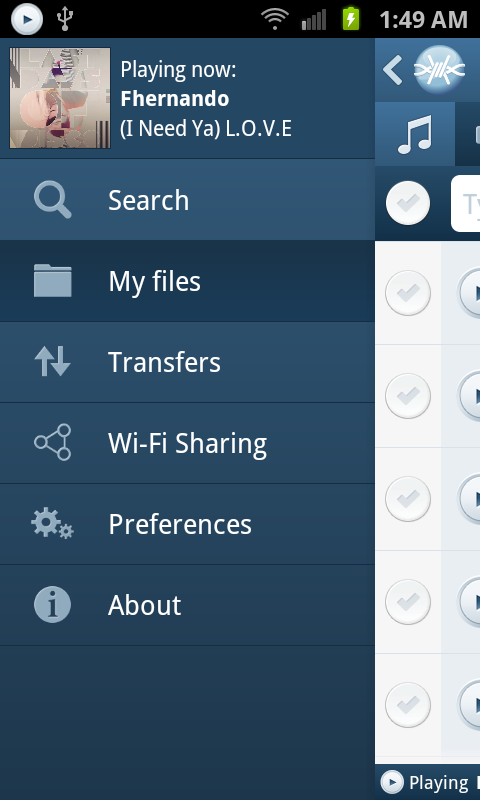
Sneak peek into the next FrostWire for Android

New simpler and more capable navigation controls are coming to Android. (Yes this will solve the issue on some devices that no longer have a “Menu” button). Coming soon.

FrostWire 5.3.9 helps trackers save bandwidth

Download FrostWire here

Updating to FrostWire 5.3.9 will help the BitTorrent network as a whole to perform a lot better.

A few weeks ago some of the major trackers went offline on strike to get the attention of the BitTorrent community, their goal was to get everyone to understand a problem that was causing trackers to loose a lot of money in bandwidth costs thanks to old or mislabeled torrents that were still pointing to HTTP tracking addresses.

HTTP traffic is a lot more verbose than the UDP traffic that occurs between BtiTorrent trackers and trackers.

Now FrostWire has implemented a BitTorrent protocol extension that allows all FrostWire clients to check a TXT DNS record that will let all BitTorrent clients know if they should override the torrent announcement url to use UDP instead of the old HTTP addresses stored in older .torrent files.

Before FrostWire attempts to connect to the tracker URL, it’ll first check that DNS configuration to see what the wishes of the tracker administrator are, now tracker admins can override the behavior of all FrostWire clients and FrostWire could potentially ignore the HTTP based handshake and perform the handshake in UDP saving tracker operators a great deal of bandwidth costs.

Update now and make the BitTorrent network better

New FrostWire 5.3.9 out (changelog)

Download it now, Free

frostwire (5.3.9) stable; urgency=high
  * BEP 34 compliant. FrostWire now checks DNS TXT records for tracker
    config.
  * Soundcloud integration (Search, Streaming and Downloads).
  * Fixes issue with partial download title window not showing the name
    of the torrent correctly.
  * UI Improvement: Action hints on top of search results to stream or
    download or see the contents of the torrent.
  * UI Improvement: Action hint on top of playable contents in the
    library.
  * UI Improvement: Search result Source now includes the name of the
    author if available.
  * UI Improvement: Search keywords are bolded in the titles of search
    results.
  * UI Improvement: Creation date for non-torrent search results available.
  * UI Improvement: File size of non-torrent search results available.
  * UI Improvement: Opening 'Configure Options' on the Library takes user
    to the Library Settings pane.
  * UI Improvement: Right clicking on the title	of a search tab	now
    shows the only action available (Repeat Search) directly.
  * UI Improvement: A FrostWire	update can now be invoked from the 'Tools'
    menu.
  * UI Improvement: New Notification update	button will	be available on	
    the	Window header to let the user know visually that there's a
    FrostWire update available.
  * UI Improvement: Added 'Cleanup Playlist' right click menu item in
    playlists.
  * UX Improvement: When saving	a newly created .torrent, FrostWire
    will make sure the file is saved with the .torrent extension.
  * Fixes issue	with file names	downloaded from	FrostWire for Android.
  * Fixes issue	adding new radio stations to the library.
  * Fix of MP3 ID3 tags unicode parsing.

 -- FrostWire Team   Fri, 24 Aug 2012 20:43:35 -0500

New FrostWire 5.3.8 out (changelog)

Download FrostWire

frostwire (5.3.8) stable; urgency=high
  * Sends MP4 files (videos) to iTunes.
  * Better language auto-detection on configuration wizard.
  * Fixes Drag and Drop issue with iTunes >= 10.6.3.
  * Fixes issues with Monova search.
        
 -- FrostWire Team   Thu, 5 Jul 2012 14:10:15 -0500