

frostwire (5.3.8) stable; urgency=high
  * Sends MP4 files (videos) to iTunes.
  * Better language auto-detection on configuration wizard.
  * Fixes Drag and Drop issue with iTunes >= 10.6.3.
  * Fixes issues with Monova search.

 -- FrostWire Team   Thu, 5 Jul 2012 14:10:15 -0500
Fhernando’s Last Days of Disco featured on FrostWire

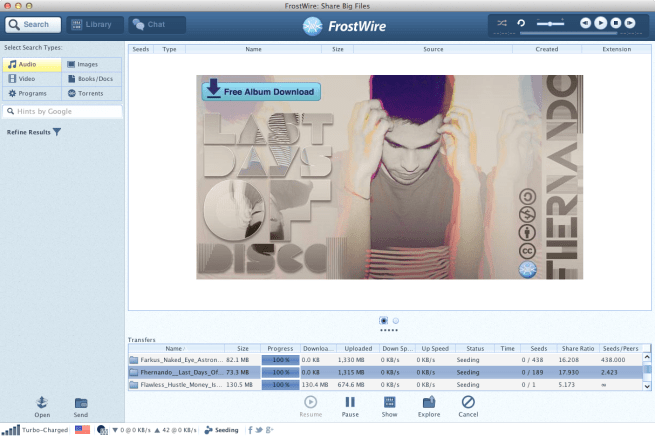
Intent on recreating an aesthetic pioneered by the 80s, Mexico-based musician Fhernando brings back the funk in Last Days of Disco.
The young Mexican DJ is not a stranger to the music scene. Since his teenage years, Fhernando or Fernando Ramires Rios has been composing music and has already released several EPs and singles. His most recent album, Sweet Addiction produced a lot of buzz on music websites.
Featuring 12 tracks of musical bliss, Last Days of Disco will transport you into an era of upbeat yet soothing melodies.
Funkylicious opens with steady dance beats mixed with jazzy horns. This radio-polished track will give that right dose of party high.
Fluttering with playful keys, title track Last Days of Disco will surely spread some good vibes. Ride My Tempo, on the other hand, features a plethora of deep drum tones and trumpet sounds.
Tracks like Anthony Jones, Kiss Me Harder, and Crying At The Discoteque feature big-hearted party anthems with some sonic surprises.
A personal favourite, (I Need Ya) L.O.V.E is that kind of track that boosts your mind and energy. It’s the perfect backdrop while working as it features subtle yet upbeat instrumentation.
Fhernando seals up the collection with Pasadena Nights, a disco track with an electro flair. I love how each the music slowly builds into a jungle of harmonized melodies.
For those who are looking for a steady upbeat vibe, Last Days of Disco is the perfect album for you. Fhernando has successfully created something that does not only revive a glowing era of music, but also recreates it in a way where it becomes an easy listenable whole.
New FrostWire for Android lets you choose your storage location
Android hardware is evolving and now more and more devices have more than one SD card to choose from.
You asked for it, and starting on FrostWire 0.9.14 for Android you got it.

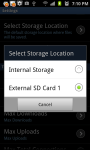
Get FrostWire for Android absolutely free at Google Play or download the android installer here.
Baiyu’s new HUNTER album featured on FrostWire

After breaking all daily download records consecutively with her previous release titled “Fan Fair”, New York City based R&B/Pop/Fashion prodigy Baiyu is back on FrostWire, this time with 13 tracks that’ll knock your socks off.
Are you also on the Hunt?
Here’s some pictures posted by Baiyu on her Twitter Account @BaiyuMusic


FrostWire 5.3.7 OUT with Faster Startup times and improved International Search results
FrostWire 5.3.7 OUT with Faster Startup times.

Everyone behind a firewall having issues while FrostWire was around 31% of starting will be very happy with this release. Thanks to the community for all the amazing feedback, helped us a lot in nailing this bug. While fixing this bug, we also fixed other issues when shutting down the Azureus core, it’s a lot cleaner under the hood when it comes to start and shutdown.
As a side effect we nailed another bug we had when sending files to friends, so sending files should work in more configurations than before.
We also detected an issue with UTF-8 encoding that was causing FrostWire to not index as many files as it could’ve been. International users will now be able to find files with special characters on FrostWire, so search just got slightly better for non-ascii character based content.
We’ve added yet another way to export files to iTunes.
You can create a kick ass playlist with our Library, and now, if you want that very same library on iTunes, to export to your mp3 player, you can right click on the Playlist name and send it to iTunes. When you go to iTunes you should see a playlist with the same name and the same audio files, which you can then configure for automatic syncing when you connect your iTunes compatible device to the computer.
Here’s the full changelog
frostwire (5.3.7) stable; urgency=high
* New Feature: Export playlist to iTunes.
* Core upgrade: Better support for UTF-8 torrent contents.
* Faster startup time. No more waiting around 31% on splash screen.— FrostWire Team Thu, 14 May 2012 08:07:05 -0500
New FrostWire for Android with improved search
Download FrostWire for Android now

The latest version of FrostWire for Android addresses very important issues affecting search experience.
We’ve made a number of improvements in our search algorithm, we’ve improved local indexing (the more you search the better it gets) and we’ve made the process of searching a bit more interactive so you have a clue what’s going on during search.
International users should be able to find more files as we’ve fixed a few UTF-8 encoding issues we found on the Azureus core, so files with non western characters should be easier to find.
The response from users that installed or upgraded the app during this week tells us that we’re on the right path to a 1.0 release.
If you also have a desktop computer running FrostWire and you’re not using FrostWire to transfer files from or to your PC, boy, are you missing out, take a look at these videos.
Full Changelog
FrostWire 0.9.12
– Search performance improvements.
– Better international search thanks to improved special character support.
– Search status UI feedback improvemens.
– Search results remain on screen when the device is tilted.
– Search results remain after a transfer has been started.
– New animated media player status bar for easy access to media player.
Hi-Rez “The Window” featured on FrostWire
Download Album
 Sometimes you just got it; the right mix of talent, creativity and passion that takes you on the road to bigger things. When you hear and see Hi-Rez at work it’s not hard to predict a self-made hip-hop Super-Star in the making.
This newest release by the 18-year-old South Florida rapper, is a great example of what one sweet mixtape should look like. So go ahead and download The Window, a treat that will take you on a ride filled with super smooth hip-hop beats, some crazy good lyrics, and crisp good production.
In the words of Hi-Rez himself, “I live and breath hip-hop. I do it for the love of it, nothing else.”
Continue reading “Hi-Rez “The Window” featured on FrostWire”
How to copy files from the Computer to Android (Phone/Tablet) #FrostWire #wifi
[youtube http://www.youtube.com/watch?v=Aw7GRuLZW4A]
Step 1. Make sure FrostWire is running on both your Android device and PC, and that all devices are connected to the same WiFi network.
You can get FrostWire for Android on Google Play or at FrostWire.com/android. FrostWire is absolutely free to download.
Step 2. On your computer Go to Library, under Devices you should see all the Android devices running FrostWire on the same WiFi network.
Step 3. Drag and drop files over the Android device you want to upload the files to.
Files may come from your file explorer or from the FrostWire library.
Step 4. Check your Android screen and accept the incoming transfer.
You’re done.
How to copy files from Android to Computer #frostwire #wifi
Step 1. Make sure FrostWire is running on both your Android and on your PC, and that all devices are connected to the same WiFi network.
You can get FrostWire for Android on Google Play or at FrostWire.com/android. FrostWire is absolutely free to download.
Step 2. On your Android device go to “My Files” and have the files you want to make available public by touching the Padlock icons so that they remain opened.
An open padlock means the file is public for anyone to download from your Android device.
When you make an Audio file public, it’s also available for streaming by FrostWire for Desktop users.
A closed padlock next to a file means nobody can have access to it except yourself.
You can use the checkboxes to select multiple files, once selected touch on any of the selected files for options to share, unshare, and more.
Step 3. On your computer Go to Library, under Devices you should see all the Android devices running FrostWire on the same WiFi network.
FrostWire will show you how many files are publicly available for each device, it will group shared files by data type (music, video, ringtones, pictures, apps)
Step 4. Browse the shared files of your device.
On your computer. Select the files you want to download from your Android and click on the “Save” button.
If the files you’re looking at are audio files, you can also stream them by clicking the “Launch” button or by double clicking on them. You will be now streaming music from your phone or tablet into your computer speakers.
https://play.google.com/store/apps/details?id=com.frostwire.android
How to send files with FrostWire
Use FrostWire to send files without limits in size or bandwidth, ad free.
The more people you send the file, the better it works. There’s no limit to how many people you can send files.
Welcome to the peer to peer cloud.
 Official FrostWire Blog