New FrostWire for Android 0.4.15 finally here

Download Now

If you haven’t restarted your FrostWire you better do so now to get the automatic update. If you haven’t installed FrostWire at all on your Android then this is probably one of the best times to go and try it since it just got a lot better to use.

The Peer browsing functionality just got a lot better after 0.4.15, we reimplemented big part of our networking framework and FrostWire can now communicate using UDP or TCP as it pleases, all it’s internal messaging can now be configured independent of the IP transport layer and now we can experiment what kinds of transport we should use for what messages.

Other than that we fixed some usability issues suggested by our tester community, so we think 0.4.15 will be a great release, but still there’s a lot more coming before we hit the Android Market.

Now try it, enjoy it and break it, then let us know so we can fix it, the comments section is all yours for feedback and ideas. (And no, we’re not doing 3G anytime soon, it’s too slow and your carrier won’t like you very much if you start doing p2p over their 3G network)

Changelog

FrostWire 0.4.15
– UX-Upgrade: New option to navigate to downloads from FrostWire Logo’s Menu (only present if there are any Downloads [active or finished])
– UX-Upgrade: Hitting “Back” on Chat or Search tabs won’t get you back to the Desktop, you’ll be taken to the Browse screen. Too many users getting lost.
– UX-Fix: Tab heights should now look the same across all devices [slimmer] (Thanks Dan Jackson for screenshot)
– UX-Fix: When submitting a search, File Type selectors are automatically hidden to have more space for search results.
– UX-Fix: When typing a search with the virtual keyboard, hitting ‘Return’ now hides the virtual keyboard.
– UX-Fix: Focus bug when trying to long press on yourself in Browse Peer Screen.
– Core-Upgrade: Rewrote delivery mechanism of ‘Browse Host’ messages. Browsing now works 99% of the time.
– Core-Upgrade: FrostWire can now be _configured_ to send messages via TCP or UDP as need be.
– Bug-Fix: Possible Force Close when search results arrived.

About FrostWire for Android
FrostWire for Android is the first P2P client written for the Android Operating System. It features a new p2p protocol designed specifically for mobile and embedded devices that allows users in a Local Area Network or across the internet to Browse, Search, Download and Offer files in a peer to peer fashion, no central servers are involved.

Support FrostWire for Android
Get something new to wear and support FrostWire development. The other way to support the project is to spread the word, you can do so in a fun way by getting the FrostWire Stickers for free

New FrostWire for Android 0.4.12 available now

FrostWire for Android

Download Now

A new release of FrostWire for Android is out after a week of long wait. The wait however is well worth the update since this new release features new functionality, the user interface is friendlier, search gets considerably better, and you have more control over your download queue.

If you want to know more in detail of all the other bug fixes and upgrades go ahead and read this changelog.

FrostWire 0.4.12
– New Feature: Delete files from the “Downloads” screen. (featured invented by Travis Rhodes, thanks)
– New Feature: “Cancel all Downloads”. Stops and removes ALL unfinished transfers, no matter what their state is.
– New Feature: The first time the application runs the user must accept the terms of use or else the application won’t continue.
– UX-Upgrade: Search is now friendlier and more obvious to use for the new user.
– UX-Upgrade: When browsing a peer the last clicked file type button will appear selected (like in Search)
– UX-Upgrade: D-Pad can now be used to click on items.
– UX-Upgrade: Visual Feedback upon List Item Touch.
– UX-Upgrade: Pressing ‘Done’ on search virtual keyboard starts a search.
– UX-Fix: Manual Listening Port couldn’t be set higher than 65000 (thanks votaguz)
– Core-Upgrade: Flood control mechanisms to reduce message forwarding.
– Core-Upgrade: Smarter search algorithm, improved result accuracy, reduces network load.
– Bug-Fix: Searches with single quotes would yield no results.
– Bug-Fix: Now the application shuts down properly.

New FrostWire for Android 0.4.8 available tonight

Lots of fixes since yesterday, the two you will notice are a better layout when browsing a peer with your screen like a landscape picture.
The other is a new feature that allows you to remove unwanted Peers from your list, say you see somebody sharing 0 files and you don’t like leechers… bam, remove it.
The removed peer will be blacklisted during the lifetime of your FrostWire session.

FrostWire 0.4.8
- New Feature: Remove Peer. It will remove the peer from your list and black list it during the session's lifetime.9
- UX-Upgrade: Typos and updates in the UI's text (thanks James W. Wilson)
- UX-Upgrade: Warning on disconnect if there are any active transfers.
- Bug-Fix: Issue with shared file count if user unshared all files one by one and then unshared all in bulk.
- Bug-Fix: Generic socket errors caused by older clients in the network.
- Bug-Fix: Issues with GPS and Network location providers. Location updates will only be requested every 5 minutes if location providers are available.

New FrostWire for Android v.0.4.7 Out!

A new FrostWire for Android is out, start or restart your FrostWire for an automatic update. If you have not installed it yet, then go right now to frostwire.com/android and install it on your android device.

This new version gets ready for the fast growth of the first peer to peer mobile network in the planet. Now your FrostWire will limit itself to a number of connections to guarantee optimal performance and use less resources. Even though you’ll be connected to about 30 other peers, your searches will reach the entire network in less than a second thanks to the power of peer to peer algorithms.

FrostWire 0.4.7 features an even smaller installer (only 357Kb) and it improves the user experience by taking care of more details and improved networking core.

Read the full Changelog since 0.4.6 for more details on this update.
FrostWire 0.4.7
- Installer size reduced to 357K
- New Feature: "/me" in the Chat room is replaced with your nickname. IRC old school 3rd person.
- UX-Upgrade: Peer list shows the version number. If your FrostWire is old, it will appear in red.
- UX-Upgrade: Search and Chat tabs are disabled when disconnected.
- UX-Upgrade: Context aware display of Go to: Home | My Files.
- UX-Upgrade: Offer to change nickname for first time users will re-appear if the user tilts the phone to use keyboard.
- Core-Upgrade: Improved port handling for LAN interaction.
- Core-Upgrade: Better maintenance of Peer List and revisited ping heuristics.
- Bug-Fix: Force Close when trying to browse yourself if disconnected.
- Bug-Fix: Force Closes when trying to manage incoming and outgoing candidate peer lists.

FrostWire 0.4.6
- New Feature: Go to My Files
- New Feature: Clear Chat. Long press on the text box to make this appear.
- New Feature: Share your Documents,Pictures,Photos and Audio via email, android's bluetooth service, sms and via web services (e.g. twitter, facebook, flickr)
- New Feature: "Copy" search a result (to share it via private message or to everyone in the chat).
- Upgrade: Considerable optimization of object management when displaying peers, files, transfers and chat messages.
- Bug-fix: Deleting too many individually unshared files could cause a bug where no files of that type would be shared.
- Bug-fix: Cleans all temporary files on exit.
- Installer size reduced 16%.

New FrostWire 4.21 series

Welcome to the new 4.21 series. This new family of releases starts off with two big upgrades: Automatic Installer Downloads (via BitTorrent) and the new Vuze Core 4.5.0.4 for even faster BitTorrent downloads.

We also added a new feature for those users that complained about the FrostClick Promotions, If you’re not into supporting independent content creators we understand, and now you can go to the FrostWire Settings and turn the promotions off altogether. You will only see the FrostWire or FrostClick logo which is the default welcome screen of the application.

Getting ready for Android and more

Our Android efforts are well underway by now, the FrostWire App for Android is very usable and it should be getting a “beta” label pretty soon. In the meantime the application has been tested in over 250 cities all over the world (by a few folks on each) and it’s getting ready for showtime.

That means that the next step will be FrostWire for Desktop talking to your Android device. This will be one of the major additions to FrostWire for Desktop 4.21 series. Expect great tools to copy files from/to your Android device via Wi-Fi.

We’re also planning on creating a FrostClick Torrent search service which will be seamlessly integrated into the “Torrent Search” results, making even more legal content available to you.

Among other very delayed ideas, 4.21 might introduce the long promised plugin platform so that you can extend FrostWire in ways we can’t possibly imagine. We know that the p2p network can be used for far more than file sharing [democratic distributed computing, social networking, gaming, and more] and we want to give you the tools to help us deliver new services on top of it. Stay tuned.

Changelog

frostwire (4.21.3) stable; urgency=low

* New "Phones and Tablets" tab. Tools to share files with Android
devices on a Wi-Fi network.
* New debian source packages available.
* Upgrades to HttpFetcher performance. Cleanups and refactors.
* Upgrades java compatibility to Java 6.
* Upgrades Mojito-DHT to the latest version found on the LimeWire
repository. Tune ups.
* Removed dependencies on Linux native libraries. JDIC is no more
for Linux releases.
* Fixes issues when rendering and scrolling torrent search results.

-- FrostWire Team Thu, 16 Dec 2010 20:00:00 -0500

frostwire (4.21.1) stable; urgency=low

* New auto-installer-download support for Windows and Ubuntu.
* Upgrades Azureus Core (bittorrent engine) to version 4.5.0.4. Thanks to the Azureus Team for their hard work and support through the integration.
* New setting pane to allow user to turn off FrostClick promotions.
* Fixes issue with Application Icon. New high resolution icon now in place.

-- FrostWire Team Wed, 22 Sep 2010 20:48:18 -0500

Did you get your Free FrostWire Stickers yet?

Sites talking about this
Thanks for linking back here to:
OMGUbuntu.co.uk

FrostWire Splash Screen Gallery – Vol V

FrostWire Splash Screens since 4.20.7

Credits and more detailed descriptions of these pictures are available on the Flickr Group.

Submitting your pictures

If you want your picture to make it to the next FrostWire, join the FrostWire Photo Album Flickr Group and submit your pictures. Here are some tips to get your picture on the FrostWire splash screen:

  • Send us pictures of your FrostWire Stickers or Shirts. Get Free Stickers here, we ship worldwide.
  • The Higher the resolution the better.
  • Horizontal pictures work better for the Splash Screen.
  • Make sure you tell us where in the world you took the picture. If there’s a funny story related to the picture please share that on the description.
  • Tag your pictures. Some suggested “tags” for your pictures are: frostwire, filesharing, p2p, gnutella, bittorrent, frostwire stickers, frostwire.com

FrostWire for Android Alpha now Open

Early Adopters Wanted!

Many of our alpha testers and early adopters are already saying FrostWire is an app that should be on every phone. Help us make this vision come true and take our alpha installer for a ride on your Android device.

It’s still labeled alpha because it’s still very far from being complete and it needs a lot more testing, but the core functionality is there already and it needs plenty of testing until it’s ready to be a 5 star app on the Android marketplace.

Download it for free at http://frostwire.com/android


FrostWire 0.4.5
- Networking-Upgrade: Fixes in search routing algorithm to avoid redundant message forwarding.
- UX-Upgrade: Touching the FrostWire logo shows a menu to Go Home, See About or Show FrostWire some love.
- UX-Upgrade: Several optimizations for smoother scrolling and better resource management.
- UX-Upgrade: Tapping on someone's nickname on the Chat will autotype @Nickname on the text box.
- UX-Upgrade: New icons for Settings, Home and Love.
- UX-Fix: Private messages take you to the Chat tab, not the Chat Activity by itself.
- UX-Fix: When a file's shared state is changed using the padlod icon the number of shared files of its kind gets updated.
- UX-Fix: Padlock icons are not shown on search results.
- Bug-fix: Downloading the same file twice from the same peer would fail. Memory referencing issues fixed.

FrostWire 0.4.4
- New Feature: Auto update.
- New Feature: Change your nickname by long pressing on your own name on the Browse Peers screen.
- New Feature: "Padlock" button when browsing your shared files to toggle sharing status without much hassle.
- Networking-Upgrade: New Peer Exchange policies result in considerable bandwidth.
- Search/Transfer-Upgrade: All peers involved in a file transfer are now keeping a metafrost file when finished, thus announcing themselves in search results as confirmed sources for that file. Metafrost files are now kept in folders by type to not put a strain on the file system as more and more files are shared.
- UX-Upgrade: Chat tab now shows the number of unread messages.
- UX-Upgrade: When starting up FrostWire will ask new users to change their nickname.
- UX-Upgrade: When disconnected you are taken to the home screen so you won't be confused by things not working.
- UX-Upgrade: Application search results now include version number.
- UX-Upgrade: Search Result Batch Downloads (using checkboxes)
- UX-Upgrade: Search results are cleared before new results are in.
- UX-Upgrade: Checkboxes auto-clear when you start a batch download.
- UX-Upgrade: Failed, Out of sources and Timed out transfers can now be individually deleted from the list of transfers.
- Bug Fix: Fixes SQLite 'where' clause bug with multiple keyword queries. Search will yield more results as everyone updates.
- Bug Fix: Incoming repeated Search responses are short circuited. Distinct results are forwarded only once. Traffic savings.
- Bug Fix: Fixes logic issues for optimal LAN packet delivery. You should feel faster peer browsing and discovery.
- Bug Fix: Audio player when browsing yourself works as expected.
- Bug Fix: Possible Force Close when pinging peer list and a peer says good bye.

FrostWire for Android is real and it gives your phone super powers #adHocMobileSocialFileSharingNetwork

This is a quick update for those of you that are not part of the Alpha Tester community on FrostWire for Android.

Don’t you think your smartphone is the most social device you own?
It was about time we could use our phones for more than talking, texting, emailing, micro-blogging, web-browsing and media creation/consumption. Your phone probably has a lot of stuff that you’ve been putting on it which could well be shared with others but never makes it out since it’s not very easy to do so.

We can’t think of any parent who has a smartphone with a high resolution camera who hasn’t taken hundreds of pictures and videos of her/his kids and doesn’t want to share with family and friends, same goes for all the party people every night, never uploading or sending hundreds of pictures to friends who would love to keep those fun memories for themselves… so many pictures and videos lost when they get a new phone or if they happen to reformat their phone’s memory. Those pictures you see on Facebook or Flickr, that’s but a fraction of all the pictures sitting on phones and cameras out there, it’ll only get worse as more and more people upgrade their cheap “dumb-phones” to smartphones.

We have this device which is probably the best representation of our real “social profile”, initially created to interact in one of the most intimate forms (voice) with our “social graph”, a device that is conveniently with us at all times, for some almost like an extension of ourselves. For some mysterious reason we can’t understand, smart-phones are crippled with inconvenience when it comes to sharing their contents with others: Slow transmission speeds (bluetooth and it’s device pairing), bad or non-existent file management tools (iPhone or Android phones don’t come with a file manager when it’s a fact your phone stores plenty of files, not everybody is dumb to understand a file manager, right?), bandwidth limitations (3g), distance limitations (bluetooth and it’s device pairing), file size limits (try attaching large files on emails), you name it, it’s almost like they don’t want you to use your phone to share files. We feel this is a great contradiction: “the most social ever device can’t easily share files“.

So we couldn’t just sit and wait for others to solve this problem and we set out to build the best file sharing app we could ever think off, An app specifically meant to run on Smart-phones, that if adopted by enough people it would instantly create one of the largest, real-time ad-hoc social networks, created by you and the people near you, no central entity peering over what you do, by the people, for the people.

No need to build profiles or sign up to anything, just open the application, connect and you’re part of a “social network” that starts with you and the files that represent who you are. If you want to put it in the hyped terms of the social media slang, it’s a real time social network where members get together for one common interest, their files.

There’s no central entity looking over your shoulder, we think human interaction is meant to occur from people to people. When you go to a cafe and start a conversation with someone you don’t tell the “barista” to record and relay all your words to a person, no intermediaries should be necessary for two people to share information.

We think our phones were initially built for that one on one communication, and now that they’re more than phones it’s about time they help some of us have social super-powers. With the chat features we believe that not only it will be a social-file-sharing app, but it’ll be a great way to break the ice if you find yourself in a place full of strangers (given the software will have mass adoption of course).

DOWN TO EARTH NOTE & PREDICTION: The social aspects of FrostWire for Android will only be truly appreciated once it’s adopted by a critical mass. In the surface it’ll feel just like a cool file sharing app, but it only takes a little imagination to think how it could be a very powerful social networking tool if over half of your city had a smartphone running it (then multiply by every city in the world). We’ll see.

Philosophical Vision aside, what did we do?

We can now say we have built the first mobile-p2p-file-sharing application in the world (please correct us otherwise if you’re already sharing files with lots of other phones, we also want to learn from competition).

Thanks to the Alpha Tester community feedback and to some inspiring technological events that occurred during the development of the application we decided to extend the sharing possibilities outside of the Local Wi-Fi network (the original concept was only for local network file sharing), now FrostWire for Android can interact with other peers via the Internet using a Wi-Fi Internet enabled connection. We think you’ll have a greater chance to serendipitously meet other FrostWire users in person if they get used to launch the application everytime they’re on a Wi-Fi internet enabled network.

When we saw that Apple launched Face-Time on the iPhone 4 and we saw that they were doing it ONLY via Wi-Fi (using standard port mapping and NAT traversal tech), and people took it like Kool-Aid (as in no revolt for lack of 3G support), we thought: “hell, we are network geeks, we can do that and better blindfolded with one hand tied to our backs”. Jokes aside (all the respect to the Cupertino coders), a couple of weeks later we had all the code for port mapping and peer rendezvous, we immediately noticed how the application usage and feedback from users surged almost exponentially . The app was more useful once you could use it over longer distances while still keeping all the core design for super fast transfers on a local level.

Currently the app is doing almost everything we intended, it allows browsing files from other peers, suggesting files (from your phone or other phone) to other peer or many (via chat-room), it allows downloading files (even large ones, tested up to 1Gb files) locally and over the internet, and it now supports pure p2p search.

We are now focusing on making sure the user experience is as convenient and natural as it can be, so expect an open beta announcement in the following weeks, and an appearance on all android markets shortly after that.

More will be revealed in time. This is only the beginning of what’s in store.

For the adventurous of heart
If you don’t mind trying software that might crash (or even break your phone) you can go ahead and install the latest alpha installer. Try it at your own risk, (If you have issues, it’s expected, it’s still alpha and we’re working on it with well over 300 testers that drill us with no compassion), the app can be highly addictive, it can be quite fun to look at other people’s shared files.

Now go! don’t be a freeloader and break your phone for the sake of freedom and privacy.

FrostWire “Torrent Joint” v4.20.9 Released – (Now powered by Vuze Technology)


The Internet – Team FrostWire – Last Update July 3rd 2010

The FrostWire team is constantly on top of the P2P & file sharing news striving to keep the application on the edge of technological developments. We have always had a clear vision of where things are headed in our little part of the Internet and we’re proud to be a part of community that can adapt to changes very quickly.

In 2009 we saw a lot of talk about and many changes ocurrying to the most popular torrent tracker websites. We also observed an increase in general usage and understanding of the underlying technology and it’s benefits. Until now, FrostWire used legacy LimeWire technology to support torrent downloads and was able to decently serve our community torrent needs. We thought that decent was not enough.

Now FrostWire’s BitTorrent engine has been entirely replaced and features all the power of a lightweight version of the Azureus BitTorrent Core under the hood.

Not only all the prior issues our users reported with torrents are gone, but downloading torrents with FrostWire is faster than ever. Torrent Bootstrapping has also significantly improved and in some cases the average download speeds are even 3x faster than with our previous torrent technology.

The introduction of gnutella based .torrent file search with our last release clearly stated our direction, a truly decentralized P2P network with the best of the BitTorrent and Gnutella networks.

BitTorrent Magnet Links Support
The new version of FrostWire also supports BitTorrent Magnets, meaning you only need to get special URL (no initial file downloads necessary) and FrostWire will fetch the Torrent Metadata on the P2P network (using the Azureus DHT technology).

.torrents can survive also in Gnutella
Now, not only will .torrent files survive in the Gnutella network, but they will be fully searchable [in gnutella] and ready to aid in BitTorrent downloads may those torrents ever be removed from web based indexing services.
Every member of the file sharing community will be able to share both the .torrent files as well as the actual content files allowing for the BitTorrent traffic to be fully de-centralized, thanks to Gnutella search and the BitTorrent DHT.

Get high on the BitTorrent DHT with FrostWire “Torrent Joint” version 4.20.1 and update your client now.

Other User Experience Updates
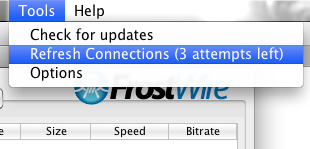
If you’re not getting enough search results from your peers, or you are seeing too many spam and fake results, it’s a good idea to Refresh your connections. FrostWire will fetch a list of healthy and recently crawled ultrapeers willing to take more peers.


Our community members repeatedly told us that the percentage indicator for download progress was not enough, so we added a new column that shows the progress of the download in bytes. Thanks for your feedback.

If you speak geek, here’s the changelog.

Changelog:
Version 4.20.9 "Torrent Joint" (August 2010)
- Fixes bug where FrostWire would not try to open exclusively UDP tracked torrents.
- New option -Dultrapeer=1 forces FrostWire to run as Ultrapeer. Only for hackers that build FrostWire.

Version 4.20.8 "Torrent Joint" (August 2010)
- Upgrades search, now powered with ClearBits.net results a service
   that indexes thousands of legal torrent files. (formerly known as
   LegalTorrents.com)
- New BitTorrent Connection Settings Available.
- New ability to configure the max. number of active torrent downloads.
- New ability to configure the max. number of peers per torrent.
- New ability to configure the max. number of torrent connections.
- New ability to configure the max. number of torrent uploads.
- Fixes torrent auto resume bug.

Version 4.20.7 "Torrent Joint" (July 2010)
- Improves torrent search dramatically.
- Upgrades to protect search results from spam.
- Source packaged (.dsc) for Debian/Ubuntu.

Version 4.20.6 "Torrent Joint" (April 2010)
- Upgrades Azureus Core to version 4.4.0.0 - Thanks to the Vuze/Azureus team for their hard work.

Version 4.20.5 "Torrent Joint" (March, April 2010)
- Fixes audio player issues. Now all MP3s should support skipping and gain control.
- Fixes bug on status bar speed meter. Now BitTorrent uploads speeds are added up and shown correctly in it.
- Fixes High CPU usage bug while loading hostiles ip list.
- Fixes a bug on MacOSX on which FrostWire would only start downloading a .torrent only if FrostWire was already running.
- The FrostWire windows installer will now clean FrostWire Desktop shortcuts if uninstalled.

Version 4.20.4 "Torrent Joint" (March 2010)
- Fixes connectivity issues for Mac version.

Version 4.20.3 "Torrent Joint" (March 2010)
- Fixes a bug where files couldn't be dragged out of the Library.
- Fixes a bug where opening a magnet link would freeze the UI while it was being fetched in the DHT.
- Fixes a bug where magnet links that were dropped on FrostWire wouldn't start downloading.

Version 4.20.2 "Torrent Joint" (HotFix)
- Fixes a bug on torrent resume.
- Installer sizes reduced over 58%

Version 4.20.1 "Torrent Joint" (February 2010)
- Major Upgrade: BitTorrent Engine replaced for a lightweight version of the Azureus BitTorrent core.
  FrostWire has become a far superior BitTorrent client starting version 4.20.x now supporting:
        - Trackerless Torrents (via Azureus DHT)
        - Improved Magnet link support (BTIH Magnet Links)
        - SuperSeeding
        - +100% Faster Torrent Connection Bootstraping  (No more "More Sources Needed" for .torrents that failed before)
        - +100% Faster Torrent Downloads in some occasions than 4.18.x
        - Transport Encryption capabilities
        - Improved UPnP implementation
- New Feature: The Download Manager now has a new column showing the amount of bytes downloaded per download.
- Update: The "Refresh Connections" Tool is now available even if you are Turbo Charged.
- Fixes a bug where Crash Reports would show an old version number. 


Screenshot of FrostWire “Torrent Joint” v4.20 – Click to enlarge

Related Posts
FILEnetworks Blog: FrostWire Torrent Joint – Powered By Azureuz BitTorrent Technology

Kellee Maize among Amazon.com’s Top 10 most downloaded albums

Kellee Maize understood the power file sharing and creative commons as positive promotional tools, that’s a screenshot of her album "Aligned Archetype" among the top 10 most downloaded albums on amazon.com.

You can get her album for free here
www.frostclick.com/wp/index.php/2010/01/29/kellee-maize-a…

Kellee Maize’s Aligned Archetype was featured on FrostWire, and so far it’s gotten over 133,000 bittorrent downloads.