Today we fixed a bug that was hidden inside one of the most important (and most used) function in our networking core, it was causing things like
the Chat showing messages said by others under your name, or you trying to browse somebody and then browsing somebody else, or trying to browse someone and never getting a response.
Unless you guys can find new “Force Close” issues tonight, we’ve decided that it’s finally time to move to the 0.5.x series, and these will be a very exciting and challenging series of releases before we make it to the Android Market.
Hopefully after tonight we think we can classify further updates as “beta” releases.
With FrostWire and the ability to transfer files via Wi-Fi to your computer you won’t have any excuses like “I don’t know where my USB cable is”, or “I’m to lazy to mount my phone right now”. Hopefully this will bring a lot of new amazing content to both mobile network and to the gnutella network.
As you might have guessed by now, we’ll first connect to your Mac/Windows/Linux Desktop/Laptop via FrostWire for Desktop (our BitTorrent/Gnutella client for desktops). But it’s in our early plans to connect FrostWire to the PS3 and the Xbox (or any device that supports UPnP/DLNA browsing and streaming) .
As we do this we’ll also try to make the appearance of the software look a little better. If you can suggest any great UI/UX people we should talk to we’d appreciate it.
Without revealing anymore than we should at this point, I leave you with the entire changelog.
Thank you for all the support and keep spreading the word, the more the merrier.
FrostWire 0.4.16
– UX-Upgrade: After typing a search for the wrong file type, changing the file type will start another search for the same keywords.
No need to bring up the keyboard out.
– Core-Upgrade: Revised time outs for persistent connections. Better maintenance and reuse of persistent connections.
– Core-Upgrade: Better management of unresponsive peers.
– Bug-Fix: Fixes core issue that was causing Chat messages to appear as coming from somebody else and browsing someone you didn’t click on.
– Bug-Fix: Possible Force closes on application Shutdown and in other situations.
FrostWire 0.4.15
– UX-Upgrade: New option to navigate to downloads from FrostWire Logo’s Menu (only present if there are any Downloads [active or finished])
– UX-Upgrade: Hitting “Back” on Chat or Search tabs won’t get you back to the Desktop, you’ll be taken to the Browse screen. Too many users getting lost.
– UX-Fix: Tab heights should now look the same across all devices [slimmer] (Thanks Dan Jackson for screenshot)
– UX-Fix: When submitting a search, File Type selectors are automatically hidden to have more space for search results.
– UX-Fix: When typing a search with the virtual keyboard, hitting ‘Return’ now hides the virtual keyboard.
– UX-Fix: Focus bug when trying to long press on yourself in Browse Peer Screen.
– Core-Upgrade: Rewrote delivery mechanism of ‘Browse Host’ messages. Browsing now works 99% of the time.
– Core-Upgrade: FrostWire can now be _configured_ to send messages via TCP or UDP as need be.
– Bug-Fix: Possible Force Close when search results arrived.
FrostWire 0.4.12
– New Feature: Delete files from the “Downloads” screen. (featured invented by Travis Rhodes, thanks)
– New Feature: “Cancel all Downloads”. Stops and removes ALL unfinished transfers, no matter what their state is.
– New Feature: The first time the application runs the user must accept the terms of use or else the application won’t continue.
– UX-Upgrade: Search is now friendlier and more obvious to use for the new user.
– UX-Upgrade: When browsing a peer the last clicked file type button will appear selected (like in Search)
– UX-Upgrade: D-Pad can now be used to click on items.
– UX-Upgrade: Visual Feedback upon List Item Touch.
– UX-Upgrade: Pressing ‘Done’ on search virtual keyboard starts a search.
– UX-Fix: Manual Listening Port couldn’t be set higher than 65000 (thanks votaguz)
– Core-Upgrade: Flood control mechanisms to reduce message forwarding.
– Core-Upgrade: Smarter search algorithm, improved result accuracy, reduces network load.
– Bug-Fix: Searches with single quotes would yield no results.
– Bug-Fix: Now the application shuts down properly.
FrostWire 0.4.11
– Core-Upgrade: Revised Peer crawling strategy when FrostWire finds itself almost alone.
– Bug-Fix: A lagged Browse response from another peer could interfere when browsing a new peer.
FrostWire 0.4.10
– Bug-Fix: Chat issues fixed.
FrostWire 0.4.9
– Upgrade: FrostWire will find better quality peers based on both Geo Location and Network Distance. Better experience when browsing.
– Bug-Fix: FrostWire should not display chat messages from unknown peers (issue with empty chat messages)
– Bug-Fix: FrostWire would return negative numbers of shared files if users would delete Unshared files outside FrostWire.
FrostWire 0.4.8
– New Feature: Remove Peer. It will remove the peer from your list and black list it during the session’s lifetime.9
– UX-Upgrade: Typos and updates in the UI’s text (thanks James W. Wilson)
– UX-Upgrade: Warning on disconnect if there are any active transfers.
– Bug-Fix: Issue with shared file count if user unshared all files one by one and then unshared all in bulk.
– Bug-Fix: Generic socket errors caused by older clients in the network.
– Bug-Fix: Issues with GPS and Network location providers. Location updates will only be requested every 5 minutes if location providers are available.
FrostWire 0.4.7
– Installer size reduced to 357K
– New Feature: “/me” in the Chat room is replaced with your nickname. IRC old school 3rd person.
– UX-Upgrade: Peer list shows the version number. If your FrostWire is old, it will appear in red.
– UX-Upgrade: Search and Chat tabs are disabled when disconnected.
– UX-Upgrade: Context aware display of Go to: Home | My Files.
– UX-Upgrade: Offer to change nickname for first time users will re-appear if the user tilts the phone to use keyboard.
– Core-Upgrade: Improved port handling for LAN interaction.
– Core-Upgrade: Better maintenance of Peer List and revisited ping heuristics.
– Bug-Fix: Force Close when trying to browse yourself if disconnected.
– Bug-Fix: Force Closes when trying to manage incoming and outgoing candidate peer lists.
FrostWire 0.4.6
– New Feature: Go to My Files
– New Feature: Clear Chat. Long press on the text box to make this appear.
– New Feature: Share your Documents,Pictures,Photos and Audio via email, android’s bluetooth service, sms and via web services (e.g. twitter, facebook, flickr)
– New Feature: “Copy” search a result (to share it via private message or to everyone in the chat).
– Upgrade: Considerable optimization of object management when displaying peers, files, transfers and chat messages.
– Bug-fix: Deleting too many individually unshared files could cause a bug where no files of that type would be shared.
– Bug-fix: Cleans all temporary files on exit.
– Installer size reduced 16%.
FrostWire 0.4.5
– Networking-Upgrade: Fixes in search routing algorithm to avoid redundant message forwarding.
– UX-Upgrade: Touching the FrostWire logo shows a menu to Go Home, See About or Show FrostWire some love.
– UX-Upgrade: Several optimizations for smoother scrolling and better resource management.
– UX-Upgrade: Tapping on someone’s nickname on the Chat will autotype @Nickname on the text box.
– UX-Upgrade: New icons for Settings, Home and Love.
– UX-Fix: Private messages take you to the Chat tab, not the Chat Activity by itself.
– UX-Fix: When a file’s shared state is changed using the padlod icon the number of shared files of its kind gets updated.
– UX-Fix: Padlock icons are not shown on search results.
– Bug-fix: Downloading the same file twice from the same peer would fail. Memory referencing issues fixed.
FrostWire 0.4.4
– New Feature: Auto update.
– New Feature: Change your nickname by long pressing on your own name on the Browse Peers screen.
– New Feature: “Padlock” button when browsing your shared files to toggle sharing status without much hassle.
– Networking-Upgrade: New Peer Exchange policies result in considerable bandwidth.
– Search/Transfer-Upgrade: All peers involved in a file transfer are now keeping a metafrost file when finished, thus announcing themselves in search results as confirmed sources for that file. Metafrost files are now kept in folders by type to not put a strain on the file system as more and more files are shared.
– UX-Upgrade: Chat tab now shows the number of unread messages.
– UX-Upgrade: When starting up FrostWire will ask new users to change their nickname.
– UX-Upgrade: When disconnected you are taken to the home screen so you won’t be confused by things not working.
– UX-Upgrade: Application search results now include version number.
– UX-Upgrade: Search Result Batch Downloads (using checkboxes)
– UX-Upgrade: Search results are cleared before new results are in.
– UX-Upgrade: Checkboxes auto-clear when you start a batch download.
– UX-Upgrade: Failed, Out of sources and Timed out transfers can now be individually deleted from the list of transfers.
– Bug Fix: Fixes SQLite ‘where’ clause bug with multiple keyword queries. Search will yield more results as everyone updates.
– Bug Fix: Incoming repeated Search responses are short circuited. Distinct results are forwarded only once. Traffic savings.
– Bug Fix: Fixes logic issues for optimal LAN packet delivery. You should feel faster peer browsing and discovery.
– Bug Fix: Audio player when browsing yourself works as expected.
– Bug Fix: Possible Force Close when pinging peer list and a peer says good bye.
FrostWire 0.4.3
– UX-Upgrade: Chat window should receive messages even if you’re not looking at it. Layout updates.
– UX-Upgrade: Transfer screen will autoscroll to the bottom to show the newest additions.
– UX-Upgrade: When files are downloaded file names are marked in a different color.
– UX-Upgrade: No more multiple FrostWire icons on the notification bar. A number will display how many finished transfers you have.
– UX-Upgrade: Download indicator now stays after all downloads are finished if transfers have not been cleared. It will display in orange the number of finished transfers so you can go back to your finished downloads even if disconnected.
– UX-Fix: Fixed size of “Delete” icon.
– Bug Fix: Internet Discovery toggle bug fix.
– Bug Fix: Force Close when starting a download of more than 15 checked files.
– Bug Fix: Force Close when setting Simultaneous Uploads to 0. (thanks Steven Peterson, Eric O’Brian)
FrostWire 0.4.2
– New Feature: New Setting to discover (or not) peers over the internet. Limit your searching to your LAN only if you need to.
– UX-Upgrade: Thumbnails are shown when browsing your own pictures and videos.
– UX-Upgrade: New search controls.
– UX-Upgrade: Batched downloads start faster.
– UX-Bug Fix: Force close when changing manual listening port fixed.
– UX-Bug Fix: Clicking on the Active Downloads button won’t reload the Transfer’s screens if you’re already standing on it.
– UX-Bug Fix: About screen can be scrolled down. Includes Thanks to alpha testers.
– Bug Fix: Search results outside local Wi-Fi network couldn’t start a download.
FrostWire 0.4.1
– Bug Fix: NPE when changing simultaneous upload setting.
– Bug Fix: Multiple NPEs when handling Search Requests and Search Responses.
– Bug Fix: Chat messages and Private Messages back to work.
FrostWire 0.4.0
– New Feature: Search.
– Bug Fix: Completed,Failed,Cancelled,Timed Out file transfers won’t change status to “Out of Sources” if peer leaves.
FrostWire 0.3.10 (file transfer breaks backwards compatibility)
– New Feature: New Setting to limit the number of concurrent uploads.
– Upgrade: Better rendering of active download(s) progress.
– Upgrade: File transfer management optimizations (which break compatibility)
– Bug Fix: Correct display of concurrent uploads and downloads.
– Bug Fix: ‘Application’ Download bug fixed.
– Bug Fix: Multiple Force Close issues fixed.
FrostWire 0.3.9 (breaks backwards compatibility):
– Upgrade: Rewrite File transfer. Considerably faster transfer startup, progressive file validation,
Minimizes Disk/IO and Garbage Collection. Swarming friendly algorithm.
– Upgrade: New File Transfer state: ‘Waiting…’ at start of transfer. (Cancellable state)
– Upgrade: Improves robustness of Message delivery.
– Upgrade: Automatic Peer Browse retries, updates peer list when peer is unreachable.
– Upgrade: Faster internal messaging between network core and UI.
– Upgrade: Protocol Message Types re-arranged for new message queue management strategies.
– Upgrade: About page shows name of current Wi-Fi network
– Bug Fix: Peers leaving won’t appear again on Peer List.
– Bug Fix: Multiple NPEs on Browse Peer when a responses would arrive too soon.
FrostWire 0.3.8:
– Upgrade: Improved Peer Discovery and Peer List maintenance.
– Upgrade: Adds new ‘failed’ state to downloads. We were abusing the ‘timeout’ state.
– Upgrade: Smarter caching of file counts by kind should yield faster browsing responses.
– Upgrade: Fixes potential IO (Index Out of Bounds) errors when reading the last part of a file from the socket.
– Upgrade: When user is leaving it will also be asked if it’s ok to leave while UPLOADs are going on.
– Bug Fix: When user is leaving now there’s a negative option on the dialog. (thanks Phase3d)
– Bug Fix: Patches a NPE when fecthing Application info from .apks that have not been installed. Still to be fixed.
FrostWire 0.3.7:
– Update: Longer TCP timeouts (20 seconds)
– Bug Fix: Found NPE when fetching Application info on some phones.
– Bug Fix: Misc. NPEs handled.
FrostWire 0.3.6:
– New Feature: Sharing Android Package Files (.apk)
– New Feature: Configuring an arbitrary manual port when UPnP is not an option (between 1000 and 65535 inclusive)
– Bug Fix: Several force close issues fixed.
FrostWire 0.3.5:
– New Feature: Show number of active Uploads.
– New Feature: Delete multiple (checked) files.
– Upgrade: Refactors on File Transfer, leaner code.
– Upgrade: Faster Ping message creation (battery savings)
– Bug Fix: Right text coloring, Numbering on Shared/Unshared files.
– Bug Fix: File transfer errors and time outs are displayed correctly.
– Bug Fix: Tilting the phone while browsing remote files recovers state as expected.
– Bug Fix: No more repeated files when browsing peer.
FrostWire 0.3.4
– Bug Fix: Private messages and “Copy & Share” over the internet work
FrostWire 0.3.3
– New Feature: Fine grained sharing.
– Upgrade: Faster retrieval of shared files.
– Upgrade: Faster browsing of your own files.
– Upgrade: P2P Peer List Exchange on ‘handshake’ and when you have few Peers available.
– Upgrade: Support for remote chat, remote private message, remote “copy & share” file.
– Upgrade: Audio playback is now done through a much simpler audio player inside the application (works for now)
FrostWire 0.3.2
– Bug Fix: Internal and Visible Peer lists are cleared upon disconnection.
– Bug Fix: FrostWire says good bye properly to all peers and to altamira.
– Bug Fix: Memory Leaks fixed in Altamira.
– Upgrade: Altamira keeps track of the last time a peer received a peer list for smarter behaviour.
– Upgrade: FrostWire now says hello back to unknown peers (pong upon first encounter)
FrostWire 0.3.1
– Bug Fix: Android XML Parsing patch for all phones running < Froyo. UPnP should work on all pre-Froyo phones.
– Bug Fix: Fixes issue where UPnP map attempt would happen only the first time FrostWire opened.
– Update: Distances between peers shown in meter,meters,Km.,Kms.
– Update: About screen now shows information about internal & external ports.
FrostWire 0.3.0
– New Feature: NAT-UPnP support to connect to other FrostWire's over the Internet (via Wi-Fi only)
– New Feature: Ability to select multiple files and perform other actions on them.
– New Feature: Ability to rename files. This will make it easier to search images and videos taken with Android phones.
– Bug Fix: Fixes WiFi auto connect/disconnect issues.
– Bug Fix: Fixes WiFi connectivity issues when switching to other hotspots.
– Bug Fix: Fixes intermittent (double connected message) connection issues.
– Bug Fix: When disconnected FrostWire won't try to connect if you tilt the device.
FrostWire 0.2.0
– Bug Fix: Fixes crash when sending a message to the chat if user is not connected (thanks adwin)
– Bug Fix: When the phone was tilted during file browsing the current list of files got lost.
– Upgrade: Avoids possible situation where FrostWire cannot know about itself. Faster startup.
– Upgrade: Custom looking checkboxes. (FrostWire.Theme in place)
– Upgrade: Multiple UI/Text corrections.
– New Feature: Select multiple files from another user to perform batched downloads. (download enquement pending, so take it easy)
FrostWire 0.1.0 – code name "Von Neumann"
– New Feature: Peer auto discovery on the Wi-Fi network.
– New Feature: Wi-Fi network availability awareness.
– New Feature: Introducing MetaFrost Mobile P2P protocol version 1
– New Feature: Setting to send Geo-Location information to other peers.
– New Feature: Displays distance to other peers if available.
– New Feature: Settings to Share/Unshare files by file type.
– New Feature: Users can be identified by nickname.
– New Feature: Community Chatroom over Wi-Fi.
– New Feature: Sends private chatroom message to another user.
– New Feature: "Copy & Share" your own files in the Community Chatroom to all participants.
– New Feature: "Copy & Share" other user's files in the Community Chatroom to all participants.
– New Feature: "Copy & Share" files with another user via Private Message.
– New Feature: Community Chatroom has 'history' support if user presses D-pad up or down.
– New Feature: Community Chatroom has 'history' support if user gestures up or down on the text field.
– New Feature: Community Chatroom messages can be cleaned with commands "/cls","/clear" and "clear screen".
– New Feature: Browse, Filter, Open and Delete your own shared files.
– New Feature: Browse, Filter and Open other user's files.
– New Feature: Download other user's files when browsing.
– New Feature: Download shared files from chat.
– New Feature: Download multiple files at the same time.
– New Feature: Open downloaded files.
– New Feature: Context menues are available upon Long Click on almost every user interface element.
– New Feature: Screen orientation awareness on every screen.
– New Feature: FrostWire Status bar indicates number of ongoing downloads.
– New Feature: Share picture files.
– New Feature: Share video files.
– New Feature: Share document files.
– New Feature: Share audio files.
– New Feature: Connect/Disconnect from local p2p network.
– New Feature: "Love FrostWire?" Tip/Donation support to development team.
– Pending Feature: Share application files (.apk)

 Starting on 0.5.6 you will notice a new icon on the bottom of the screen when you are browsing your own files


 If the category is disabled and you still unlocked the file, it won’t be shared since the category as a whole as been disabled for sharing. To understand it easily, grayed out files and locked padlocks tell you that the file will not be shared.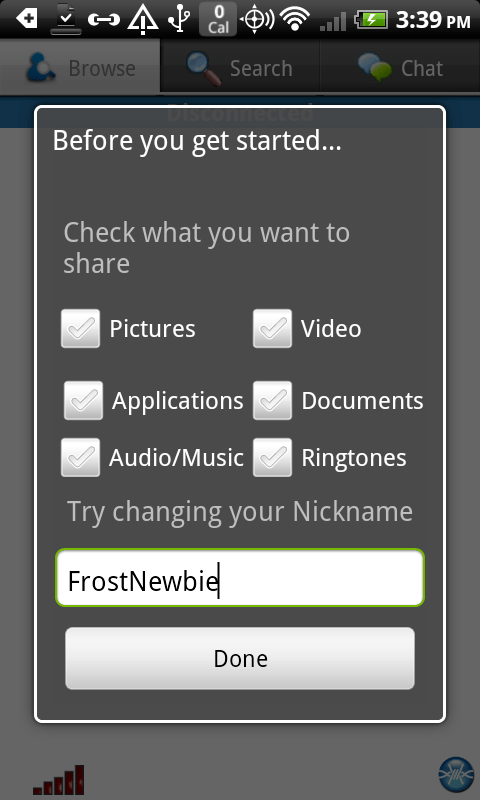


 Official FrostWire Blog