New FrostWire 0.6.0 for Android with considerable performance upgrades.

What’s new?
> Uses way less memory per connection.
> It’s able to support more connections.
> It browses and downloads faster
> See what’s being uploaded
> FrostWire for Android just turned 1 year old (~950,000 total installs as of this post)

Geek Speak

Basically we rewrote the entire networking core using a nonblocking io framework called Netty.

In the past FrostWire did a lot over UDP to avoid creating threads, then little by little we started migrating some of the messages over to TCP and things started working better, however we had to keep the number of peers you connected to a bare minimum since each connection required us to create a new thread. In theory the linux kernel used by most android should be able to handle lots of threads without much cost but in reality this is not so pretty.

With Netty we’ve gotten rid of a lot of threads and we’re able to use the network interface very efficiently to deliver and receive messages in just a few threads. This results in a lot more free memory and the new version of FrostWire (if connected to less than 20 peers) should feel a lot snappier, browsing (as more people upgrade) should work better, and the same with downloads and search.

On the UI side, we fixed a lot of crashes you guys reported (thanks) and now if you Touch the green Upward arrow when someone is uploading files from your Android, you will be able to see what files are being uploaded, at what speed and what the progress is. We didn’t add a “cancel” because we figured the new sharing policies are so strict now, that there should be no reason why you’d be sharing something you didn’t want to share in the first place, and if you did, you can always disconnect or exit the application and the transfer will be killed.

More coming

A hell of a lot more coming, with this release we’re now 1 year and 1 month old. We hope to regain the lost speed/time spent on the FrostWire 5 for desktop release. Expect a lot of changes during the next months in the UI, we’re thinking of new ways (probably UI rewrite) to make sharing both easy and safe. The last updates were meant to keep your files safe so that nothing would be shared unintentionally, however we know the UI is probably a bit hard to grasp for regular users but this will change soon.

We do read all the feedback you leave in the android market, wish we could leave responses, but just know we care a lot about this project and we are working hard to make it better with each release.

If you like this release don’t forget to rate us in the android market, we keep our fingers crossed that you’ll feel the difference.

Full Changelog

FrostWire 0.6.0:
– Core-Upgrade: Inspired by Twitter’s Engineering blog http://goo.gl/bg5jk the protocol stack
was rewritten using NIO/Netty. Reducing the numbers of threads, memory and battery consumption
considerably. The Application should now be able to browse more peers and feel a lot snappier.
– UX-upgrade: See what files are being uploaded.
– UX-upgrade: The multiple selection checkboxes are now available for unshared files.
– UX-upgrade: Long pressing on an unshared file and sharing it will now ask
to enable sharing for the file type if it was disabled, just like on the padlock icon.
The current file type being browsed will also be reloaded to show the user this file type
is now available for sharing.
– Core-fix: Makes sure FrostWire won’t go beyond the max number of peers.
– Bug-fix: Crash when trying to check all files when there are no files.

FrostWire 5 Now with “Send File” capabilities #frostwire5 #bittorrent

Download FrostWire 5

In case you don’t notice many of the changes, the most important ones are:

Send File & Send Folder

Available on the “File” Menu or by right clicking on an active torrent in the transfer manager.

This feature allows you to send a file or a folder, no matter its size to another person using a simple http:// link. The other person needs to have FrostWire +5.0.6 running to receive the file.

The page shown on the link you send will guide the receiving person through the process with a series of live notifications. The moment FrostWire starts running it’ll automatically start downloading the file or folder over the bittorrent network. You as an user will never have to deal with .torrent files, trackers, or anything, it’s all transparent and it rocks.

With this new feature we hope we can give “normal people” a new and convenient alternative to the nuisance of sending large files over the internet.

Here’s a few benefits of using FrostWire to send files to friends:

  • No file size limits (in theory up to 16TB but we don’t have a harddrive that large to test)
  • You can send entire folders!
  • No need to register or have your files uploaded to a third party service.
  • The more people you send the file, the faster it gets because each FrostWire will collaborate as a swarm
  • The receiving party won’t get lost with Advertisement or will have to wait minutes before the download starts
  • The receiving party can pause and resume the download
  • The receiving party can select which files to download (if you send a folder)
  • No ads
  • The downers?

  • You need to leave FrostWire running for others to get the file (until there’s enough people sharing that is)
  • If your friend doesn’t have FrostWire she’ll have to install it and run it to receive the file
  • We don’t recommend using this feature for private files since anybody with the link can download the file as well
  • Partial Downloads are now an obvious feature

    Now all search results have [+] icon left of the search result name, if you click there the Partial Download window opens to let you see the contents of the torrent. If the torrent has way too many files and you’re just interested in a few you can use a type as you text search filter to find what you need in the torrent easily.

    And for the curious, here’s the full changelog for this release

    FrostWire 5 changelog:

    frostwire (5.0.7) stable; urgency=high

    * UX upgrade, send file or send folder support when a file or folder
    is dropped on FrostWire.
    * UX upgrade, file choosing dialogs on Mac now also show mounted volumes.
    * UX upgrade, playback support for m4a files.
    * UX upgrade, search result filters re-arranged.
    * UX upgrade, main search button gone, updated search text box to include
    clickable search icon.
    * UX upgrade, filters re-arranged.
    * UX upgrade, searches can be up to 50 characters long.
    * UX upgrade, either disconnected or turbocharged, no idle state.
    * UX upgrade, search as you type on the library, no more search button.
    Disconnected only if it cannot connect to the internet.
    * UX bugfix, iTunes options were not visible for Windows users.
    * UX bugfix, fixes possible UI freeze on startup.
    * UI bugfix, sending songs to iTunes on Mac is now done in a single process.
    * Mac OSX Lion compatible.
    * Bugfix, issue where opening a torrent from maglnk.com would result in a
    double invocation of the Partial Dialog window.
    * Bugfix, when user didn’t start a partial download the torrent wouldn’t be
    deleted.

    — FrostWire Team Fri, 15 Jul 2011 15:13:16 -0500

    frostwire (5.0.6) stable; urgency=high
    * New feature, Send file. Available on File Menu and Transfer Manager.
    * New feature, Send folder. Available on File Menu and Transfer Manager.
    * UX upgrade, we now have a [+] icon next to search result file names to
    show partial download dialog.
    * UX upgrade, when a partial download is cancelled, the entry is removed
    from transfers.
    * UX update on partial download dialog. Includes new text filter.
    * UX fix, Library search now also looks for .torrents on “Torrents” folder.
    * UX fix, Mac OSX file menu does no longer show “Exit” action.
    * Fixes bug, incomplete files are no longer exported to iTunes playlist.
    * UX update, Help Menu now says “Sharing Help”. Items rearranged.
    * UX update, rearranged View options into single panel.
    * UX update, torrent seeding settings are now a control of its own with
    an explanation of what seeding is.
    * UX update, the installation wizard now forces the user to decide if
    she wants to seed or not seed to continue. Links to what is seeding
    are in place.
    * UX update, in Windows and Linux, when the user Xs the window the user is
    explained that the application will be hidden and is given the option
    to exit.
    * UX bugfix, font size can now be increased.

    — FrostWire Team Mon, 27 Jun 2011 10:57:00 -0500

    frostwire (5.0.4) stable; urgency=high
    * UI upgrade, Create and seed New Torrents.
    * UI upgrade, Ability to throttle torrent transfer speeds
    * UI upgrade, Copy info hash from torrent.
    * UI upgrade, Copy magnet link url from torrent.
    * UI upgrade, Searchable library. Searches recursively downloaded
    files, folders and torrents.
    * UI upgrade, Search results filterable by Torrent Search Engine.
    * UI upgrade, Search results filterable by file size.
    * UI upgrade, Search results filterable by number of seeds.
    * UI upgrade, Search results filterable by keywords as you type.
    * UI upgrade, Ability to download partial files.
    * UI upgrade, Promotional slides can now be switched by the user.
    * UI upgrade and bug fixes on Phone & Tablets tab.
    * UI upgrade, Ability to rebuild “FrostWire” playlist on iTunes.
    * UI upgrade, Replaced legacy skinning code for “Substance” skinning system.
    * Core update, audio playback is now done using mplayer.
    * Core update, Vuze core integration with transfer manager.
    re-written from scratch.
    * Core update, No Gnutella support. Multiple library dependencies gone.

    — FrostWire Team Fri, 24 Jun 2011 12:00:00 -0500

    FrostWire 5 BETA Testers wanted – BitTorrent So Easy

    Sign up for the beta test

    FrostWire 5 (BETA) is a new generation of our file sharing software that does away with the old and broken to adjust to the requests of the user community throughout the years. We need your feedback to make sure the final release will meet all the goals we’re trying to accomplish with this next generation of P2P software.

    With FrostWire 5 you can:

  • Get search results without fakes or spam.
  • Get much faster search results with plenty of seeders.
  • Download partial files out of torrents.
  • Playback audio files without any issues (now powered by mplayer)
  • Create and seed torrents.
  • Send files to friends using magnet links (direct integration with Facebook coming soon)
  • Enjoy a new look with new “Substance” skins (more skins available with final release)
  • FrostWire 5 is a safer, faster, cleaner and lighter P2P client. It will feature a few surprises that we hope will reshape the landscape of legal file sharing, free content discovery and a massive expansion of Creative Commons content to the world.

    FrostWire for Android 0.5.6 with more filesharing controls

    We heard your feedback on 0.5.5, we understood that it was too hard to share on 0.5.4 but it was our priority to make sure that you were not sharing files by mistake, therefore the policy of having things not shared as default when you first install.

    Now we’ve included controls to let you share and unshare equally easy.

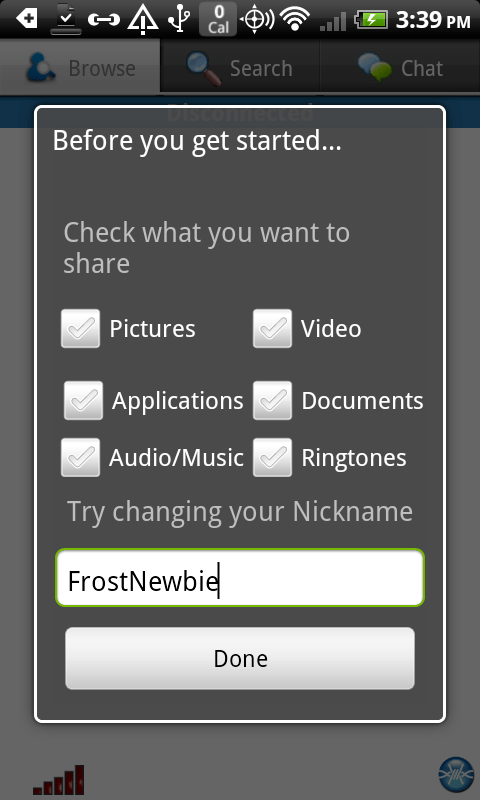
    Starting on 0.5.6 you will notice a new icon on the bottom of the screen when you are browsing your own files

    Pressing this icon will automatically load the rest of the files and check them all (or uncheck them if they were checked). Once you have a bunch of files checked you can Long press on any of the files and a range of possible actions will be available to you.

    Now you will be able to Share selected files, Unshare selected files, Toggle sharing state of the selected files and more.

    We’ve also made available the option to Enable or Disable sharing (without having to select all) on an entire category of files. The same result can also be achieved from the Settings page.

    You can now intuitively know wether sharing is enabled or disabled for a file type by looking at the color of the padlocks. You can enable/disable sharing, and FrostWire will remember what individual files you had shared in the past.

    If the file category was disabled for sharing whenever you try to share a file FrostWire will ask you if you want to enable sharing for a category.

    If the category is disabled and you still unlocked the file, it won’t be shared since the category as a whole as been disabled for sharing. To understand it easily, grayed out files and locked padlocks tell you that the file will not be shared.

    We hope you can make use of these changes, there’s still a lot more to come in the coming releases, stay tuned, give us feedback and share safely.

    New FrostWire 4.21.8

    A new FrostWire for Desktop is out with lots and lots of bug fixes that had a long time coming as well as some new policies to better protect you from sharing unwanted files by mistake.

    New UI Elements have been added or modified for your convenience and better understanding of the application.

    Take a look at the changes on the File Menu, and all the better explained Sharing options for Gnutella files as for Torrent Seeding control.
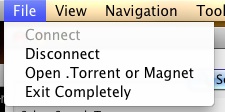

    With the changes done to the File Menu, many new users will easily know how to completly shutdown FrostWire if they want to, no need to right click the FrostWire Icon on the Icon Tray if you want to leave.

    We also changed the wording from “Download Torrent/Magnet” to “Open Torrent/Magnet” to better follow the old school tradition of File -> Open across many software applications.

    One bug that had a long time coming had to do with choosing your Torrent Data Save Folder path, now you’ll be able to select an external drive if that’s where you choose to save your Torrent Data files, thanks to all the people on the forum that reminded us of these and many other issues.


    Now, from the Library you can intuitively find the Sharing Options with a new “Options” button that’ll take you to the Sharing Options of the application. Also, you will be able to see the files downloaded via BitTorrent on the Library Tree Node named “Torrent Saved Files”

    Updated Policies
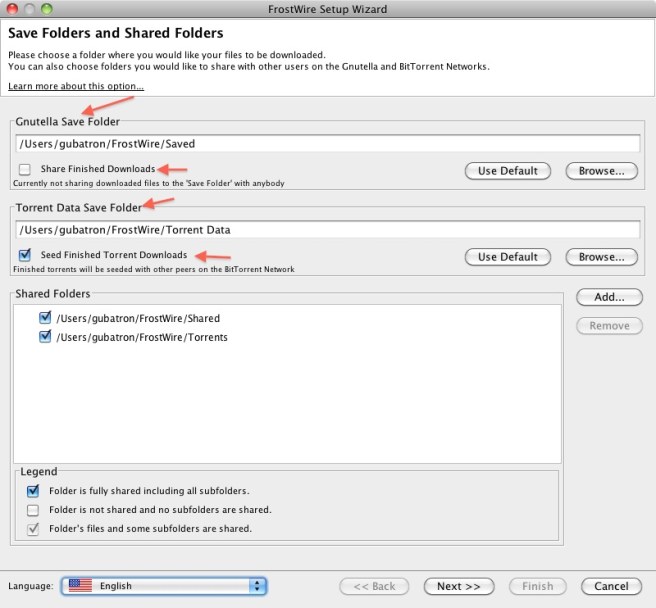
    When you go through the configuration Wizard, you will see a clear difference between your “Save Folder” and your “Shared Folder”. You will be able to choose wether or not you want to share gnutella downloads as individual files or not. By default you won’t be sharing finished downloads. Incomplete files will also not be shared by default.

    Also, if you decide to not share new finished downloads, all previously shared individual downloads that were on the default Saved folder won’t be shared any more.

    Your Torrent Data Folder cannot be shared in Gnutella. This is to avoid any inconsistencies that may arise when a user doesn’t want to seed a torrent. We have tried to make a clear distinction between Gnutella Sharing and BitTorrent Seeding.

    You can now choose wether or not you want to seed finished torrents or not. By default you will be seeding torrents but you’ll be able to turn this off during the configuration wizard. We have made this decision so that you’re not catalogued as a “Leech” by torrent trackers and you have the best experience when it comes to using bittorrent.

    Spam Results are also now hidden by default. You will know how many results are being hidden by looking at the numbers on your Search Result Tab Title. If you see something like “my keywords (7/234)” on the title, that means that you’re looking at 7 results and 234 Spam results detected and hidden from you for a better experience. You can always display Junk Results by Going to Tools -> Options -> FIlters -> Junk -> Display.

    Also, you can now Block malicious hosts right after marking their Search Results as Spam, no need to right click on them after you’ve marked them as Spam, FrostWire will show you the option to block malicious hosts if you haven’t blocked them already.

    A lot more coming, stay tuned.

    4.21.8 Changelog

    frostwire (4.21.8) stable; urgency=high
    * Fixes a possible freeze reported by some users when the configuration
    wizard is shown.
    * Fixes issue when a user changes default Gnutella Save Folder
    and unchecks Sharing finished downloads. Individually shared
    files from the old Save Folder would still be shared.
    Now all individually shared files will be unshared if you uncheck
    this setting.
    * Now users don’t have to re-start to stop seeding after they’ve changed
    their torrent Seeding Configuration. All torrents old and new will stop
    seeding as soon as the setting is applied.
    * Better wording to explain on which networks files are being shared on,
    Gnutella or BitTorrent.
    * Changed color of “Sharing Options” gear icon to blue, gray
    icon may have seemed as if the button was disabled.
    * Added “Sharing Options” gear button on Search Tab. It’s only visible
    once a search has been started.
    * Added Help Menu options to learn about how to share/unshare files,
    torrent seeding, and how to avoid being scammed into paying for
    FrostWire. DO NOT PAY FOR FROSTWIRE.

    — FrostWire Team Thu, 16 May 2011 17:40:20 -0500

    frostwire (4.21.7) stable; urgency=high

    * Makes sure cancelling torrents that have finished are not deleted.
    * Folders created by torrents that are cancelled during download are deleted to avoid any unwanted file sharing.
    * Fixes a bug when migrating from an older version of FrostWire on which previously Saved and individually shared files would still be shared after not sharing finished downloads on the migration wizard.
    * Fixes a bug on configuration screens that could make the application freeze for a few seconds before moving towards the next screen.
    * Migration wizard will always be shown to make sure users are aware of what they’re sharing.
    * Sharing completed files is always set to off by default on the configuration wizard.

    — FrostWire Team Thu, 16 May 2011 17:10:25 -0500

    4.21.6 Changelog

    frostwire (4.21.6) stable; urgency=high

    * Fixes a bug where some Debian systems that didn’t support the Icon Tray would crash on startup.
    * Fixes a bug where running FrostWire for the very first time (and later) display Uploads number -1 in the bottom status bar.
    * UX improvement Junk & Block. When marking Junk Results UI offers to block malicious hosts that haven’t blocked already.
    * Policy update, Incomplete files are not shared by default to avoid sharing files you started downloading and didn’t want.
    * Policy update, Finished downloads are not shared by default to avoid confusion between files on Shared folder versus files on Save folder.
    * UX improvement, better explanation and option to turn on/off individual sharing of finished downloads (that end up in Saved Folder) during FrostWire setup wizard.
    * UX improvement, when user turns off Finished Download sharing those files that were shared as individual files inside the ‘Saved Folder’ will not be shared anymore.
    * UX improvement, File menu now has option to Exit FrostWire completely.
    * UX improvement, File menu now says “Open Torrent/Magnet” instead of “Download Torrent/Magnet” for clarity.
    * Bug Fix: The Torrent Save folder is now considered correctly, now users can set a Torrent Save folder on external drives.
    * Bug Fix: Slideshow component had an issue where it would not update correctly the URL of the currently displayed slice if it had issues fetching the image file, this could in turn sometimes cause 100% CPU utilization.

    — FrostWire Team Thu, 5 May 2011 11:03:14 -0500

    About FrostWire
    “FrostWire is a Peer-to-Peer file sharing program for the Gnutella network and BitTorrent protocol. It is built on the Limewire source code, and it is written in the Java programming language. Development of the program has been active since the program was first released in September 2004.” Wikipedia.

    Download FrostWire

    Do not pay for FrostWire, FrostWire is absolutely Free as in Free Beer

    New FrostWire for Android 0.5.5 with improved file sharing controls

    We urge all FrostWire for Android users to install this latest update which addresses some stability issues and introduces improved sharing controls so that you are always aware of exactly what files you are sharing from your Android device when connected to the FrostWire for Android P2P network.

    Here’s how sharing works after this update.

    Now by default you decide on what file categories you will enable file sharing.

    By default you will be sharing 0 files. This way you’ll avoid sharing the wrong files by mistake.

    Now, there are clear instructions on how to enable sharing file categories and how to share individual files.

    At first you won’t be sharing any files to better protect your privacy.

    Long Press on a Category Icon at the top (e.g. Pictures), this will show an action to Enable file sharing on that category

    After enabling Sharing on a category, you will see Padlock buttons.
    A closed padlock means the file is private,

    An open padlock means the file is shared with the network.

    If you wish to disable file sharing for a particular category, again, Long Press on that category icon at the top of the screen.

    All padlock buttons will be gone.

    Now share safely and responsibly with FrostWire for Android.
    A lot more changes coming in the weeks to come in regards to network performance.

    Update: We are aware of file availability dropping now that the rules have gone in favor of making files harder to share. We are working on a few solutions to make sharing and un-sharing equally accesible.

    However we’re strong on our decision to having files not shared by default when you first install the app. People have very personal files on their phones that they might not want to share with others and we prefer to keep everyone safe so that they’re not deterred from installing the app and we all have a great experience using it.

    FrostWire for Android is still in its infancy but we like to release early, release often so hang in there, the app will get better and better as updates arrive so be sure to upgrade when you see the next notice for 0.5.6.

    FrostWire for Android 0.5.1, now with 3G/4G support

    Download FrostWire for Android

    The top request by the FrostWire for Android community was being able to use the application outside a WiFi network, wel the first version with 3G/4G support is finally available.

    This new release brings a few new Features like “Send File To Chat”, you will also notice subtle but useful changes to the User Interface and User Experience.

    After FrostWire 0.5.x, we’ll be dropping support for older Androids still running 1.6. According to our stats only 4% of the network was running 1.6 and this 4% was holding back the rest from some great ideas we had in the beginning on how to use multitouch, gestures and other features of Android +2.1. Other than that we believe Androids running newer versions of the operating system will handle the p2p networking technology a lot better.

    Many more to come during the 0.5.x series, please report all bugs, crashes and give us your feedback on how to make the application better.

    This slideshow requires JavaScript.

    Here’s the full changelog for 0.5.1:

    FrostWire 0.5.0:
    – New Feature: 3G/4G support. Use FrostWire outside your Wi-Fi network.
    – New Feature: Send file(s) to chat. Long press on a file or select many, then send to the chatroom.
    – UI-love: Updated look of Screen Headers. Tabs and Headers have new gradient looks and look well across all devices.
    Better looking buttons on Transfers screen.
    – UI-fix: Updated “Love FrostWire” section. No more donations until we integrate payment system.
    Please rate us 5 stars on the Android Market if you like the app instead.
    – UX-upgrade: Distances to peers now shown in both miles and kilometers (by popular demand)
    – UX-upgrade: Peer Browsing is more frugal in screen real-state. Good for small screens.
    – Drops support for Android 1.6 to favor health of the network with faster/better peers.
    – Bug-fix: Fixes several reported (NPE) crashes.

    Warning
    Make sure you know your carrier rules regarding the use of P2P applications since you might be breaching your carrier contract by using this app in some countries. Also make sure you don’t leave FrostWire for Android running for a long time if you have a limited data transfer plan since you might exceed your plan limits.

    FrostWire condemns Piracy

    Since the FrostWire project started the FrostWire Team and community have worked hard to show the potential of p2p file-sharing as a legitimate and convenient mechanism of content delivery that can level the playing field for content creators all over the world who are willing to share some of their content for free.

    We designed and built FrostWire for Android thinking of how the world should be, before FrostWire for Android the most social device by nature (your phone) was crippled when it came to connecting with people near you, it was a great device for remote interaction (email, phone, web browsing, tweeting, blogging) but not for close range interaction. Now you can connect and share one of the most precious assets in your mobile device with those around you, your files.

    P2P filesharing will evolve as a content distribution model, we think there’s been plenty of schooling about illegal downloading over the world, we want to school the world on what legal file sharing is, specially in regards to music when you have over 8 million bands and singers in sites like myspace willing to share their music and be discovered, p2p is perfect for them.

    We created FrostWire for Android initially for close range file sharing having in mind use cases like:

    • Groups of Friends and family sitting at the dinner table in a restaurant who are usually “texting”, tweeting and being disconnected from what’s in front of them. Now they have another way to interact with the people in front of them, they can exchange pictures, videos of earlier in the day and not be so technologically alienated. No need to have a rain check on that video you recorded of your friends hours earlier in the club, you can exchange the recently recorded memories while you’re having a slice of pizza at 3am on that open Wi-Fi of the pizzeria
    • Conferences and classrooms. Speakers can now share materials with the audience right from the phone, no need to give an URL for later, just grab the presentation, or the video, or the pictures, or the podcast related to the talk from my phone, right now.
    • Parents with smartphones usually have hundreds (if not thousands) of pictures and videos of their kids. You can now easily send in a short amount of time all those pictures and videos to your friends and family, more over, you can now share these files across all the android devices you have at home, think of tablets and tvs.
    • You’re part of an indie band and you want to share a few free tracks with your live audience, whip out your Android and tell the audience to start downloading those demo tracks right now, create buzz around your band after the show is over.
    • You are a shy person, you find yourself in a room full of hundreds of people, there’s an open Wi-Fi network, start FrostWire and see who’s around, the Chat is a great way to break the ice with other shy people around you.
    • Use FrostWire to promote your free Android Apps. FrostWire will only share Apps the user has installed and which are not copy protected (this also gives a level of protection against malware, you can’t just share malicious .apk files unless you have installed them on your own phone/device).
    • Search and Download thousands of Free Apps. You’ll actually see what people has installed on their phones, not some reviews or sketchy numbers on a website.
    • Sending files Wirelessly between your Android devices and PCs. FrostWire is a great way to transfer all the videos and pictures taken with your Smartphone into your computer without any hassle.

    FrostWire 4.21.5 – Huge update out

    After this update you will have a more robust, safer, faster and leaner FrostWire.

    Better BitTorrent Support
    The biggest upgrades done to this release address proper integration with the Azureus core. FrostWire is no longer a leech of the bittorrent network, when you restart FrostWire it will try to seed previous torrents you have downloaded and not removed, this will make the bittorrent network a lot healthier and we won’t risk having FrostWire banned from torrent trackers.

    DHT Support
    With the last Mac release we upgraded the Mojito DHT codebase and all FrostWire’s will now connect to it. The Mojito DHT will help FrostWire yield better results, protect itself from spam, and provide more nodes to this open DHT which can be used for many other purposes.

    Cleaner Search Results with improved Spam Filters
    We also went in the code base and removed a lot of never to be used code from the LimeWire codebase that will make loading time faster and memory use slightly lower. Also a lot of work went into the FrostWire spam filter, make sure you mark spam results as junk so FrostWire will learn what’s spam and what’s not.

    FrostWire 5 coming this year
    If there are no major issues with this release, we’ll probably release one or two more maintenance updates while we keep working on the next generation of FrostWire. We don’t plan on making any radical changes to the user experience since we don’t think there’s anything wrong with it, however we know it needs a make over. For this we have already gotten rid of the current skinning system and integrated the substance skinning project to a branch of FrostWire which you can already try if you like running FrostWire from source.

    Here’s the full changelog in geek speak:

    * New setting to turn off automatic installer downloads.
    * New setting to limit the speed of BitTorrent downloads.
    * New Galician flag added.
    * UX improvements when creating new folders on the Phones and Tablets UI.
    * Fixes bug when dropping files on an Android device that hasn’t been
    selected.
    * UX change. FrostWire will now seed torrents that have not been removed
    from it’s download manager. Completed torrents now will appear as
    “Completed/Seeding”
    * UX change. Default save location folder in Windows Vista and Windows7 is
    now the user’s default “~Downloads/FrostWire” folder.
    * UX improvements when showing FrostClick overlays. No more flickering.
    Overlays are now shown in an animated slideshow. More than 2 artists
    can now be promoted.
    * Fixes bug when copying .apk files from Android device to desktop computer.
    * Fixes bug when saving torrents to it’s default Save location if that
    folder has been deleted.
    * Fixes bug on which removed Torrent downloads would reappear.
    * Updated Mojito DHT integration. Mojito DHT is now active.
    * Upgraded anti-spam mechanisms.
    * Removed all remnant code related to LimeWire Store.
    * Cleanup to use a single logging library.
    * Fixes newly introduced bug where it would not recursively share the
    files in a folder. Thanks File_Girl71.
    * Fixes newly introduced bug where it wouldn’t correctly display the
    title of a file on the Playlist.
    * Fixes issue where it would not kill torrent uploads until
    the next restart.
    * Fixes NPE on HttpFetcher.fetch()

    And here’s a collage of all the pictures sent by you that made it to the new splash screens

    And if you’re an Android user you might want to check out our latest version, also released this week and getting a lot of positive feedback from users in the Android Market.

    New FrostWire for Android 0.4.24

    On this new release you can expect better connectivity (even from behind some firewall configurations) and a more responsive UI due to better resource management and a rewrite of our connectivity management, which was re-architected to support 3G and 4G connections (After we test this version, we’ll be getting closer to a release that will be able to use your 3G/4G connection)

    FrostWire 0.4.24
    – Core-Upgrade: Socket management rewritten to connect behind most firewall configurations (almost ready for 3G/4G support)
    – Core-Upgrade: Rewrite of Application Provider.
    – UX-Upgrade: Internationalization: French Support (i18n).
    – UX-Upgrade: When browsing your own apps you now see their corresponding icons.
    – UX-Upgrade: New setting to control vibration notifications upon finished downloads.
    – Bug-fix: Crash when opening an old notification if the app wasn’t running.
    – Bug-fix: Copying .apk files from the phone to the desktop didn’t work.
    – Bug-fix: Possible search result filtering Exception fixed. Better search results for the network.
    – Bug-Fix: Fixes obscure FC when starting a batch download then hitting the Back button right away.
    – Bug-Fix: Fixes I/O bug that should result in less “Waiting…” cases when browsing peers.
    – UI-Fix: Smoother scrolling and updating of Peer list.

    Get it now at frostwire.com/android or on the android market.

    FrostWire Source Package distribution ready – Ubuntu/Debian Sponsors wanted

    Download the source packages

    A new Debian Guideline compliant Source Package is finally ready for Linux repository mantainers to build official FrostWire binaries and finally have FrostWire included as part of your favorite Linux distribution or at least have it available in the repository of your Linux distro.

    With FrostWire 4.21.3 for Linux we have finally achieved complete architecture independence, FrostWire for Linux is a 100% Java GPL application.

    This source package includes every single line of code of every third party library used in FrostWire.

    We will be distributing on every release from now on the following files:

    frostwire_x.y.z.orig.tar.gz (ALL sources, useful for non Debian based linux mantainers)
    frostwire_x.y.z.debian.tar.gz (All Debian specific files required to build the frostwire debian package)
    frostwire_x.y.z.dsc (Debian source control file)

    We are looking for a friendly repository sponsors/maintainers/uploaders that are willing to take the next step of grabbing our source package and building the binaries that could be included in every official package repository of every major Linux distribution.

    Thanks to the #ubuntu-motu folks for their patience and guiding during this process.

    How to build a .deb package on a Debian based distro

    You will need the following packages installed:
    Download the source packages

    ant, libgnome2-dev, libxt-dev, maven2, default-jdk, python, zlib1g, libc6, libgcc1, libacl1-dev, javahelper

    Build like this:

    $ #extract the sources
    $ dpkg-source -x frostwire_x.y.z.dsc
    $ cd frostwire-x.y.z
    #build the package
    $ dpkg-buildpackage -us -uc -rsudo